
Zero-Click Search: How to Win Customers When People Don’t Click
Most Google searches now end without a visit to any website. That is not the same as most searches being lost to you. Here is what the 2025 and 2026 data actually shows, which search features answer on the page, and how to get calls, leads and brand searches from people who never click.
Key takeaways
- A zero-click search is one that ends without a click to any website. SparkToro, using Similarweb’s US panel, measured 68.01% of Google searches as zero-click from January to April 2026, against 60.45% in 2024 on a different panel.
- Zero-click is not the same as zero value. Some of these searches are quick facts that were never likely to send a visit, and a search that ends with a tap on Call or Directions in a Business Profile can bring a customer without any website visit.
- AI summaries reduce clicks on the results around them: Pew Research Center found people clicked a traditional result on 8% of visits when an AI summary appeared, against 15% when none did. Google says total organic clicks are relatively stable and click quality has risen.
- The practical response is to sort your searches by type: aim to be named in quick answers, win calls and directions on local searches, and earn the click on research searches, then measure impressions, branded searches and profile actions as well as visits.
On this page
What is zero-click search?
A zero-click search is a search that ends without a click to any website. The person types a query, reads what Google shows, and then either has what they need, searches again with different words, or leaves. No visit reaches anyone’s site.
Three very different things hide inside that one label, and the difference decides what you should do about it:
- Answered on the page. The results page settled the question: a store’s hours, a definition, a quick fact, an AI summary that was good enough.
- Acted on the page. The person tapped Call or Directions on a Business Profile, or opened a map. No website visit, but a customer is on the way.
- Not satisfied. They rephrased the search, went back or gave up. Nobody won that one.
Clickstream studies, which follow the browsing of a panel of volunteers, measure clicks; they cannot tell you whether a call or a store visit followed. For a dentist, a plumber or a law firm, though, the second group is often where the money is.
An impression is your result or link being shown on a results page. A click is someone following it to your site. Zero-click search widens the gap between the two, which is why measuring what people saw matters as much as what they clicked.
How many Google searches end without a click in 2026?
About two-thirds in the most recent US data. SparkToro’s June 2026 study, written by Rand Fishkin, used Similarweb’s desktop and mobile web panel for January to April 2026 and found that 68.01% of US Google searches ended without a click. Pew Research Center reached a similar picture from a different direction: in its March 2025 browsing data from 900 US adults, around two-thirds of searches ended with the person browsing elsewhere on Google or leaving without clicking a result.
The trend, with its caveats
SparkToro puts its 2024 figure at 60.45%, measured by Datos, and estimates the share at about 45% ten years ago. The direction is clear, but treat the exact rise with care. Fishkin notes that each year’s data comes from a different panel, with different users and devices, and that the 2026 numbers cover mobile browsers but not the Google app, where he expects zero-click rates to be higher.
What AI summaries do to clicks
Pew’s study isolates the AI effect most cleanly. About 18% of the searches in its sample produced an AI summary. On those pages, people clicked a traditional result on 8% of visits, against 15% on pages without a summary, and clicked a link inside the summary on just 1% of visits. They also ended their browsing session after 26% of pages with a summary, against 16% without.
Ahrefs measured the same effect from the publisher’s side. Its February 2026 study compared desktop Search Console data for 300,000 keywords in December 2023 and December 2025 and found that an AI Overview correlated with a 58% lower average click-through rate for the top-ranking page. Ahrefs’ April 2025 study had put the drop at 34.5%, using a different measure, and the 2026 study describes a correlation, not proof of cause.
What Google says
Google disputes the gloomiest readings. In August 2025, Liz Reid, head of Google Search, wrote that total organic click volume to websites is “relatively stable year-over-year.” She added that Google sends “slightly more quality clicks” than a year earlier, meaning clicks where people don’t quickly return to the results. Google’s documentation for site owners says clicks from results pages with AI Overviews are higher quality, with visitors more likely to spend time on the site. These claims rest on Google’s own data, which outsiders cannot check.
Our view: the two accounts fit together better than the headlines suggest. Clicks per search are falling on informational questions, while Google’s AI features reach huge audiences: over 2.5 billion monthly users for AI Overviews and more than one billion for AI Mode, per its June 2026 post. Some businesses lose most of their quick-answer traffic; others barely notice. Whether this adds up to the end of SEO is a separate question, which we take on in Is SEO dead because of AI?
Which search features answer without a click?
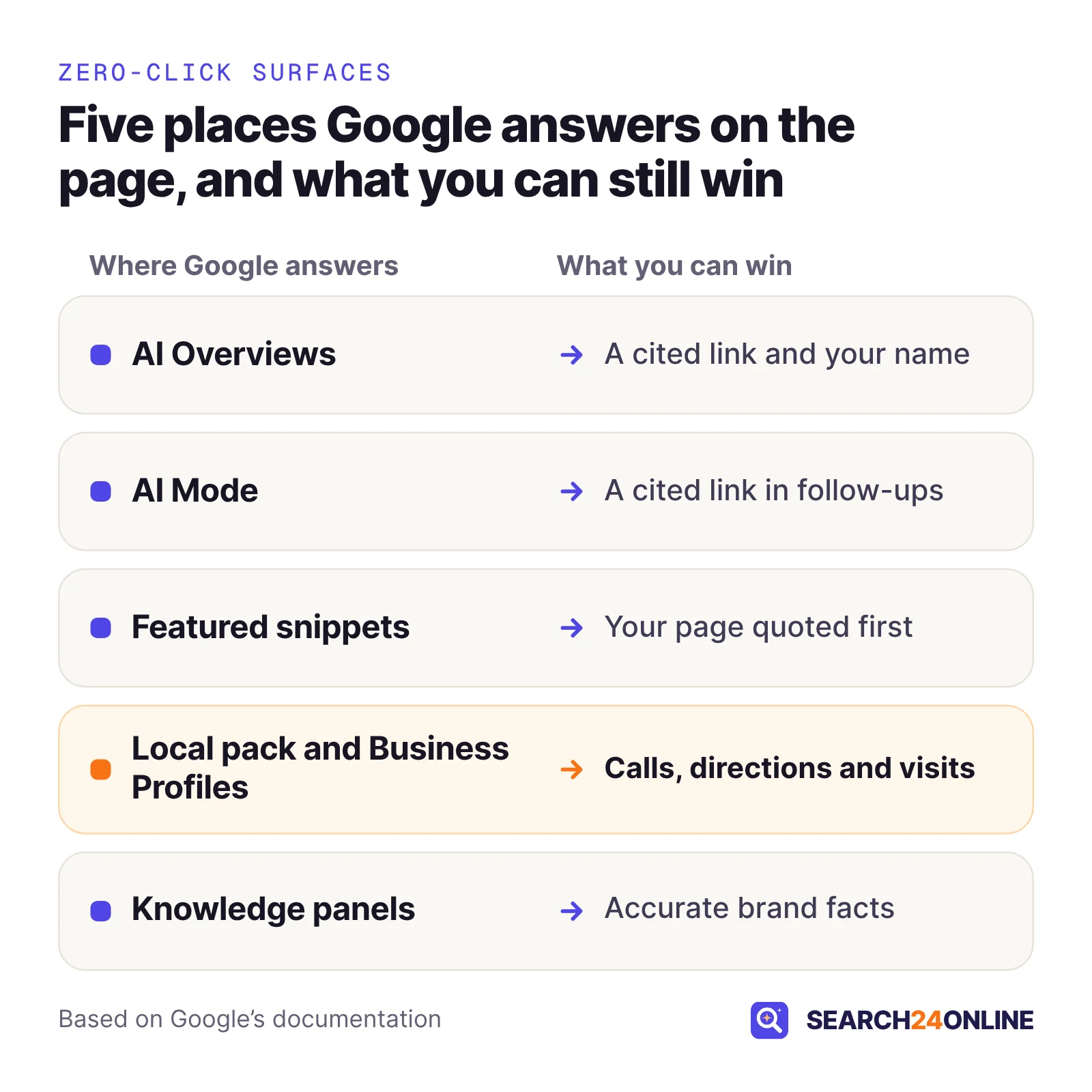
Five features do most of the answering: AI Overviews, AI Mode, featured snippets, the local pack with Business Profiles, and knowledge panels. Each one can also put your business in front of the searcher.
AI Overviews
An AI Overview is a generated summary at the top of the results with links to its sources. Google says it appears only when its systems judge it adds something beyond the classic results. In Pew’s data, length and phrasing mattered a lot: summaries appeared on 8% of one- or two-word searches, 53% of searches of ten words or more, and 60% of searches starting with a question word such as “what” or “why”.
AI Mode
AI Mode is Google’s conversational search mode, where people ask follow-up questions and get longer answers with links. Google reports more than one billion monthly users, yet SparkToro measured only 0.34% of US searches in its panel going to AI Mode from January to April 2026. The two numbers count different things, monthly users against share of all searches, and both are worth watching.
Featured snippets
A featured snippet reverses the usual result: Google shows a passage from a page first, then the link. Google says its systems pick these automatically and that you cannot mark a page as a featured snippet. They can also appear inside “People also ask” boxes, though by September 2026 most answers there were AI Overviews, according to AlsoAsked data reported by Search Engine Roundtable. The page is credited, so a snippet builds recognition even when it answers the question in full.
The local pack and Business Profiles
For “near me” and service searches, Google shows a map with a short list of businesses, each linked to its Business Profile, with buttons to call, get directions or visit the website. Google says local results are based mainly on relevance, distance and prominence, and that there is no way to pay for a better local ranking.
Knowledge panels
Search for a known organization, person or thing and Google may show a panel of facts beside the results. Google says knowledge panels are generated automatically from its Knowledge Graph, using information from various sources across the web, and that official representatives can claim a panel and suggest changes. For businesses serving customers at a location or in a service area, the Business Profile plays that role.
Which of your searches will still send clicks?
Searches that need more than a sentence, a comparison or a decision still send clicks; quick facts mostly don’t. The useful exercise is to sort the searches that matter to your business into three types, because each needs a different goal and a different measure of success.
| Search type | Example (roofing company) | Click likelihood (our view) | What to aim for | What to measure |
|---|---|---|---|---|
| Answer-and-done | “how long does a shingle roof last” | Low: the answer fits in a summary | Be the named, cited source | Impressions, AI impressions, branded searches later |
| Act-on-Google | “roof repair near me” | Low for the website, high for the profile | Win the call or directions request | Profile calls, directions, website clicks |
| Research-and-decide | “metal vs shingle roof cost in Tampa” | Higher: needs detail, trust and comparison | Earn the click with depth a summary can’t hold | Clicks, leads, conversions |
Export your top 100 queries from Search Console, tag each with one of the three types and add up the impressions in each group. For many service businesses, the answer-and-done group turns out to be large in impressions and small in revenue, while the research group is smaller but close to the sale.
What we often find in audits
A common situation: a home services company has spent two years publishing short blog posts that each answer one definitional question (“what is a heat pump”, “what does SEER mean”). These are exactly the searches an AI summary now answers in full. Meanwhile its service pages, the ones that convert, are thin and several of them target the same phrase and compete with each other, a problem called keyword cannibalization. Traffic falls and the owner blames AI. The fix is to stop judging the blog by visits alone and move effort to the pages people use to decide.
How do you earn visibility inside the answer?
Make your pages eligible, then give Google something specific and attributable to quote. When the answer stays on the results page, the prize is being the source it credits and the business it names.
Google says there are no additional requirements to appear in AI Overviews or AI Mode, nor special optimizations: a page must be indexed and eligible to show a snippet, and standard SEO best practice applies. Our guide to appearing in AI Overviews and AI Mode covers those checks in detail; here the focus is making visibility pay off when nobody clicks.
Attach your name to the fact
A passage that says “roofs last 20 to 30 years” can be quoted without anyone noticing who said it. A passage built on your own experience (“Across the roofs we replace in Hillsborough County, most shingle roofs we see failing are 18 to 22 years old”) carries your name with it and is harder to find elsewhere. Our view: original figures, local detail and first-hand process are what make a summary worth crediting, and what make a reader remember who said it. Our guide on writing content AI assistants want to quote covers the rewriting.
Make the facts about you consistent
Knowledge panels and AI answers draw on many sources across the web, not only your site. If your name, services, address or founding details differ between your website, Business Profile, directories and social profiles, the summary may pick the wrong version. Use one description of your business everywhere, mark up your organization and local business details with structured data that matches the visible page, and claim the profiles Google offers. Our guide to entity SEO explains how Google connects these signals.
Fix the basics first
Our team brings over 20 years of digital marketing experience and has served 500+ brands, and when a business is absent from answers the cause is usually not AI-specific. In audits we often find important pages not indexed, missing or mismatched structured data, and content too thin or outdated to quote. Any of them can keep you out of several zero-click surfaces at once.
Google says the nosnippet rule blocks all snippets, including featured snippets, and lists it among the controls that limit how your content appears in AI features. Using it to “make people click” usually just hands the answer, and the credit, to a competitor.
How do Business Profile calls and directions win customers without a click?
For a local business, the best zero-click search is one that ends with a tap on Call. The searcher never visits your website, yet you get the customer, and Google counts the action in your Business Profile’s performance report.
What the performance report counts
Google’s Business Profile performance report, available for verified profiles, includes these actions:
- Calls: the number of times someone clicked the call button on your profile. That is taps, not completed or answered calls.
- Directions: how many people asked for directions. Google says it adjusted this count for repeated taps, cancelled requests and spam.
- Website clicks: clicks on the website link in your profile.
- Messages and bookings: conversations started, and bookings completed through a booking provider.
- Views and searches: people who viewed your profile on Search and Maps (each counted once a day), and the search terms that showed it. The search terms update monthly and can take up to five days to appear.
Win more of those actions
Google ranks local results mainly on relevance, distance and prominence, and you can influence the first and last. Google says complete, accurate information helps a profile appear, and that positive reviews and helpful replies help a business stand out. Keep hours (including holiday hours) current, choose accurate categories, list your services and add real photos. Our step-by-step guide to optimizing your Google Business Profile covers each field, and how to rank in the map pack covers the competition for a place on the map.
A common pattern: a dental practice’s website sessions from Google fall year over year while new-patient calls hold steady. The profile report shows why: more people now call straight from the map without visiting the site. Judged only on website traffic, the practice looks like it is losing. Judged on calls and appointments, it is doing fine.
Add tracking parameters (UTM tags) to the website link in your Business Profile. Visits that start on the profile then show up as their own source in your analytics.
How do you measure success when people don’t click?
Measure in three layers: what people saw (impressions), what they did on Google (profile actions and branded searches), and what reached your business (leads and sales). Clicks remain one useful number, not the scoreboard.
- Track impressions next to clicksIn Search Console’s Performance report, watch impressions by page and query. Google says traffic from AI Overviews and AI Mode is counted there, under the Web search type, mixed with all other results.
- Add AI impressionsThe Generative AI performance report, available to all sites since August 31, 2026, counts how many times links to your site were shown in AI Overviews and AI Mode, by page, country, device and date. It reports impressions, not clicks.
- Watch branded searchesSearch Console’s branded queries filter separates searches that include your brand name from those that don’t. Google notes it isn’t available for sites with few impressions and may misclassify some queries.
- Review profile actions monthlyLog calls, directions requests and website clicks from your Business Profile, and compare them with call logs or booking records where you can.
- Ask customers where they heard of youAdd a “How did you hear about us?” field to forms and intake calls, with options such as Google search, Google Maps and an AI assistant.
- Tie it to revenueReport leads and sales by source each month, so a fall in visits is judged against what happened to the business.
Our view on branded searches: if your name appears in answers and on the map, some people will search for you directly later. Rising branded impressions alongside flat non-branded clicks is a sign your visibility is working even when the first search sends nobody. It is a signal, not proof, so read it with your lead numbers. Our guides to tracking your brand in AI answers and measuring SEO ROI go further.
It does not label any search “zero-click”, and Google’s help pages list no featured snippet or local pack type in its search appearance filter. Profile actions are reported in your Business Profile instead.
What content still earns the click?
Content that delivers something a summary cannot: a tool, a price for this specific job, a comparison based on your own work, a next step. If a page can be fully replaced by three sentences at the top of Google, expect it to be.
Pew’s data points the same way. AI summaries appeared far more often on long, question-style searches, so “what is” and “why does” content is the most exposed. Only 8% of one- or two-word searches produced a summary, and many short searches are for a business or a service in a place.
Formats that hold up
- Tools. Cost calculators, quote builders, sizing guides, eligibility checkers. People must interact with them on your site.
- Specific pricing. Real ranges and the factors that move them, for your area. A summary can quote a national average; your page can tell the reader what their job will likely cost.
- Comparisons from experience. “Metal vs shingle in Tampa humidity” written by people who install both is more useful than a generic pros-and-cons list, and much harder to summarize away.
- Original data. A survey of your customers or numbers from your own jobs gives others a reason to cite you, and a citation carries your link.
- A clear next step. Booking, a quote form, a phone number. Someone who clicks through from a summary has usually read the short answer already, so make acting easy.
Structure matters too. Answer the main question in the first lines, because people skim, then give the depth a summary leaves out. The answer earns you the citation; the depth earns you the click.
Fishkin’s advice in the SparkToro study is a fair summary of where this leaves you. He tells marketers to stop treating traffic as the main measure of success and to invest in platforms beyond their own site. He also writes: “Don’t neglect your website in all this.” In his view, SEO still drives traffic for branded searches, local businesses and high-intent queries. That matches what we see: the searches closest to a purchase still send visitors and calls.
If you want to know where your own site stands, our free SEO + GEO report analyzes your website, and you get password-protected dashboard access to view it within 24 hours. No one can promise you a citation or a click; you can make sure your pages deserve both.
Common questions
Is zero-click search bad for small businesses?
Not automatically. Fewer people click through on quick-answer questions, but a local business can still win the customer on the results page through a call or directions request from its Business Profile, and a name seen in an answer can lead to a branded search later.
What percentage of Google searches are zero-click?
About two-thirds in the most recent US data. SparkToro, using Similarweb’s panel, measured 68.01% for January to April 2026, and Pew Research Center found that around two-thirds of searches in its March 2025 browsing data ended without a click on a result.
Do AI Overviews count as zero-click searches?
Only when the person leaves without clicking anything. AI Overviews contain links, but Pew found people clicked a link inside the summary on just 1% of visits to results pages that showed one, and a traditional result on 8%. Most of those visits produced no click to a website.
Can I see zero-click searches in Google Search Console?
Not as a separate number. You can see impressions and clicks for each query and page in the Performance report, AI Overview and AI Mode impressions in the Generative AI performance report, and branded versus non-branded queries where the filter is available.
Should I block snippets so people have to click through to my site?
Usually not. Google says the nosnippet rule blocks all snippets, including featured snippets, and lists it among the controls that limit your content in AI features, so you lose visibility without any promise of extra clicks. Competitors fill the space instead.
Sources
- SparkToro (June 2026): In 2026, less than one third of Google searches still send a click
- Pew Research Center (July 22, 2025): Google users are less likely to click on links when an AI summary appears in the results
- Ahrefs (February 2026): Update: AI Overviews reduce clicks by 58%
- Google, The Keyword (August 6, 2025): AI in Search is driving more queries and higher quality clicks
- Google, The Keyword (June 3, 2026, updated August 31, 2026): New controls for website owners
- Google Search Central: AI features and your website
- Google Search Central: Featured snippets and your website
- Search Console Help: Generative AI performance report (Search)
- Search Console Help: Performance report dimensions and data groupings (branded queries filter)
- Google Business Profile Help: Understand your Business Profile performance and insights
- Google Business Profile Help: Tips to improve your local ranking on Google
- Google Search Help: How knowledge panels work
Fewer clicks? See where your website stands — free.
We’ll analyze your website, create your SEO + GEO report and give you password-protected dashboard access to view it.
Free · No obligation · We only review your public pages.