
How to Track Your Brand Visibility in AI Answers
AI answers change from one run to the next, so a single screenshot proves nothing. Here is a measurement method you can run yourself: a fixed set of customer questions, repeated sampling across assistants, a simple log, the free reports Google, Microsoft and GA4 now provide, and a monthly report that separates real trends from noise.
Key takeaways
- To track AI visibility, ask a fixed set of real customer questions in each assistant on a schedule, run each one several times, log whether you are mentioned, cited and described correctly, and report the share of answers that include you.
- Repeat runs are essential: in SparkToro’s January 2026 study, ChatGPT and Google’s AI had less than a 1-in-100 chance of giving the same list of brands twice for the same prompt.
- Three free first-party sources now exist: Search Console’s Generative AI performance report (impressions in AI Overviews and AI Mode), Bing Webmaster Tools’ AI Performance report (citations in Copilot and Bing) and GA4’s AI Assistant channel (visits from assistants).
- Report monthly and judge trends over several months: with a few hundred sampled answers, swings of several percentage points are normal noise, not proof that something worked or broke.
On this page
What does AI visibility mean, and what can you actually measure?
AI visibility is how often AI assistants include your business when people ask the questions you want to be found for, and how they describe you when they do. You can measure four things: whether you are mentioned, whether your site is cited as a source, whether you are recommended rather than just listed, and whether the facts stated about you are correct.
The first two are different events. A brand mention is your name appearing in the answer, with or without a link. An AI citation is a link to one of your pages shown as a source. A plumber can be named in a ChatGPT answer that cites only Yelp and a local news article, and a law firm’s blog post can be cited in an answer that never names the firm. Track both, separately.
What you cannot measure reliably is a “rank”. SparkToro’s study, run with Gumshoe.ai over late 2025, found that a brand could appear in nearly every answer and still move around inside it: one cancer hospital appeared in 69 of 71 ChatGPT responses but came first in only 25. The authors concluded that visibility percentage, the share of answers that include you, is a reasonable metric. We agree, and the whole method below is built on it.
Mention rate: answers that name you ÷ answers sampled. Citation rate: answers that link to your site ÷ answers sampled. Share of voice: your mentions ÷ mentions of you plus the competitors you track. Each one is a percentage of a sample, so it always comes with a sample size.
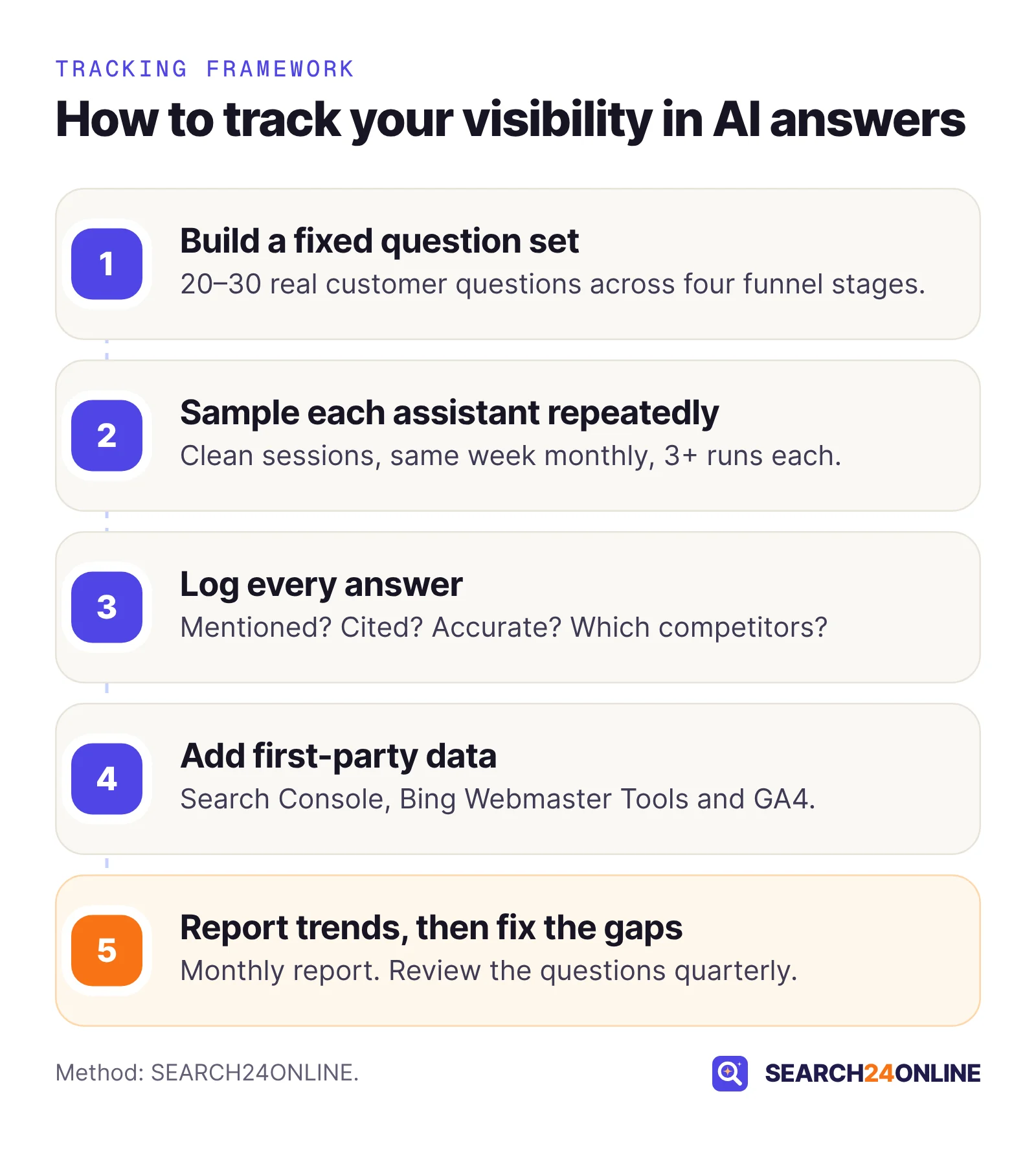
The framework has five parts. If you only have an afternoon a month, steps 1 to 3 plus a look at the free reports in step 4 already beat checking ChatGPT once and screenshotting the result.
Which first-party AI data can you get in November 2026?
Three free reports now exist, and none covers everything: Google reports impressions in its AI features, Microsoft reports citations in Copilot and Bing, and GA4 reports clicks from assistants. For mentions inside ChatGPT, Perplexity, Gemini or Claude answers, we found no comparable report for ordinary business websites, so you sample those yourself.
| Source | What it covers | What it counts | What it cannot tell you |
|---|---|---|---|
| Search Console: Generative AI performance report | Google AI Overviews and AI Mode (not Search Labs; Discover has its own report) | Impressions, by page, country, device and date | Clicks, the questions asked, or whether your brand was named |
| Bing Webmaster Tools: AI Performance report (preview) | Microsoft Copilot, Bing’s AI summaries and select partner experiences | Citations, cited pages, sample grounding queries, and since June 2026 intents, topics and citation share | Clicks, placement inside the answer, or which competitors were cited |
| GA4: AI Assistant channel | Visits referred by assistants such as ChatGPT, Gemini, Copilot and Claude | Sessions, key events and revenue, like any channel | Answers that mentioned you without a click; clicks from AI Overviews and AI Mode (counted as Organic Search) |
Google: impressions in AI Overviews and AI Mode
Search Console’s Generative AI performance report counts how many times links to your site were shown in a generative AI feature on Google Search. Google says it reached all websites worldwide as of August 31, 2026, and that it will add more metrics over time. It may not appear at all for sites with too few AI impressions, which for a small business is itself a finding. Our guide to appearing in AI Overviews and AI Mode explains how to read it next to the regular Performance report.
Microsoft: citations in Copilot and Bing
Bing’s AI Performance report, in public preview since February 10, 2026, is the closest thing to a citation counter that any platform offers site owners. It shows total citations, average cited pages per day, page-level citation counts and samples of grounding queries, the phrases the AI searched for before citing you. Microsoft says the counts do not indicate placement within an answer.
On June 16, 2026, Microsoft added four views, also in preview: Intents, Topics, Citation Share and Compare. Citation Share is “the percentage of citations attributed to your site out of all citations shown across all sites” for a grounding query. Microsoft calls it an observational metric, “not a ranking system or a competitive scoreboard,” and it does not reveal competitor domains. On October 13, 2026, Microsoft added a Topics Portfolio view, in beta, that groups grounding queries into topics and lists Opportunity Queries, where other sites are cited and yours is not. Microsoft says to treat its numbers as directional.
GA4: visits from assistants
Since May 13, 2026, GA4’s default channel group has included an AI Assistant channel for visits “from sources like ChatGPT, Gemini, Deepseek, Copilot, or Grok.” A June 11 update added built-in source grouping for ChatGPT and Perplexity. OpenAI also says ChatGPT adds utm_source=chatgpt.com to referral links. Setup and blind spots are covered in how to see AI assistant traffic in GA4.
How do you build a question set by funnel stage?
Start from the questions real customers ask at each stage of buying, not from your keyword list. For most small and mid-sized businesses, 20 to 30 questions spread across four stages is enough to see patterns without making the monthly sampling unmanageable.
The four stages
- Problem. The customer describes a symptom or need and doesn’t yet know the solution. Assistants often answer these without naming any business, so they mainly test whether your pages get cited.
- Solution. They compare approaches, costs and options. Cost and “X vs Y” questions belong here, and they are where assistants lean hardest on sources.
- Shortlist. They ask who to hire or buy from: “best”, “near me”, “who offers”. This is where recommendations happen, so weight it most.
- Brand check. They ask about you by name: reviews, reputation, prices, service area, you versus a competitor. These test accuracy more than visibility.
A worked example
Take an independent heating and cooling company in Raleigh, North Carolina. A sensible 24-question set might hold four problem questions, six solution questions, eight shortlist questions and six brand checks. A sample from each stage:
- Problem: “Why is my heat pump blowing cold air in winter?”
- Solution: “Heat pump or gas furnace for a house in North Carolina, which is cheaper to run?” and “How much does a new heat pump cost in Raleigh?”
- Shortlist: “Best HVAC companies in Raleigh”, “Who does same-day AC repair in Cary?” and “Which Raleigh HVAC companies offer financing?”
- Brand check: “Is [Company] a reputable HVAC company?”, “Does [Company] service Wake Forest?” and “[Company] vs [Competitor]”.
Where good questions come from
Sales call notes, contact form messages and review text give you the customer’s own phrasing. Search Console’s query report shows the longer, question-style searches already reaching you. Bing’s grounding queries, and their new Intents and Topics groupings, show what the AI itself searched before citing you, which often reveals sub-questions you hadn’t considered.
Phrase each question the way a customer would type or say it, and include a location wherever the buyer would. Give each question an ID and a stage, then freeze the list. You can add or retire a few questions each quarter, but if the list changes every month, the trend line measures your edits instead of your visibility.
When SparkToro collected 142 prompts that real people wrote for the same headphone-buying task, the prompts were almost never worded alike, yet the same handful of brands kept appearing. For your most important shortlist questions, track two or three phrasings and report them together as one intent.
How do you sample answers when they change every time?
Run every question several times in each assistant, under the same conditions, at the same point each month, and record every run. One answer is an anecdote; the share of runs that include you is a measurement.
The variation is large. SparkToro’s study collected 2,961 responses to 12 prompts in ChatGPT, Claude and Google’s AI. ChatGPT and Google’s AI had less than a 1-in-100 chance of returning the same list twice, identical order came up roughly once in 1,000 runs, and list length ranged from two or three items to ten or more. Google adds its own source of difference: it says AI Mode and AI Overviews “may use different models and techniques,” so their links vary. Treat them as two engines in your log.
Personal context matters too. OpenAI says ChatGPT may use saved memories when it rewrites a question into searches, and an approximate location based on your IP address for local results. Your own account, full of conversations about your business, is the worst place to test from.
- Pick your enginesChoose the three to five your customers most likely use. A common set: ChatGPT, Google AI Overviews, Google AI Mode, Microsoft Copilot and Perplexity. Add Gemini or Claude if your buyers do.
- Use clean sessionsIn ChatGPT, use a Temporary Chat, which OpenAI says won’t access or create memories, or search while logged out, which OpenAI also allows. For Google, use a private browser window with no signed-in account.
- Fix the location contextRun local questions from inside your market, or name the city in the question. Note in the log which you did, and do it the same way every month.
- Run each question at least three times per engineUse a fresh session for each run. For your eight to ten most valuable questions, run five.
- Sample in the same week each monthAnswers drift as indexes and models update. Fixed timing keeps month-to-month comparisons fair.
- Save the raw answerCopy the full text and the cited links into the log, or save a screenshot. When a number moves, you will want to reread what changed.
How much noise to expect
SparkToro suggests 60 to 100 runs per prompt for a dependable read on a single question. Few businesses can do that by hand, which is why you report totals across many questions instead. Using standard sampling-error arithmetic, our own calculation: with 24 questions run three times on one engine (72 answers), a mention rate around 30% can move about 15 points between two months by chance alone. Across four engines (288 answers), the band narrows to about 7 or 8 points.
So a jump from 30% to 36% in one month is not news. The same rise holding for three months across several engines usually is.
What should you record for each answer?
One row per answer, with the same columns every month. A spreadsheet is enough. The fields that matter:
- Date, engine and mode: for example, ChatGPT in a Temporary Chat, or Google AI Mode in a private window.
- Question ID, stage and run number.
- Mentioned? No, mentioned in passing, listed among options, or clearly recommended.
- Cited? Yes or no, and which URL. This tells you which pages are doing the work.
- Competitors named: the three to five you track, plus any newcomer that keeps appearing.
- Domains cited: every source linked, yours or not. Over a few months this becomes a list of the review sites, directories and publications assistants rely on in your market.
- Accuracy: wrong hours, services you don’t offer, outdated prices, a closed location, a competitor’s phone number.
From the log, calculate the three rates from the box above, overall and broken down by engine and by funnel stage. Illustrative numbers for the Raleigh company: 288 answers in a month, its name in 61 (a 21% mention rate) and its site linked in 23 (an 8% citation rate). Its 61 mentions against 183 for three tracked competitors give a 25% share of voice. If 52 of those 61 mentions sit in brand-check questions, the business is known by name but rarely recommended, and the shortlist stage is the work.
Don’t confuse this with Bing’s Citation Share. Bing’s figure is your slice of all citations for one grounding query in Microsoft’s products; yours compares mentions against named competitors across your chosen questions. Report them separately.
Which kinds of tools help, and what should you ask before paying?
Tools fall into five categories, and the first two are free. Whether you need anything beyond a spreadsheet depends on how many questions and engines you track, not on how sophisticated the dashboard looks.
- First-party reports. Search Console, Bing Webmaster Tools and GA4, covered above. Free, authoritative for what they count, and narrow.
- A spreadsheet and a calendar. The manual method in this guide. Free, fully transparent, and practical up to roughly a few hundred answers a month.
- AI visibility trackers. Dedicated services that run a prompt list on a schedule across several assistants and calculate mention rate, share of voice and cited sources. They save labor at scale; their numbers are only as good as their sampling.
- AI modules in SEO suites. Some rank-tracking and SEO platforms now flag which tracked keywords show an AI Overview and whether your site appears. Useful for Google; usually thinner on other assistants.
- Server log analysis. Shows which AI crawlers fetch your pages and how often. That measures access, not visibility, but a search crawler that never visits explains a lot. Our guide to AI crawlers lists which bots matter for search.
Before paying for a tracker, ask the vendor these questions. SparkToro’s authors make the same point: ask for a transparent, reviewable method before spending money.
- Consumer app or API?Does it query the assistants people actually use, or a developer API? SparkToro lists whether API results match real user experiences as an open question.
- How many runs sit behind each number?A visibility score from one run per prompt is a screenshot with a chart on top.
- Which location and account state?Local results depend on both.
- Can you export every raw answer?If you can’t reread the answers, you can’t check the score.
- Can you keep your question set fixed?And can you see the sample size next to each percentage?
How do you turn the numbers into fixes?
Read the log for patterns, then trace each one to its usual cause; tracking only pays off when it changes next month’s work. Most of the patterns below trace back to ordinary SEO problems, not anything specific to AI.
| What the log shows | What it usually means | First thing to do |
|---|---|---|
| Not mentioned anywhere, even when asked by name | Assistants find little about your business, or key pages aren’t indexed | Check indexing in Search Console and Bing; make your name, address, services and area consistent everywhere |
| Known by name, absent from shortlist answers | Competitors have stronger coverage on the sites assistants cite | Study the cited-domains column and earn a presence on those sites |
| Competitors’ pages cited for cost and comparison questions | You have no page that answers them clearly | Publish answer-first sections with real figures and dates |
| Wrong facts about you | Old or conflicting information on your site and listings | Fix it at the source, including Google and Bing listings |
| Cited in Bing, no ChatGPT referrals | Possibly OpenAI’s search crawler is blocked by robots.txt or a firewall | Check robots.txt and your bot-protection settings |
Our team brings over 20 years of digital marketing experience and has served 500+ brands, and the gaps that tracking reveals are rarely new problems. In audits we often find important pages that were never indexed, internal links that bury key services, and several pages chasing the same phrase. A common situation: a home services company whose city pages all repeat the same text, so no single page answers “who does same-day repair in Cary?” better than a competitor’s dedicated page. Assistants cannot recommend what they cannot find or tell apart.
For building the footprint beyond your own site, see how to get your business mentioned in ChatGPT.
Rewriting a page because one ChatGPT run left you out is the most common way tracking wastes money. Act on patterns that show up across runs, engines and at least two months of sampling, and give a change several weeks before rerunning, since each engine has to recrawl the page first.
How should you report AI visibility, and how often?
Monthly, on one page, as a section of your regular SEO report, with the sample size shown next to every percentage. Sampling more often than monthly mostly measures noise; reviewing less often means problems sit for a quarter.
A useful AI visibility page holds five blocks:
- Mention and citation ratesOverall and by engine, against last month and the three-month average, with the number of answers sampled.
- Share of voiceYou against the three to five competitors you track, by funnel stage.
- First-party figuresGoogle AI impressions and top pages, Bing citations and citation share, and GA4 AI Assistant sessions and key events.
- Accuracy issuesWhat assistants got wrong, what you corrected, and whether it has changed.
- ActionsWhat was done last month, what the data suggests next, and what you are leaving alone because it looks like noise.
Keep a change log next to the report. Microsoft says citation patterns shift with user behavior, model changes, freshness signals and partner refresh cycles, so record known model updates as well as your own site changes. Review the question set quarterly, and once a year check that your competitor list still reflects who actually wins work.
Where this fits in the bigger picture: our guide to what a monthly SEO report should include covers the rest of the report, and how to measure SEO ROI explains how to connect AI Assistant visits and leads to revenue. Visibility is a leading indicator; leads and customers are the result.
If you would rather start with a baseline, our free SEO + GEO report analyzes your website, and you get password-protected dashboard access within 24 hours. Ongoing tracking is part of our plans: 25 AI questions on Starter (Google AI and ChatGPT), 75 on Growth (adding Perplexity, Gemini and Copilot) and 200 on Authority (adding Claude). Nobody can promise that an assistant will recommend you; a good tracking method tells you honestly whether it does, and why not.
Common questions
Can I see how often ChatGPT mentions my business?
Not from OpenAI directly: its publisher FAQ describes no visibility report for site owners. What you can see is clicks, because ChatGPT adds utm_source=chatgpt.com to the links it sends, and GA4 groups those visits in its AI Assistant channel. Mentions without clicks have to be measured by asking the questions yourself, repeatedly.
How many times should I run each question?
More than once, because the same prompt rarely returns the same answer. SparkToro suggests 60 to 100 runs per prompt for a reliable read. By hand, about three runs per assistant per month is realistic, as long as you judge totals across many questions and trends over several months.
Are AI visibility tracking tools worth paying for?
They can be once you track more questions than you can run by hand, but only if the vendor shows its method. Ask whether it queries the consumer apps or an API, how many runs and which location sit behind each number, and whether you can export the raw answers.
Why did my AI visibility drop when I changed nothing on my site?
Often it is sampling noise or a change on the assistant’s side. Microsoft says citation patterns shift with user behavior, model changes, freshness and partner refresh cycles. Check whether the drop is bigger than your normal month-to-month swing and whether it lasts two months before acting on it.
Is AI visibility tracking worth it for a small local business?
Yes, in a light form. Check fifteen to twenty customer questions monthly in two or three assistants and read the free Search Console, Bing Webmaster Tools and GA4 reports. That takes a few hours and shows whether assistants know you exist and describe you correctly.
Sources
- Search Console Help: Generative AI performance report (Search)
- Google Search Central: AI features and your website
- Google (June 3, 2026, updated August 31, 2026): New controls and insights for website owners
- Bing Webmaster Blog (February 10, 2026): Introducing AI Performance in Bing Webmaster Tools Public Preview
- Microsoft Bing Blogs (June 16, 2026): New AI Visibility Insights in Bing Webmaster Tools: Intents, Topics, Citation Share, Compare
- Bing Webmaster Blog (October 13, 2026): Introducing Topics Portfolio (Beta) in AI Performance
- Google Analytics Help: Default channel group
- Google Analytics Help: What’s new in Google Analytics
- SparkToro (January 2026): AIs are highly inconsistent when recommending brands or products
- OpenAI Help Center: Searching the web with ChatGPT
- OpenAI Help Center: Temporary Chat FAQ
- OpenAI Help Center: Publishers and developers FAQ
Want a baseline before you start tracking? Get one free.
We’ll analyze your website, create your SEO + GEO report and give you password-protected dashboard access to view it.
Free · No obligation · We only review your public pages.