
How to Rank in Cities Where You Do Not Have an Office
What Google’s rules let a service-area business do, where the map pack stops being realistic, and how to build city pages and local proof that earn rankings in the towns you actually work in.
Key takeaways
- You can rank in towns where you have no office, but mostly in the regular search results and AI answers. The map pack is much harder, because Google ranks local results on relevance, distance and prominence, and distance is measured from the searcher.
- Google Business Profile lets a service-area business hide its address and list up to 20 service areas by city or postal code (no radius), with overall boundaries of about two hours’ driving time from its base.
- City pages are allowed; doorway pages are not. Google’s spam policies name “pages targeted at specific regions or cities that funnel users to one page” as doorway abuse.
- Relevance in another town is earned with proof from that town: jobs you completed there, reviews from customers who live there and links from local organizations.
- Build in order: strong pages for each service first, then city pages only for towns where you have real work, demand and something specific to say.
On this page
Can you rank in a city where you don’t have an office?
Yes, but not everywhere on the results page equally. A service-area business is one that travels to customers, like a plumber, roofer or mobile groomer. When someone searches “roof repair” in a town 25 miles away, it competes on three surfaces: the map pack (the three Business Profiles under a map), the regular “organic” results underneath, and often an AI answer at the top. Only one of them is tightly tied to where you are based.
Google’s help page says local results are “mainly based on relevance, distance, and popularity,” and then defines the third factor as prominence. Distance is measured between the business and the searcher, so a profile based in one town starts every search in the next town at a disadvantage. Organic results and AI answers lean far more on what your website says and proves.
| Map pack | AI answers | Organic results (focus here) | |
|---|---|---|---|
| What it mainly draws on | Your Business Profile: relevance, distance, prominence | Pages the AI retrieves from a search index, plus profile data for local questions | Your web pages and the links pointing to them |
| How much your base location matters | A lot: distance to the searcher is a core factor | Varies by question; less for research questions | Less: a strong page about a town can rank there |
| What you control | Categories, reviews, accuracy of the profile | Clear, specific, quotable pages | Content, site structure, local proof, links |
| Realistic in towns without an office? | Near your base, sometimes; far away, rarely | Yes, if your pages are the best source | Yes, with genuinely local pages |
Surveyed local search experts rate distance as one of the heaviest factors. Whitespark’s 2026 Local Search Ranking Factors survey asked 47 local search experts to score 187 factors (published November 2025). “Proximity of address to the point of search” ranked second for map pack visibility and “physical address in city of search” ranked fourth. For organic local results, the same experts put “dedicated page for each service” first and the city or neighborhood relevance of your content second. That split is the whole strategy in miniature: accept the map pack’s geography, and win the other towns with your website.
How should a service-area business set up its Google Business Profile?
Hide your address if customers don’t come to you, list the places you actually serve, and keep one profile for the business. Google’s guidelines put it plainly: “If you’re a service-area business, you should hide your business address from customers.” Its example is a plumber who runs the business from home and should clear the residential address from the profile.
The current rules, from Google’s service area help page and its profile guidelines:
- Pick the right business typeService-area businesses visit or deliver to customers. Hybrid businesses (Google’s example is an auto repair shop with a garage that also offers roadside service) can show a staffed storefront address and add a service area. If customers never visit, you are a service-area business.
- Remove the address from public viewIn your profile, go to Edit profile, then Location, and clear the address. To remove every service area, by contrast, you must be a storefront with your address showing.
- Add up to 20 service areasUse cities, postal codes or other area types. Google no longer lets you draw a radius around your business, and asks you to be “as specific and accurate as possible.”
- Keep the boundary realisticGoogle says the overall service area shouldn’t extend farther than about two hours of driving time from your base, adding that larger areas may be appropriate for some businesses.
- Allow time for changesApproved edits can take up to 48 hours to appear.
A few limits catch people out. Businesses selling age-restricted products such as alcohol, cannabis or weapons need a storefront. A rented mailing address you don’t operate from is not eligible. A service-area business “can’t list a ‘virtual’ office unless that office is staffed during business hours.” A second profile is allowed only for a genuinely separate location with its own service area and its own staff. The rest of the profile work (categories, photos, hours) is covered in our step-by-step Business Profile guide.
Google says setting a service area helps people find your profile. It does not say service areas move rankings, and the Whitespark experts ranked “setting service areas in GBP” 152nd for map pack impact. In Darren Shaw’s view, service areas only draw an outline on the map: listing 20 towns will not make you rank in 20 towns.
One quirk is worth knowing. Whitespark’s Darren Shaw has written (updated October 2024) that when you hide your address, Google still anchors your map rankings to the address the profile was verified at. By his account, if you moved and never updated that verified address, your rankings can stay centered on the old town. His suggested fix is to ask Business Profile support to update the verification address, without mentioning rankings in the request.
Where are the honest limits of the map pack?
Expect to show in the map pack around your verified base and, with strong reviews and categories, somewhat beyond it. Expect to struggle in towns well outside that zone, whatever your profile says. Google’s help page is explicit that “there’s no way to request or pay for a better local ranking.”
How far your map visibility reaches depends on competition. In Shaw’s estimate, most businesses rank within roughly one to five miles of their address point, more in thin markets and less in crowded ones. Our map pack guide explains how distance interacts with the other factors and how to measure your real reach with a geo-grid (a grid of ranking checks across your area) rather than a single search from your office.
Whitespark’s experts ranked “address is showing on GBP (not SAB)” seventh for map pack visibility, though Shaw remains “unconvinced” that showing versus hiding is a ranking factor in itself. The same survey rates showing your address as a service-area business, and service areas beyond two hours’ drive, as suspension risks. Hiding the address is the rule, not a choice to optimize.
Virtual offices, co-working desks without signage and staff, a relative’s address in the next town, or a second profile for the same crew all break Google’s guidelines. Co-working offices only qualify with clear signage, customers received and your own staff there during business hours. A suspended profile loses the rankings you already had around your real base.
The legitimate way to win the map pack in another town is to open a real, staffed location there. Once that happens you are a multi-location business, with a profile and page for each branch; our multi-location SEO guide covers that setup. Until then, put your effort where the base location matters less.
What separates a good city page from a doorway page?
A good city page tells someone in that town something true and useful that no other page on your site tells them. A doorway page is the same page as every other city page with the town name swapped, built to catch a search and pass the visitor along. Google treats the second as spam.
Google’s spam policies (last updated August 28, 2026) define doorway abuse as sites or pages “created to rank for specific, similar search queries” that lead users to intermediate pages less useful than the final destination. Two examples describe the typical service-area mistake. One is “pages targeted at specific regions or cities that funnel users to one page.” The other is “substantially similar pages that are closer to search results than a clearly defined, browseable hierarchy.” The same page describes scaled content abuse: many pages generated mainly to manipulate rankings, including with generative AI tools, “without adding value for users.” A matrix of 12 services times 30 towns, 360 pages from one template, sits squarely in that territory. Our plain-English guide to Google’s spam policies covers the other policies.
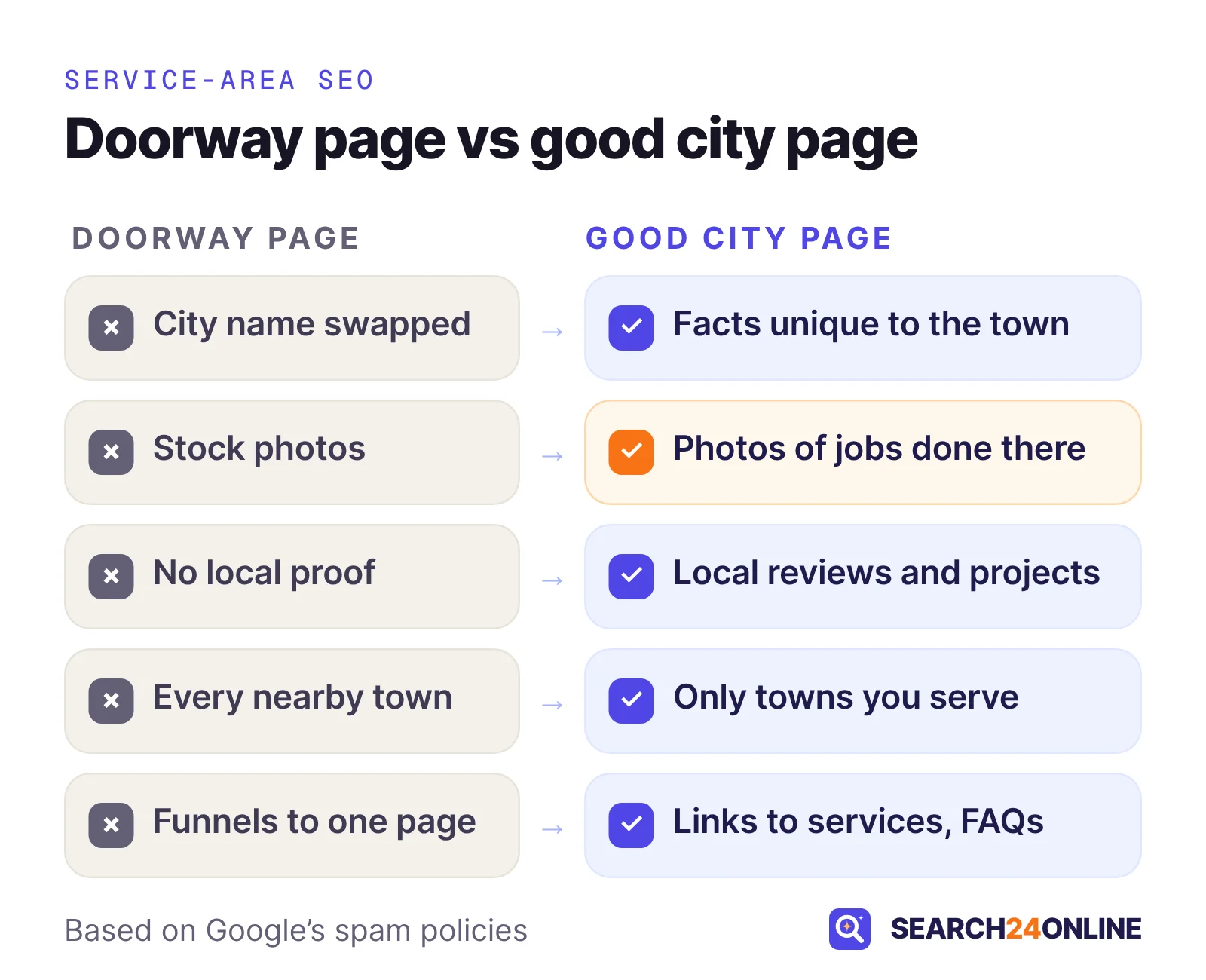
A quick test we use in audits: delete the town name from the page and read it again. If it could now describe any town you serve, it is a template, not a city page. A second test comes from Google’s helpful content guidance, which asks: “Is the content primarily made to attract visits from search engines?” If the honest answer is yes, the page needs real local content or it needs to go.
In audits we often find the same pattern. A typical example: a pest control company with 35 city pages of about 300 words, identical apart from the town and a list of zip codes. Most are either not indexed (Google crawled them and chose not to keep them) or compete with the main service page for the same searches, a problem called cannibalization. Often only a footer links to them. Cutting them to the six towns where the company does most of its work, and rewriting those six around real jobs, does more in our experience than adding another 30.
What should a city page actually contain?
Things only a business that works in that town could write. The raw material is usually already in your job records, your photo roll and your customers’ reviews; the work is collecting it per town.
The content that makes it local
- Jobs you have done there. Two to five short project write-ups: the problem, what you did, the neighborhood or street area (never a customer’s address without permission), and before-and-after photos you took.
- Local conditions that change the work. Older housing stock, common roof types, a local permit step, hard water, seasonal pests. Only include what you have seen on jobs or confirmed with the town; invented local color is worse than none.
- Logistics from your base. Typical response time, whether there is a travel fee, which days your crew covers that area. This is exactly what a customer 30 miles away wants to know.
- Reviews from customers in that town. Quote or embed real reviews that mention the place, with the reviewer’s first name if your review platform shows it publicly.
- Questions people there actually ask. Pull them from calls and quote requests, not from a generic list.
A worked example
Take a hypothetical roofing company based in one suburb that does a quarter of its jobs in a larger town 20 miles away. The doorway version says “Looking for the best roofers in [Town]? We offer roof repair, replacement and inspections in [Town] and surrounding areas,” then lists every service. The useful version opens with how fast the crew arrives for storm damage and shows four re-roofs done in the town last year, with photos. It notes which roof types those jobs found most often, quotes three local reviews and links to the repair and replacement pages. Only the second gives Google, an AI assistant or a homeowner a reason to pick it.
Structure and markup
Keep city pages in a clear hierarchy: a Service Areas hub linking to each town, and each town page linking to the relevant service pages and back. Link the hub from your main navigation, not only a footer. That browseable hierarchy is what Google’s doorway examples contrast against.
Google’s LocalBusiness structured data documentation lists address as required and no service-area property, so markup won’t put you on the map in another town. Mark up what is publicly true, consistent with your profile; see our schema markup guide for which types matter.
How do you earn relevance in the towns you serve?
By collecting evidence from those towns over time: completed projects, reviews and links from local organizations. Google says prominence is based partly on “how many websites link to your business and how many reviews you have,” and experts tie town-specific content to organic local rankings. It is the record of actually working there, made visible.
Real projects, documented
Make project write-ups part of closing a job. A technician who takes three photos and answers four questions (town, problem, fix, anything unusual) gives you a project entry in two minutes. Publish the best on a projects page tagged by town and feature them on the matching city page. Within a year, that is local proof competitors cannot copy.
Reviews that mention places
A review saying you fixed a furnace in a particular town helps the next customer there decide. Ask every customer for an honest review, and invite them to mention what you did and where. Don’t script keywords, offer anything in return or ask only happy customers. Google’s content policy bars incentives and says businesses may not “selectively solicit positive reviews from customers.” Whitespark’s experts ranked “keywords in native Google reviews” only 36th for map pack visibility, so treat place mentions as a by-product of detailed reviews, not a target. Our guide to getting more Google reviews within the rules covers the request process.
Steady volume matters to customers as much as to rankings. BrightLocal’s Local Consumer Review Survey 2026 (1,002 US adults, published February 2026) found that 74% of consumers look for reviews written in the last three months, and 47% won’t use a business with fewer than 20 reviews. A review request built into every job keeps both numbers on your side.
Local links and mentions
In our view, links from organizations in the towns you serve are among the most useful outside signals you can earn there. The Whitespark experts ranked links from locally relevant domains 13th for organic local results. Realistic sources: a youth team or community event you sponsor, the local chamber of commerce, manufacturers that list certified installers, local news coverage of a seasonal safety tip, and partners such as property managers. Consistent listings on the directories that matter help too; our local citations guide covers which still count.
When a chamber or sponsor in another town links to you, ask whether the link can point to that town’s page on your site rather than your home page. It ties the link’s local context to the page you want to rank there.
What does a content plan for a service-area business look like?
Start with your services, then add towns in order of where the work and proof already are. Most service-area sites we review have this backwards: dozens of city pages and one thin page per service. Since the experts rank dedicated service pages first for organic local results, a city page linking to a weak service page is building on sand.
Step 1: Score your towns
Score every town you serve on four things: jobs completed there last year, revenue per job, search demand and proof (projects, photos, reviews). For demand, check the search terms in your Business Profile performance report and the queries in Search Console. Then sort the towns into tiers.
| Tier | Which towns | What they get |
|---|---|---|
| Tier 1 | Your base plus the few towns with the most jobs and proof | A full city page, updated each quarter with new projects and reviews |
| Tier 2 | Towns with steady work but little proof yet | A section on a regional or Service Areas page; promoted to their own page once you have enough local material |
| Tier 3 | Occasional or edge-of-area towns | Listed in your Business Profile service areas and on the hub page only |
Step 2: Fix the foundations first
Before any new city page, make sure each core service has its own strong page, that the pages you already have are indexed, and that they are linked from your navigation. In audits we regularly find service-area sites where the most valuable pages are orphaned (nothing links to them) or several pages target the same search. A free SEO + GEO report checks indexability, canonicals, broken links, headings and your business schema, which covers most of these basics.
Step 3: Publish on a rhythm you can keep
A realistic cadence for a small team: one new or much improved Tier 1 city page a month, and two to four project write-ups tagged by town. Each quarter, add new reviews and photos to every city page. Promote a Tier 2 town only when you can fill a page with material from it. Avoid bumping the “updated” date without real changes; Google’s helpful content guidance lists changing dates to make pages seem fresh as a warning sign.
Step 4: Write so AI assistants can use it
AI answers draw on the pages search systems retrieve, and specific facts are easier to quote than slogans. “No travel fee within 25 miles; most emergency calls reached within two hours” is far more useful to an assistant than “fast, friendly service in your area.” Our guide to writing content AI assistants want to quote goes deeper.
How do you know if it’s working in each town?
Track leads by town, not just rankings. Rankings vary with where the searcher stands; calls and quote requests are what pay for the work.
- Search Console: filter the Performance report by queries containing each town name and by each city page’s URL.
- Business Profile performance: Google lists the search terms people used to find your profile. The figures update at the start of each month and can take up to five days to appear.
- Your own intake: add a required town or zip code field to quote forms and ask callers where the job is. It is the only reliable way to tie revenue to a town.
- Map pack reach: run a geo-grid check every month or two to see whether your map visibility around your base is growing, with the expectation set above.
Give a new city page at least a quarter, and judge it on leads from that town. If a strong page still produces nothing after two quarters, check demand and competition before writing more.
Common questions
Should a service-area business show its address on Google?
No, not if customers never come to you. Google’s guidelines say a service-area business should hide its address, and give the example of a plumber working from home clearing it from the profile. Show the address only if the location is staffed and receives customers during your stated hours.
Can I use a virtual office or a friend’s address to rank in another city?
No. Google says a mailing address you rent but do not operate from is not eligible for a Business Profile, and a service-area business cannot list a virtual office unless it is staffed during business hours. Profiles built on addresses like these risk suspension, which costs you the rankings you already had.
Do the service areas I set in Google Business Profile help me rank there?
Probably not. Google says service areas help people find your profile but does not tie them to ranking, and the 47 experts in Whitespark’s 2026 survey placed setting service areas 152nd for map pack impact. Set them accurately for customers, then earn rankings in those towns with your website.
How many city pages should a service-area business have?
As many as you can fill with facts true only of each town, and no more. For most small service businesses that means a handful of pages for the towns with the most work, with smaller towns covered on a regional page until you have jobs and reviews there.
Will city pages get my site penalized?
Not if each page is genuinely useful to someone in that town. Google’s spam policies target near-identical pages built to rank for each city and funnel visitors elsewhere, and pages produced at scale without adding value. A page with local projects, local reviews and town-specific details is the opposite of that.
Sources
- Google Business Profile Help: Manage your business’s service area
- Google Business Profile Help: Guidelines for representing your business on Google
- Google Business Profile Help: Tips to improve your local ranking on Google
- Google Search Central: Spam policies for Google web search (doorway abuse, scaled content abuse)
- Google Search Central: Creating helpful, reliable, people-first content
- Google Search Central: Local business (LocalBusiness) structured data
- Google Maps User Contributed Content Policy: Prohibited and restricted content
- Google Business Profile Help: Understand your Business Profile performance and insights
- Whitespark: 2026 Local Search Ranking Factors (Darren Shaw, November 2025)
- Whitespark: Should service area businesses show or hide their address for local SEO?
- BrightLocal: Local Consumer Review Survey 2026
Are your service and city pages indexed and ready? Check free.
We’ll analyze your website, create your SEO + GEO report and give you password-protected dashboard access to view it, with every issue ranked from critical to low.
Free · No obligation · We only review your public pages.