
How to Measure SEO ROI: Leads, Revenue and the Numbers That Matter
A plain formula, a worked example with illustrative numbers, and the GA4, call tracking and CRM setup you need to see whether SEO is actually paying for itself.
Key takeaways
- SEO ROI is the gross profit from customers SEO actually added, minus the full cost of SEO, divided by that cost. Use profit rather than revenue, and count only customers you would not have won anyway.
- Measure leads, not traffic. In GA4, mark form submissions and call clicks as key events (a standard property allows up to 30, and marking is not retroactive), then record the lead source in your CRM so you can see which leads became customers.
- Lifetime value often decides the answer. In our illustrative example, the same SEO program shows −31% ROI on first-year profit and +71% on three-year customer value.
- Since May 13, 2026, GA4 reports visits from ChatGPT, Gemini, Claude and other assistants in a separate AI Assistant channel. Clicks from Google’s AI Overviews and AI Mode stay in Organic Search.
- Attribution is always incomplete, so report ROI as a range, from conservative to inclusive, and judge it over 12 months rather than month by month.
On this page
What is SEO ROI, and how do you calculate it?
SEO ROI (return on investment) is the profit that search brings in, minus what you spent on it, divided by what you spent. If SEO cost $20,000 this year and produced $30,000 of gross profit you would not otherwise have earned, your ROI is 50%. The arithmetic is simple. Getting honest inputs is the real work.
SEO ROI = (gross profit from SEO-added customers − total SEO cost) ÷ total SEO cost. A result above zero means SEO earned back more than it cost; below zero means it has not yet.
Three choices decide whether that number means anything.
Use gross profit, not revenue
A $10,000 kitchen remodel that costs $6,000 in materials and labor returns $4,000, not $10,000. Revenue-based ROI flatters every marketing channel, which is why it turns up so often in marketing reports. Use your gross margin, by service line if your margins differ a lot.
Count every cost
Include the agency or freelancer fee, tools, any writing or development you pay for separately, and the hours your own team spends reviewing pages and answering questions. Typical fees are covered in our guide to what SEO costs in 2026; for reference, our own plans run from $500 to $2,000 a month.
Count only what SEO added
Some customers would have found you anyway: past clients searching your name, referrals checking your phone number. Compare against a baseline: the same months last year, or the months before the program started. Growth in non-branded searches, the ones that do not include your business name, is the clearest sign of new demand that SEO reached.
What does an SEO ROI calculation look like in practice?
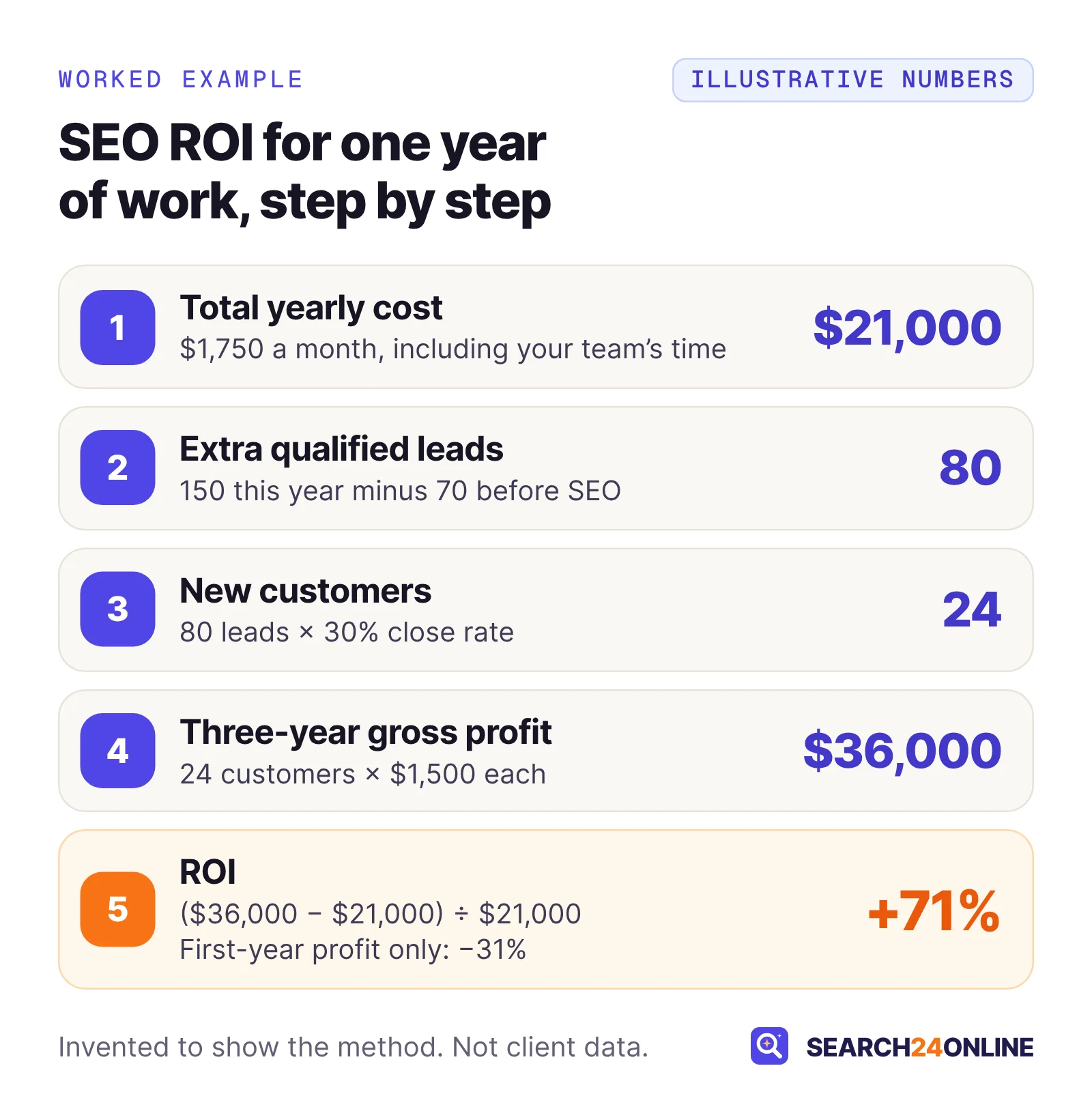
Here is the full calculation for a hypothetical heating and cooling company. Every number in this section is illustrative: invented to show the method, not taken from a client and not an industry benchmark. Swap in your own figures.
- Total cost: $21,000 a yearA $1,500 monthly SEO fee plus about $250 a month of the owner’s and office manager’s time: $1,750 a month, times 12.
- Incremental qualified leads: 80150 qualified organic leads (calls and forms, spam removed) this year, against 70 in the year before the program.
- New customers: 2480 extra leads at a 30% close rate.
- Gross profit: $14,400 in year one, $36,000 over three yearsEach new customer brings $1,200 of revenue in the first year at a 50% margin ($600 gross profit), and $1,500 of gross profit over three years once repeat maintenance visits are included.
- ROI: −31% or +71%($14,400 − $21,000) ÷ $21,000 = −31% on first-year profit. ($36,000 − $21,000) ÷ $21,000 = +71% on three-year value.
What the example teaches
First, the time frame changes the verdict. A business that judges SEO on first-year profit would cancel this program; one that knows its customers return for years would expand it. Neither is wrong, but you should decide which view you are using before you look at results, not after.
Second, break-even is a more useful number than ROI in the early months. At $600 of first-year gross profit per customer, this company needs 35 new customers a year to cover $21,000. At $1,500 of three-year value, it needs 14. That second target is something you can track month by month in a CRM.
Third, the baseline matters as much as the growth. Had the company counted all 150 leads instead of the 80 extra ones, it would have more than doubled its apparent return and made a decision on fiction.
How much is a lead worth to your business?
A lead is worth your close rate multiplied by the gross profit of an average customer. In the example above, a qualified lead is worth $180 in first-year terms (30% × $600) and $450 on three-year value (30% × $1,500). Once you know that number, every report becomes easier to read: 10 extra qualified leads a month is worth $1,800 to $4,500 in that business.
Work backward from the sale
If you have more than one stage, chain the rates. Suppose 40% of form fills are genuine prospects, half of those book an estimate, and you win 60% of estimates. Then 12% of raw form fills become customers (0.4 × 0.5 × 0.6), and a raw lead is worth 12% of a customer’s gross profit. Use your own invoices and CRM history for these rates; if you are new, pick conservative guesses and replace them after a quarter.
Then estimate lifetime value
Customer lifetime value (CLV) is the gross profit a typical customer brings over the whole relationship: average gross profit per job, times jobs per year, times the years they usually stay. A dental patient, a bookkeeping client or an HVAC maintenance customer can be worth several times their first invoice. A one-off emergency job may not be. Leave referrals out of the calculation; they are real, but too hard to tie back to search.
Contact forms collect spam, sales pitches and job applications. If you value every submission at full price, your ROI is inflated before you start. Count qualified leads, and have someone mark junk in the CRM each week.
How do you set up conversion tracking in GA4?
In Google Analytics 4, conversions are called key events: actions you tell GA4 matter to the business. Set one up for each way a customer can contact you, check it fires correctly, and add later sales stages if your CRM can send them. These steps follow Google’s Analytics Help pages as of November 2026.
- List the actions that countQuote requests, contact form submissions, booking confirmations, clicks on your phone number and chat starts. Page views and scroll depth are not leads.
- Make sure each action creates an eventEnhanced measurement can record
form_startandform_submitautomatically. For your main lead forms, a dedicatedgenerate_leadevent, which Google recommends for when a user submits a form, is cleaner. Fire it only on a successful submission, usually through Google Tag Manager. - Mark it as a key eventIn Admin, under Data display, click Events, find the event and click the star next to it (Editor role or above). To create a new event, click Create event and turn on “Mark as key event”, then choose a default key event value and a counting method.
- Give it a valueUse your lead value from the previous section as the default value, so GA4 can show estimated value by channel and landing page.
- Test before you trust itSubmit a test form and check the event appears in the Realtime report within minutes. Standard reports can take up to 24 hours.
- Add the later stagesIf your CRM can send them, add
qualify_leadandclose_convert_lead. GA4’s Lead acquisition report (Reports > Acquisition > Lead acquisition) then shows new, qualified and converted leads by channel.
Three limits from Google’s documentation are worth knowing. A standard property can have up to 30 key events (50 on Analytics 360). Marking an event as key “doesn’t change historic data”, so tracking starts the day you set it up. And GA4 marks some events as key by default, such as purchase, which matters for online stores but not for lead businesses.
Fire your lead event on the confirmation step, not every time the thank-you page loads, and use a counting method that will not record the same visitor twice in one session. Then compare a month of GA4 leads with your inbox. If GA4 shows more leads than you received, something is counting twice.
How do you connect phone calls and form leads back to SEO?
You need two extra pieces: call tracking, because GA4 cannot hear a phone ring, and a lead-source field in your CRM, because GA4 cannot see who became a customer. Without them, many local businesses undercount SEO badly.
A common situation: a family law firm sees organic form fills stay flat and concludes SEO is not working. Meanwhile most new clients phone the office after reading a practice-area page, and none of those calls is attributed to anything.
Phone calls
Start by tracking clicks on your phone number as a GA4 event and marking it as a key event. That captures intent from mobile visitors, though not whether the call connected. A call tracking service adds the rest: dynamic number insertion shows organic visitors a different number from ads visitors, and logs the source, duration and often a recording of each call.
Your Google Business Profile is a separate source of calls that never touch your website. Its performance report counts Calls as “the number of times a customer clicked on the call button on your Business Profile,” alongside website clicks and direction requests. Add those to your SEO outcomes, because none of them shows up in GA4.
Be careful with tracking numbers on the profile itself. Google’s guidelines say the number “must be under the direct control of the business” and ask for a local number over a central call center where possible. Our view: if you use a tracking number there, make sure it rings straight through to you, and keep your main number listed as an additional phone number so your details stay consistent across the web.
Forms and the CRM
Add hidden fields to each form that capture the landing page and traffic source, so every lead arrives in your CRM already labeled. When a lead is qualified or closes, mark it there. That record, not GA4, is where ROI is finally calculated, because it holds the revenue. To feed those outcomes back into GA4, developers can send qualify_lead and close_convert_lead events server-side with the Measurement Protocol or the Data Manager API, which Google added as an alternative in May 2026.
How do you measure visits and leads from AI assistants?
Use GA4’s AI Assistant channel for clicks, and treat AI visibility reports as early signals rather than ROI. Google added the channel to the default channel group on May 13, 2026. When the referrer matches a recognized assistant, GA4 sets the medium to “ai-assistant” and the campaign to “(ai-assistant)”.
Google’s channel definition names ChatGPT, Gemini, Deepseek, Copilot and Grok as examples, and the release note also mentions Claude. Clicks from Google’s own AI Overviews and AI Mode are excluded from that channel and counted in Organic Search. A June 2026 update added a Source Group field with built-in grouping for sources such as ChatGPT (OpenAI) and Perplexity. OpenAI also says ChatGPT adds utm_source=chatgpt.com to the links it sends you, so those visits are labeled even outside GA4. The full walkthrough is in how to see AI assistant traffic in GA4; the glossary has a one-line definition.
Once the channel exists, the ROI method is the same as for search: key events by channel, then qualified leads and customers in the CRM. Add an “AI assistant” option to any “How did you hear about us?” question too.
Visibility without clicks
Much AI influence never produces a referral. Someone reads an answer that recommends you, then searches your name or types your web address, and the visit lands in branded organic search or Direct. Two free reports help you see the visibility side:
- Search Console’s Generative AI performance report counts impressions: how many times links to your site were shown in AI Overviews and AI Mode. Google says it rolled out to all websites worldwide as of August 31, 2026.
- Bing Webmaster Tools’ AI Performance report, launched in public preview in February 2026, shows how often your pages are cited in Microsoft Copilot and Bing’s AI summaries, and samples of the queries behind them. It reports citations, not clicks.
Our view: watch these next to your branded search impressions. If AI citations and branded searches rise together while direct leads grow, AI visibility is probably contributing, even though no report can give you an exact figure. For ways to monitor answers across assistants, see how to track your brand in AI answers.
Why will SEO attribution never be exact?
Because customers rarely take one clean path, and every tool sees only part of it. Someone may find you in an organic result, come back a week later through an ad, then call from a business card. Each system credits the touch it saw.
GA4 now offers three reporting models: data-driven, paid and organic last click, and Google paid channels last click. First click, linear, time decay and position-based models were retired in November 2023. Data-driven attribution compares the paths of people who converted with those who did not and spreads credit by estimated influence. Two rules affect SEO directly. Direct visits get no credit unless the whole path was direct, so a customer who found you organically and later typed your address on the same device is still credited to search. And the lookback window for most key events defaults to 90 days (you can choose 30 or 60), so a law firm or B2B supplier with a longer sales cycle will see early touches drop out.
Other blind spots: untracked calls, sales closed offline, people switching from phone to laptop, visitors who decline cookies, and AI answers that never produce a click. You cannot fix all of them. You can be transparent about which ones apply.
Report a range, not a single number
| Conservative | Balanced | Inclusive | |
|---|---|---|---|
| What counts | Closed customers whose CRM source is organic search | Conservative, plus tracked organic calls and Business Profile calls that became customers | Balanced, plus a share of branded and AI-assisted demand |
| Strength | Hard to argue with | Close to how local customers actually behave | Captures influence the tools miss |
| Weakness | Undercounts calls and repeat visits | Needs call tracking and CRM discipline | Relies on judgment; easy to inflate |
| Use it to | Decide whether to keep paying | Plan budget and priorities | Understand the full picture |
If SEO is profitable on the conservative measure, the decision is easy. If it only works on the inclusive one, look harder before you spend more.
How long should SEO take to pay for itself?
There is no honest single answer, and anyone quoting a standard payback period is guessing about your business. What you can do is define payback clearly: the month in which cumulative gross profit from SEO-added customers overtakes cumulative SEO cost. Costs start on day one; returns build slowly as pages are fixed, indexed and start to rank, which is why the first months almost always show a loss.
How long that takes depends on three things: the condition of your site, the strength of competitors and the value of a customer. The timelines themselves are covered in how long SEO takes to work. For ROI, set checkpoints in advance:
- Months 1–3: tracking works, key pages are indexed, technical problems are fixed. Judge the work, not the return.
- Months 4–6: non-branded impressions and clicks are rising, and the first incremental leads appear.
- Months 9–12: enough closed customers to run the full calculation on your conservative measure.
Payback is slowest when the site is fighting itself. In audits we often find that the pages which should earn the most are the ones holding SEO back. Typical causes: important service pages not properly indexed, several pages targeting the same phrase so they compete with each other (cannibalization), or thin pages buried deep in the site with few internal links. Fixing those first is usually the fastest route to break-even, because it improves pages that already have demand. A good audit ranks fixes by potential impact for exactly this reason.
It also helps to compare like with like. Paid search can start producing leads as soon as ads go live, but the leads stop when the spending does, while SEO work keeps paying after the month it was done. If you are deciding where to put the first dollar, see SEO vs Google Ads.
Which numbers belong in a monthly SEO ROI review?
A handful of numbers in three layers: early signals, leads and money. Anything else is context, and a report that leads with traffic charts and keyword counts is hiding the question you care about.
- Early signals: non-branded clicks and impressions from Search Console, the number of key pages indexed, and AI citations or impressions.
- Leads: organic and AI Assistant key events by landing page, tracked organic calls, and Business Profile calls and website clicks.
- Money: qualified leads, new customers, gross profit, total cost, and ROI on your conservative and balanced measures.
Treat total sessions, rankings for phrases nobody searches, and third-party authority scores as noise unless they explain a change in the numbers above. Our guide to what a monthly SEO report should include covers the format in more detail.
The landing-page view is where ROI turns into decisions. When leads cluster on a few service pages, those pages deserve the next round of work; when a page with plenty of impressions produces no leads, it usually needs a clearer offer or better alignment with what searchers want. We track this for clients in a live dashboard. If you want a starting point for your own site, our free SEO + GEO report analyzes your website and gives you password-protected dashboard access within 24 hours, so you know which pages are worth tracking first.
Common questions
What is a good ROI for SEO?
There is no reliable universal benchmark, because lead values, margins and competition vary too much between businesses. A practical test is whether SEO is profitable on your most conservative measure, counting only tracked leads that became paying customers, within a 12-month window, with lifetime value as the upside.
Should SEO ROI be calculated on revenue or profit?
Profit. Revenue makes every channel look better than it is, because it ignores the cost of materials, labor and delivery. Use gross profit per customer, and if you sell repeat services, use the gross profit a typical customer brings over the years they stay with you.
Does traffic from Google AI Overviews count as SEO traffic?
Yes. Google Analytics 4 classifies clicks from AI Overviews and AI Mode as Organic Search, and Search Console reports them under the Web search type. Visits from standalone assistants such as ChatGPT, Gemini and Claude fall into the separate AI Assistant channel instead.
Can I measure SEO ROI without Google Analytics?
Partly. A CRM field for lead source, call tracking numbers and your Google Business Profile performance data will show where many customers came from. GA4 adds what those miss: which pages and channels produced each lead, and the pages people read before they contacted you.
How do I measure SEO ROI if I never tracked anything before?
Start tracking now and use the first two or three months as your baseline. GA4 key events are not retroactive, so you cannot rebuild old lead data, but Search Console already holds your past organic clicks and impressions, so you can see how visibility has trended.
Sources
- Google Analytics Help: [GA4] Default channel group
- Google Analytics Help: What’s new in Google Analytics (2026 release notes)
- Google Analytics Help: [GA4] Mark events as key events
- Google Analytics Help: [GA4] Enhanced event measurement
- Google Analytics Help: [GA4] Lead acquisition report
- Google Analytics Help: [GA4] Get started with attribution
- Google Analytics Help: [GA4] Select attribution settings
- Search Console Help: Generative AI performance report (Search)
- Google Business Profile Help: Understand your Business Profile performance and insights
- Google Business Profile Help: Guidelines for representing your business on Google
- OpenAI Help Center: Publishers and developers FAQ
- Bing Webmaster Blog: Introducing AI Performance in Bing Webmaster Tools Public Preview (February 2026)
Find out which pages should be earning you leads — free.
We’ll analyze your website, create your SEO + GEO report and give you password-protected dashboard access, so you can see which pages are worth fixing and tracking before you measure the return.
Free · No obligation · We only review your public pages.