
What a Monthly SEO Report Should Include (and What Is Just Noise)
A section-by-section guide to the numbers that show whether SEO is working, how to check them yourself in Search Console and GA4, and the padding that only makes a report look busy.
Key takeaways
- A monthly SEO report should answer three questions in order: did organic search bring in business, why did the numbers move, and what happens next.
- The numbers that matter: organic leads or sales, non-branded Search Console clicks and impressions, positions for money terms, indexing of key pages, and AI visibility.
- Google now reports AI Overviews and AI Mode impressions in Search Console’s Generative AI performance report, rolled out to all websites by August 31, 2026, and GA4 groups visits from ChatGPT, Gemini and Copilot in an AI Assistant channel.
- Sitewide traffic totals, counts of “keywords ranking,” third-party authority scores and task lists without results are noise. Google itself says you shouldn’t focus too much on absolute position.
- The biggest red flag is a report you can’t check against your own Search Console and Google Analytics accounts.
On this page
What should a monthly SEO report include?
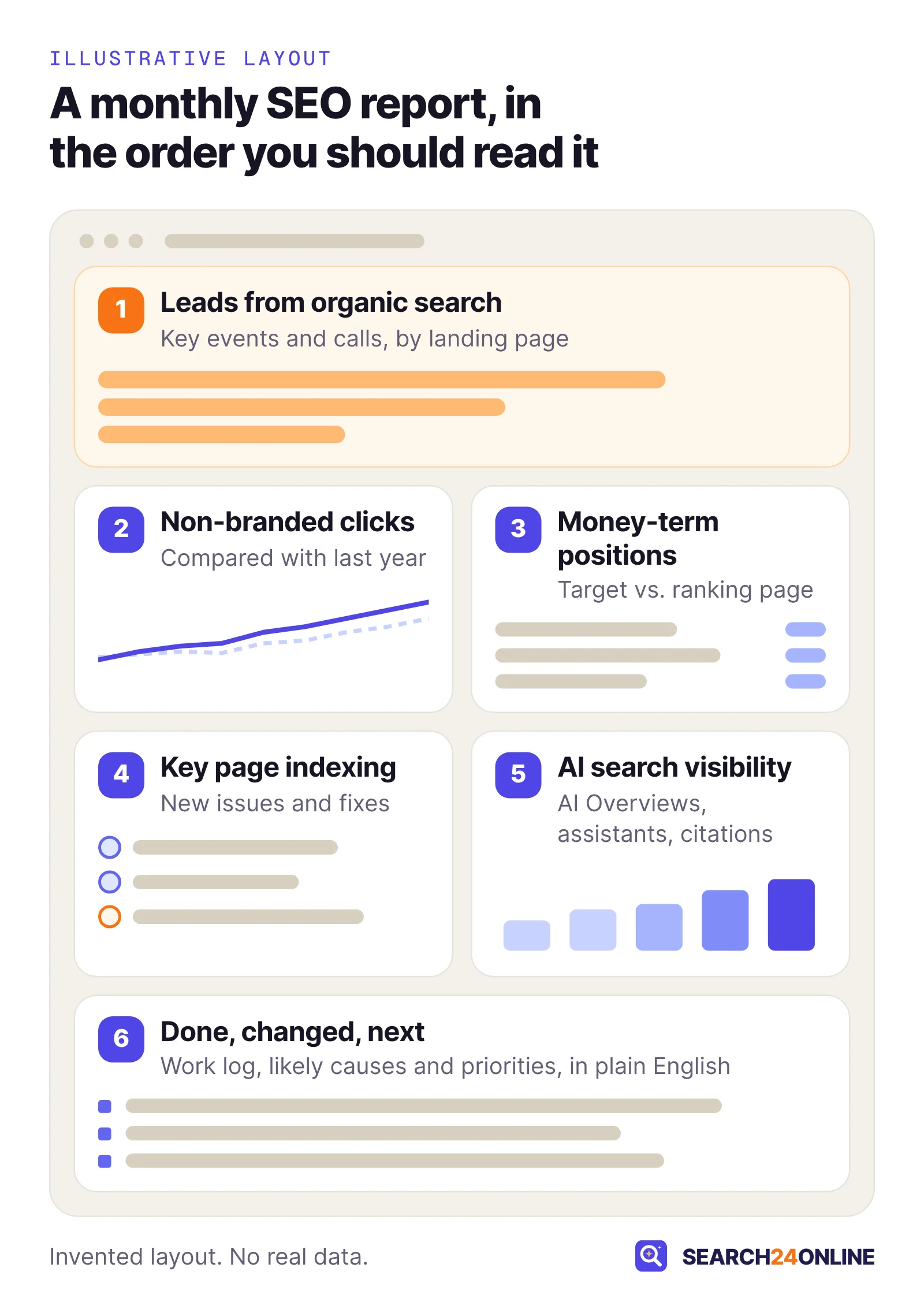
A useful monthly SEO report has six parts, in this order: business outcomes, search visibility, positions for money terms, key page health, AI visibility, and a short account of what was done and what comes next. Without the first or last part, it is a data dump, not a report.
The order matters. Outcomes come first because they are why you pay for SEO. Visibility and rankings explain the outcomes; site health and AI visibility explain the visibility. The narrative turns it all into decisions.
In audits we often meet business owners who have received a monthly report for years and still can’t say how many inquiries came from Google last quarter. The reports were built to show activity, not to answer the owner’s questions. The layout below is the one we would want as the client.
Which numbers show whether SEO is bringing in business?
Leads, bookings or sales that started with an organic search visit show whether SEO pays; everything else is a leading indicator. They come from Google Analytics 4 and, for local businesses, Google Business Profile.
Key events in Google Analytics 4
GA4 calls the actions you care about key events. Google defines a key event as “an event that measures an action that’s particularly important to the success of your business,” and any event you collect can be marked as one. Typical examples: a contact form submitted, a click on a phone number, a booking confirmed, a purchase.
The report should show key events from the Organic Search channel (visits from a recognized search engine, or with the medium “organic”), broken down by landing page. Most reports skip the landing-page view, yet it shows which pages earn inquiries and where the next round of work should go.
Calls and clicks from Google Business Profile
Customers who find you on Google Maps often never reach your website. Business Profile’s performance page counts calls (taps on the call button), website clicks, direction requests, messages and bookings. A local report without these understates SEO badly. One quirk: the searches metric, showing the terms people used to find your profile, updates at the start of each month.
Lead quality, which only you can see
An agency sees form fills, not whether they became customers. A common situation: a home services company celebrates a jump in organic form submissions, and many turn out to be vendors and job seekers. Our view: share a monthly count of qualified leads by source, even from a spreadsheet, and have it included. That one line turns a marketing report into a business report. Our guide on how to measure SEO ROI shows how to take the next step and put a revenue figure on it.
How do you read the Search Console numbers in your report?
Start with non-branded clicks and impressions compared with the same period last year, then look at click-through rate and average position. The Performance report is Google’s own record of how your site appears in its results.
The four metrics in plain English
- Clicks: how many times someone clicked through to your site from Google Search results.
- Impressions: how many times your site appeared in results, whether or not anyone scrolled to it.
- CTR (click-through rate): clicks divided by impressions.
- Average position: Google’s help page calls it “the average position of the topmost result from your site.” If two of your pages appear for one search, only the higher one counts in the chart.
Google notes that the newest data can be preliminary and may still change, so a dramatic dip in the last day or two usually means nothing yet.
Separate brand searches from everything else
People who search your business name already know you. That traffic is valuable, but SEO did little to create it. Search Console now has a built-in Branded and Non-branded query filter, with data from March 11, 2025. Google defines branded queries as ones that include your brand name, your domain or a brand-specific product or service. The filter isn’t available for sub-properties or for sites with low impression counts.
Non-branded clicks are the closest thing to a pure measure of SEO reach: people looking for what you sell who found you. Total clicks can rise on the back of a radio campaign while the non-branded line stays flat.
Compare the right periods
Month-over-month comparisons mislead any seasonal business. Google’s guide to traffic drops suggests the Last 16 months view, to see whether a dip repeats yearly, and comparing the last three months with the same months a year earlier. Search Console keeps 16 months of data.
The table below is how we read common patterns. None of them is proof on its own; each is a reason to ask a specific question.
| What you see | What it often means | What to ask |
|---|---|---|
| Impressions up, clicks flat | Pages are appearing for more searches, usually low on the page or for loosely related terms. | Which queries are new, and are any close enough to target properly? |
| Clicks down, impressions steady | CTR fell: a weaker title, a lower position, or more competition on the results page. | Which pages lost CTR, and what changed on their results pages? |
| Clicks and impressions both down | Lost visibility or lower demand. Could be seasonal, technical or an algorithm change. | Is it the same as last year? Which pages account for most of the drop? |
| Branded up, non-branded flat | Brand awareness grew elsewhere; SEO reach did not. | What is the plan for the non-branded searches we want? |
| Clicks up, leads flat | The traffic is landing on informational pages, or the pages that get it don’t convert. | Which landing pages gained, and do they have a clear next step for visitors? |
You can also link Search Console to GA4, but its metrics there combine only with landing page, device and country. For the early signals of a new program, our article on how long SEO takes to work covers what should move in which order.
Do keyword rankings still belong in an SEO report?
Yes, but only for a short list of terms that bring in business, each tied to the page meant to rank for it, and shown as a trend rather than a scoreboard. Google’s debugging guide is blunt that you “shouldn’t focus too much on your absolute position,” and that small fluctuations can happen at any time. Its Performance report help also suggests focusing more on trends in impressions and clicks than on position alone.
Rankings earn their place because they explain movement in clicks. If clicks to your “emergency plumber” page fell, the first question is whether it slipped down the page. A focused table answers that in seconds.
What a useful rankings table shows
- The term, chosen because it signals buying intent, not because it is easy to rank for.
- The page you want to rank and the page that actually ranks. When those differ, something is wrong.
- The trend over three to six months, not this week’s number.
- Clicks from Search Console for that term, so you can see whether a position change actually mattered.
The second bullet catches one of the most common problems we find in audits: cannibalization, where two or more of your pages compete for the same search. A typical case is a regional HVAC company with a service page, a blog post and a city page all aimed at “furnace repair.” Google keeps switching between them and the term bounces between page one and page three. Listing the ranking URL each month makes the swap visible; listing only the position hides it.
A rank tracker usually checks one location and device at one moment; Search Console’s average position comes from real searches everywhere your site appeared. For a local business, ask which location the tracker uses, and treat Search Console as the tiebreaker.
Which site health checks belong in the report?
The report should confirm that your money pages are indexed and healthy, and list any new issue on them with what is being done about it. It doesn’t need a long crawler export.
Indexing of key pages, not total indexed pages
Search Console’s Page indexing report shows which URLs Google has indexed and why others were left out. Google is explicit that you “should not expect all URLs on your site to be indexed, only the canonical pages.” So the number to watch is not the total. It is whether every service, product and location page you care about is in the index.
Important pages that aren’t indexed are among our most frequent audit findings. Watch three statuses: Crawled – currently not indexed (Google read the page and passed on it); Discovered – currently not indexed (Google knows the URL but hasn’t crawled it); and Duplicate without user-selected canonical (Google picked a different page as the main version). Causes range from thin content to weak internal links; the report should name the cause and the fix.
After a fix, you can request validation, which Google says typically takes up to about two weeks and sometimes much longer. A good report notes when it was submitted and follows it to the outcome.
Other health items worth a line
- Internal linking: orphan pages, with no internal links pointing at them, are a frequent reason good content never ranks.
- Structured data: new errors on the markup you use, such as LocalBusiness or Product.
- Content: outdated or thin pages that were updated, merged or removed.
- Security or manual actions: normally one line saying “none.” If that changes, it leads the report.
How should a report cover visibility in AI answers?
A current report should show your impressions in Google’s AI features, visits from AI assistants in GA4, and how often assistants mention or cite you for a fixed set of customer questions. It is the newest part of reporting, and where vague claims are easiest to make.
Google AI Overviews and AI Mode in Search Console
Search Console’s Generative AI performance report counts impressions: how many times links to your site were shown to someone in a generative AI feature on Google Search. It covers AI Overviews and AI Mode, and breaks the data down by page, country, date and device. Google says the report reached all websites worldwide by August 31, 2026. It may not appear at all if your site has too few AI impressions, and it leaves out experiments in Search Labs.
It does not show clicks. Google says traffic from AI features is reported in the Performance report within the Web search type, mixed in with everything else. So a report can say your pages were shown in AI Overviews more often, but cannot honestly claim an exact number of clicks from them.
Visits from ChatGPT, Gemini and other assistants in GA4
GA4’s default channel groups now include an AI Assistant channel, which Google describes as the way users arrive “from sources like ChatGPT, Gemini, Deepseek, Copilot, or Grok.” It excludes Google’s AI Overviews and AI Mode. For most small businesses these visits are few, but key events from that channel deserve a line. Our guide to seeing AI assistant traffic in GA4 covers the setup and its blind spots.
Mentions and citations in assistants
Where an assistant offers no site-owner report, the workable method is a fixed list of real customer questions, checked on a schedule for mentions of your business and citations of your pages. If the list changes monthly, the trend means nothing. We cover the method in how to track your brand visibility in AI answers. Our plans state how many AI questions each level tracks; any provider should be that specific.
A single “AI visibility score” is meaningless unless you can see the questions, the assistants and the dates it came from. Google also says there are no special requirements or schema for appearing in AI Overviews or AI Mode, so a report that credits a secret AI trick deserves a follow-up question.
Which report metrics are just noise?
Noise is any number that can rise while your business gets nothing from it. Most of these metrics become noise only when presented as results instead of context.
- Total sessions, sitewide. One blog post that ranks for a curiosity search can add a flood of visitors who will never buy.
- “Now ranking for thousands of keywords.” Most are rare phrases on page five. The count says nothing about the searches that bring customers.
- Third-party authority scores. These are a tool vendor’s estimate of link strength, not a measure Google reports anywhere.
- Number of backlinks built. A pile of links from irrelevant directories is worth less than one link from a respected trade association. Ask for the list, not the count.
- Impressions on their own. A useful early signal, but celebrating them month after month while clicks stay flat avoids the next question.
- Total indexed pages. Not every URL should be indexed; a rising count can even signal thin or duplicate pages.
- Hours and task lists without outcomes. “Optimized meta descriptions” matters only if you can see which pages, and what happened to their click-through rate.
- A speed score in isolation. Fine to mention in the health section, not as a headline.
A quick test for any chart: if this number doubled next month, would you expect more customers? If the honest answer is “not necessarily,” the chart belongs further back in the report, or out of it.
What should the written summary say?
The summary should say, in plain English, what was done this month, what changed and why, and what comes next. It is the most valuable page in any report, and the one most often reduced to a single line about traffic “trending positively.”
Google’s advice on hiring an SEO suggests asking, “Will you share with me all the changes you make to my site,” along with the reasoning behind its recommendations. A monthly work log is how that promise is kept.
- What was doneSpecific changes with page names and dates: pages rewritten, internal links added, fixes shipped, articles published, links earned and from where.
- What changed, and whyThe two or three movements that matter, each with its most likely cause and how confident the analyst is.
- What did not workEvery program has pages that didn’t move. Naming them, with a theory, is a sign of honesty.
- What comes nextThe priorities for the coming month, ranked by likely impact, with any decisions or approvals needed from you.
Mark every change on the chart
Search Console lets owners and full users add annotations to the Performance chart: notes of up to 120 characters on a date, up to 200 per property, deleted after 500 days. Ask your provider to annotate each meaningful change. Months later, when someone asks why clicks rose in March, the answer is on the chart.
Separate cause from coincidence
Google’s traffic-drop guide lists the usual suspects: algorithm updates, technical, security and spam issues, site moves, seasonal demand and reporting glitches. It suggests Google Trends to check whether a query fell everywhere or only for you. A good summary does that work before crediting or blaming anything, including taking credit for a seasonal rise.
“Non-branded clicks to the five service pages rose year over year, mostly from the water heater page we rewrote on the 4th. Leads from organic search were flat because two of those pages still have no booking button. Next month: add booking to both and consolidate the two drain cleaning pages that are competing with each other.” Invented example, but every claim in it can be checked.
How can you check your SEO report yourself?
You can verify the core of any SEO report in about 15 minutes in your own Search Console and GA4 accounts. If you don’t have access, get it first: a report built on accounts you can’t open must be taken on trust.
Red flags worth raising
- No organic leads anywhere in the report, month after month.
- Data you can’t reproduce in your own accounts, or tools you have no login for.
- A keyword list that changes every month, so the trend always looks good.
- No work log, or one that repeats the same generic tasks.
- Only month-over-month comparisons for a seasonal business.
- Promises of a position by a date. Google’s guidance is direct: “No one can guarantee a #1 ranking on Google.”
Many reports are poor simply because nobody asked for better. For warning signs beyond reporting, see the SEO promises that mean you should walk away. Choosing a provider now? Our questions to ask an SEO agency cover sample reports.
A 15-minute self-check
- Open the Performance reportCompare the last three months with the same period last year, with the Non-branded filter if available.
- Look at the Pages tabSort by clicks. Are your money pages near the top, and are their clicks rising or falling?
- Check indexingConfirm your main service, product or location pages are indexed, using the Page indexing report or URL Inspection tool.
- Check organic key events in GA4Filter to the Organic Search channel and look at key events by landing page for the same period.
- Compare with the reportThe numbers should broadly match. Small gaps are normal; different trends are not.
A report should be a window into data you own, not a replacement for it, which is why our clients get a private client dashboard as well as the written summary. If you would like a baseline before your next report arrives, our free SEO + GEO report analyzes your website, and you get password-protected dashboard access to view it within 24 hours.
Common questions
How often should I get an SEO report?
Monthly suits most small and mid-sized businesses. Leads arrive unevenly and the newest Search Console data can still change, so weekly reports mostly show noise. Larger programs can justify a shorter cycle, but the contents should stay the same.
Why don’t my Search Console and Google Analytics numbers match?
They measure different things. Search Console counts clicks on Google results; GA4 counts sessions recorded by its tracking tag on your site. Search Console data also reaches GA4 about 48 hours after Search Console collects it, so small gaps are normal. A steady gap is fine; a sudden new one is worth a question.
Should my SEO report include Google AI Overviews?
Yes, if your site appears in them. Search Console’s Generative AI performance report shows how often links to your site were shown in AI Overviews and AI Mode, by page, country, date and device. It counts impressions only; clicks from those features sit in the regular Performance report under the Web search type.
What is a good click-through rate in Search Console?
There is no single good number. Click-through rate depends on your position, the type of query and what else appears on the results page. Compare each page with its own past and with your pages in similar positions. A page with many impressions and an unusually low rate may need a clearer title and description.
Can I build my own SEO report for free?
Yes. Search Console, Google Analytics 4 and your Google Business Profile performance page are free and cover organic leads, non-branded clicks, key page indexing and local calls. What they don’t give you is the interpretation and the plan, which is the part worth paying for.
Sources
- Search Console Help: Performance report (Search results)
- Search Console Help: Performance report common tasks and use cases
- Search Console Help: Generative AI performance report (Search)
- Search Console Help: Page indexing report
- Search Console Help: Search Console annotations
- Google Search Central: Debugging drops in Google Search traffic
- Google Search Central: AI features and your website
- Google Search Central: Do you need an SEO?
- Google Analytics Help: Events and key events
- Google Analytics Help: Default channel group
- Google Analytics Help: Connect Search Console to Google Analytics
- Google Business Profile Help: Understand your Business Profile performance and insights
See the baseline your next SEO report should start from.
We’ll analyze your website, create your SEO + GEO report and give you password-protected dashboard access to view it before your next monthly report lands.
Free · No obligation · We only review your public pages.