
What Does an SEO Audit Include? A Plain-English Walkthrough
The ten areas we check on every website, the problems that turn up again and again, how to spot each one yourself with free tools, and how to decide what to fix first.
Key takeaways
- An SEO audit checks whether search engines can reach, understand and trust your website, and should end in a short list of fixes ranked by likely impact, not a tool score.
- Start with indexing. Google says not to expect every URL to be indexed, but your key service and product pages should be, and Search Console’s Page indexing report shows which are left out and why.
- The problems we find most often are structural, not exotic: key pages with few internal links, several pages chasing the same keyword, and thin or outdated content.
- AI search belongs in every audit now: check that robots.txt lets search crawlers such as OpenAI’s OAI-SearchBot in, and that Search Console’s generative AI setting has not been switched to Exclude.
- Fix in order of dependency: access problems first, then duplication and structure, then content and links, then polish. Most of the first pass needs only free tools.
On this page
What is an SEO audit, and what should you get at the end?
An SEO audit is a structured review of your website against the things that decide whether it shows up in search. It answers three questions: can search engines reach your pages, do they understand what each page is for, and is each page a better answer than the competition’s? The part that matters is the output: a short list of fixes, ranked by likely impact, with evidence for each one.
That is different from the automated “site score” many tools produce. A crawler can flag hundreds of warnings in a minute, and many are harmless, like a missing meta description on a tag archive nobody visits. What a tool cannot tell you is that your most profitable service has no page of its own, or that two of your pages are splitting the same search between them. That takes someone looking at the site with the business in mind.
Our team brings over 20 years of digital marketing experience, and across the 500+ brands we have served, a handful of problems explain most lost visibility: good businesses held back by indexing gaps, weak structure, pages competing with each other, thin topic coverage and poor links. Below, we walk through each audit area in the order we check them.
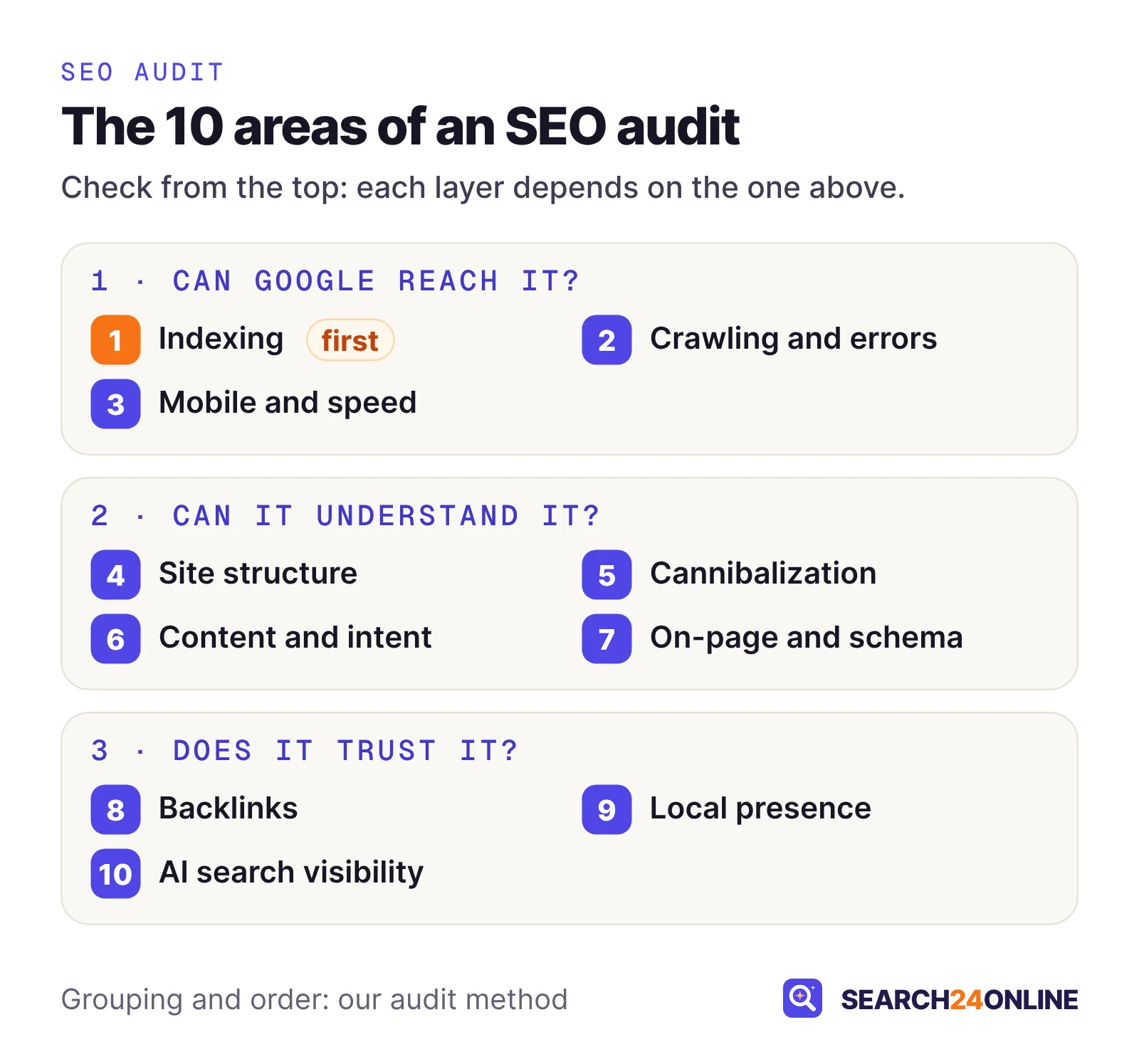
Each item should name the affected URLs, show the evidence, explain why it costs you visibility, say what to do and estimate the effort. A finding missing any of those is hard to act on.
Are your most important pages actually indexed?
Check this first, because a page missing from Google’s index cannot rank for anything, and important pages left out of the index is one of the findings we see most often. Not every page needs to be indexed. Google’s own help page for the report says not to “expect every URL on your site to be indexed.” The question is whether the pages that bring in customers are.
How to spot it
In Google Search Console (free once you verify your site), open the Page indexing report. It lists each reason Google gives for leaving pages out, such as “URL marked ‘noindex’” or “Soft 404.” Click into each reason and scan for pages you care about. Then check your five or ten most important URLs one by one in the URL Inspection tool.
Two statuses confuse almost everyone. “Discovered – currently not indexed” means Google found the URL but has not crawled it yet, sometimes because crawling was postponed to avoid overloading the site. “Crawled – currently not indexed” means Google read the page and chose not to index it for now. Google notes there is no need to resubmit those URLs, so the real fix is making the page more worth indexing.
A pattern we see often
A home services company has 30 city pages, all built from one template with the city name swapped in. Half of them sit under “Crawled – currently not indexed” or a duplicate status, because Google sees little reason to index near-copies. Adding more city pages makes it worse. The fix is fewer pages that are genuinely different: real projects, local details, staff and reviews from that area.
Other causes are mundane: a noindex tag left over from a redesign, a robots.txt rule meant for the staging site, or canonical tags pointing every product at its category. We cover the common causes and fixes in why your website is not showing up on Google.
What technical issues get in the way of crawling, mobile and speed?
The usual culprits are blocks and errors left by past changes, content that only appears after JavaScript runs, and a mobile version thinner than the desktop one. Speed matters too, though in our experience less than owners fear.
Blocks and errors. The Page indexing report also lists server errors (5xx), redirect errors, URLs blocked by robots.txt and pages that return 404. After a migration we often find redirect chains, old URLs returning errors and internal links still pointing at old addresses. Each one wastes crawling and leaks the value of links to the old pages.
Mobile parity. Google’s documentation is explicit: it “uses the mobile version of a site’s content, crawled with the smartphone agent, for indexing and ranking.” It asks that the mobile site carry the same content and the same structured data as desktop. A common finding is a mobile theme that drops the reviews, the FAQ or half the service description to save space. Open your key pages on a phone and compare them line by line with the desktop version.
JavaScript. Compare the raw page source (right-click, View page source) with what you see on screen. If service descriptions or menu links appear only after scripts run, search engines have more work to do, and some crawlers may never see them. Ask your developer about server-side rendering for key pages.
Speed. Google’s guidance asks site owners to aim for Largest Contentful Paint within 2.5 seconds, Interaction to Next Paint (INP) under 200 milliseconds and a Cumulative Layout Shift score under 0.1. It says good scores align with what its ranking systems seek to reward, which is not the same as outranking relevance. Our view: fix templates that fail badly, especially on mobile, rather than chasing a perfect score. The full list of checks, including how to read these speed metrics, is in our technical SEO checklist.
Does your site structure lead Google to the pages that matter?
Often it does not. Poor internal linking is one of our most consistent findings. Key pages sit four clicks deep or behind a search box, and blog posts describe a service without linking to it.
Internal links are how search engines find your pages and judge which ones you consider important. Google’s link guidelines put the minimum plainly: “Every page you care about should have a link from at least one other page on your site.” Google can generally only crawl a link that is an HTML <a> element. Menus built from buttons and click handlers can hide whole sections.
How to spot it
- In Search Console, open the Links report and look at the internal links table. If your main service pages get fewer internal links than your privacy policy, the structure is upside down. The report is a sample, with tables capped at 1,000 rows.
- Run a free crawler to find orphan pages (no other page links to them) and the click depth of key pages.
- Do it by hand: start at the homepage and count the clicks to your five most important pages. More than three is a warning sign.
What to do
Organize the site in hubs: a hub page links to every service, each service links back and to the articles about it, and each article links to the service it supports. Use descriptive anchor text, “water heater repair” rather than “click here,” which is what Google’s guidelines recommend. Take a B2B manufacturer whose 200 product pages are reachable only through a filter tool: it usually gains more from category pages with plain links than from any amount of new content.
Are several of your pages competing for the same search?
On sites that have published for a few years, usually yes. Keyword cannibalization means two or more of your pages target the same search with the same intent. Search engines have to guess which to show, and the signals that could build one strong page get split across several weak ones.
How to spot it
In Search Console’s Performance report, open the Queries tab, click one of your important searches, then switch to the Pages tab. If several URLs are picking up impressions for that one query, look closer. A quick second check: search Google for site:yourdomain.com plus the phrase.
A common situation: a dental practice has a “dental implants” service page and three blog posts called “dental implants guide,” “are dental implants worth it” and “everything about dental implants.” All four chase the same thing. A blog post ends up outranking the service page, so visitors land on an article with no booking prompt and leave.
What to do
- Merge pages that say the same thing into the strongest one, then 301-redirect the others to it.
- Differentiate pages that could serve different needs: one for cost, one for the procedure, one to book. Each should link to the main service page.
- Leave alone overlap that serves genuinely different intent. A cost article and a service page can both appear for related searches and help each other if they link.
Does your content match what searchers want and cover the topic properly?
Three linked findings live here: thin, outdated or poorly structured pages; pages that miss the intent behind the search; and missing topical authority. That last one means the site covers a subject too shallowly to look like a good source.
Intent first. Search your main phrases and look at what ranks today. If Google shows comparison guides and price breakdowns and you offer a sales page, you are answering a question nobody asked. Match the type of page before you work on the words.
Topic coverage. List the questions a buyer asks before choosing you, from “how much does it cost” to “how long does it take” and “what are the alternatives,” and check which ones your site answers. Our view: a connected set of pages that answer those questions, linked to the service page, does more than a long run of unrelated blog posts.
Quality. Google’s helpful content guidance offers questions worth putting to every key page. Does it provide “original information, reporting, research, or analysis”? Is it “the sort of page you’d want to bookmark, share with a friend, or recommend”? Google also lists changing a page’s date to look fresh, without substantial changes, as a warning sign.
| Action | When it fits | Signal to look for |
|---|---|---|
| Refresh | The topic still matters; facts, prices or examples are out of date | Impressions holding but clicks falling in the Performance report |
| Expand | The page targets the right search but answers it thinly | Ranks on page two; competitors cover subtopics you skip |
| Merge | Two or more pages cover the same ground | Several URLs getting impressions for the same query |
| Remove or redirect | No search demand, no links, no business purpose | No impressions for months; often “Crawled – currently not indexed” |
Are your titles, headings and structured data doing their job?
On-page basics are the cheapest fixes in most audits and some of the most neglected. Typical findings: dozens of pages titled “Home | Company Name” or sharing one boilerplate title, missing or duplicated H1 headings, images with no alt text, and service pages that never state the service and the city in plain words.
To spot them, export titles and headings from a free crawler and sort by duplicates. Each important page needs a unique title that says what it offers, a matching H1 and a first paragraph that answers the obvious question.
Structured data
Structured data is code (usually JSON-LD) that labels facts on a page, such as your business name, address, opening hours, products or reviews, so machines read them without guessing. We often find it missing, especially LocalBusiness or Organization markup on the homepage and Product markup on stores, or added by a plugin and describing things the page does not show.
Google is clear on two points. Structured data should match the visible text on the page, and there is “no special schema.org structured data” needed for AI Overviews or AI Mode. Be wary of anyone selling special “AI schema.” Our schema markup guide for small businesses covers which types are worth adding.
Is your backlink profile natural, and is your local presence consistent?
Backlink findings usually fall into one of two camps: too few relevant links to compete, or a profile padded with directories, paid guest posts and link swaps. The second is the more dangerous. Google’s spam policies name “Buying or selling links for ranking purposes,” excessive link exchanges and “Low-quality directory or bookmark site links” as link spam. Sites that break those policies “may rank lower in results or not appear in results at all.”
How to spot it
Search Console’s Links report shows your top linking sites and the most common link text. Warning signs: sites unrelated to your industry, foreign-language directories, and link text that repeats your exact money keyword, which rarely happens naturally.
Google calls its disavow tool an advanced feature to use with caution. It says “in most cases, Google can assess which links to trust without additional guidance.” The tool is meant for spammy links that have caused, or likely will cause, a manual action. For most sites the right move is to stop buying links and earn them from suppliers, trade associations, local press and useful content.
Local presence
For businesses serving a specific area, the audit also covers the Google Business Profile and whether your name, address and phone number match across your site and listings. An old office phone number and a profile category that does not fit the main service are regular findings. The details are in our local SEO guide.
Can AI assistants find, read and cite your site?
This is the newest audit area, and one we now check on every site. Some sites rank well on Google but block the crawlers AI search tools use. Others keep key facts in images and PDFs that assistants cannot read. Visibility in AI answers, often called GEO, starts with the same foundations as SEO, plus a few specific checks.
Crawler access
Open yourdomain.com/robots.txt and look for rules naming AI crawlers. OpenAI’s documentation separates them: OAI-SearchBot surfaces sites in ChatGPT’s search features, and “Sites that are opted out of OAI-SearchBot will not be shown in ChatGPT search answers,” while GPTBot collects content that may be used to train models. OpenAI says each setting is independent, so you can block training and allow search:
User-agent: OAI-SearchBot
Allow: /

User-agent: GPTBot
Disallow: /
Whether to block training crawlers is a business decision, which we discuss in AI crawlers explained. Blocking search crawlers by accident is simply a mistake. Check your firewall too. Google asks site owners to make sure crawling is allowed in robots.txt “and by any CDN or hosting infrastructure.”
Google’s generative AI setting
Search Console has a Search generative AI control under Settings, rolled out to all websites worldwide as of August 31, 2026, according to Google. The default, Include, lets your content appear in AI Overviews, AI Mode and generative AI features in Discover. Exclude keeps it out, with no traffic or impressions from those features, though Google says it does not affect ranking elsewhere in Search. Confirm it is set the way you intend.
What else to check
- Key facts (services, prices, areas served, hours) written as text on your pages, not only in images, PDFs or a booking widget.
- A test set of 10–20 questions your buyers ask, put to ChatGPT, Perplexity and Google’s AI Mode. Note whether you are mentioned, what is said and which sites are cited instead.
Google says no special optimizations are needed to appear in AI Overviews or AI Mode, so be suspicious of anyone selling AI tricks. Rerun the same test questions every month or two to see whether anything changes.
How do you decide which audit findings to fix first?
Rank findings by dependency first, then business impact, then effort. Improving a page Google cannot index achieves nothing, and new content struggles while three older pages compete with it. This is the order we work in.
- Remove anything that blocks accessNoindex tags, robots.txt rules, server errors and broken redirects on revenue pages, plus accidental blocks on Google or AI search crawlers.
- Resolve duplicationMerge cannibalizing pages and near-duplicate templates, so signals concentrate on one URL per topic.
- Repair the structureAdd internal links to key pages and bring them within a few clicks of the homepage.
- Upgrade pages close to page onePages already getting impressions in the Performance report, but sitting just below the top results, usually respond fastest to better content and titles.
- Fill gaps and earn linksNew pages for unanswered buyer questions, and outreach for relevant links. This is the slow, ongoing part.
- PolishStructured data, image alt text and speed fixes on templates that fail badly.
Within each step, sort by closeness to revenue. Say a plumbing company’s audit finds a noindex tag on its water heater page, four blog posts competing with its drain cleaning page, 40 images without alt text and a slow mobile homepage. The noindex comes first: minutes of work on the page that sells the highest-value job. The drain cleaning merge is second, homepage speed third if it really fails the thresholds, and alt text last.
DIY checks or a professional audit?
A site with a few dozen pages can get a long way with these checks and a free Search Console account. A professional audit earns its cost when the site is large, recently redesigned or moved, losing traffic for no obvious reason, or needs a developer brief. We break down typical costs in how much SEO costs in 2026.
If you want a first look before deciding, our free SEO + GEO report analyzes your website, and you get password-protected dashboard access to view it within 24 hours. Whoever does the audit, judge it by one test: does it tell you what to fix first, and why?
Common questions
How long does an SEO audit take?
In our experience, a small local website takes a few working days and a large e-commerce or multi-location site several weeks. The time goes into reviewing pages by hand and checking findings against the business, not running the crawl.
How often should a website be audited?
Our view: a full audit once a year, plus an extra one after any redesign, platform change, domain move or sudden traffic drop. Between audits, a monthly look at the Page indexing and Performance reports in Search Console catches most new problems early.
Do I need paid SEO tools to audit my own site?
No, not for a first pass. Google Search Console is free and covers indexing, search performance and links, and a free crawler handles small sites. Paid tools add competitor data and backlink research, which matter more as your market gets more competitive.
Are automated SEO audit scores reliable?
They are useful for finding problems and poor at ranking them. A tool can flag hundreds of warnings without knowing which pages earn you money, so a site can score well and still have its main service page missing from Google. Treat the score as a to-check list, not a grade.
What should happen after an SEO audit?
Someone should own each fix, with a date. An audit is only worth what gets implemented, so assign findings to your team, developer or agency, fix access problems first, and re-check the same reports a few weeks later.
Sources
- Google Search Console Help: Page indexing report
- Google Search Console Help: Performance report (Search results)
- Google Search Console Help: Links report
- Google Search Console Help: Disavow links to your site
- Google Search Console Help: Search generative AI control
- Google Search Central: Link best practices for Google
- Google Search Central: Mobile-first indexing best practices
- Google Search Central: Understanding Core Web Vitals and Google search results
- Google Search Central: Creating helpful, reliable, people-first content
- Google Search Central: Spam policies for Google web search
- Google Search Central: AI features and your website
- OpenAI: Overview of OpenAI crawlers
See what an audit of your site would find — free.
We’ll analyze your website, create your SEO + GEO report and give you password-protected dashboard access, so you can see which of these issues apply to you.
Free · No obligation · We only review your public pages.