
Schema Markup for Small Businesses: Which Types Matter
Schema markup won’t lift your rankings, but the right few types make your pages eligible for richer Google results and keep your business facts machine-readable. Here is which types to add, working code, Google’s current rules and the mistakes we keep finding in audits.
Key takeaways
- Most small businesses need only a few schema types: LocalBusiness (in its most specific subtype) or Organization, BreadcrumbList, Product for stores and Article for blog posts, plus Event or VideoObject only if you publish events or videos.
- Schema markup makes a page eligible for rich results; it does not boost rankings. Google’s John Mueller put it plainly in April 2025: “Structured data won’t make your site rank better.” Even valid markup carries no promise of a rich result.
- FAQ rich results stopped appearing in Google Search on May 7, 2026, and HowTo rich results were dropped in 2023. Neither is among the 25 features in Google’s structured data gallery as of October 2026.
- Review stars are off the table for your own business: Google says pages are ineligible when the business being reviewed controls the reviews about itself, even through an embedded third-party widget.
- Google says there is no special schema for AI Overviews or AI Mode. The rule that matters everywhere is that markup must match what visitors can see on the page.
On this page
What does schema markup actually do for a small business?
Schema markup tells search engines, in a fixed vocabulary, what a page is about: this is a plumber with these hours, this is a product at this price, this page sits under Services. On Google, its main payoff is eligibility for rich results, the enhanced listings that show prices, stock, event dates or a business’s details. It is not a ranking factor.
The vocabulary comes from Schema.org, and the code itself is called structured data. Google accepts three formats and labels one of them, JSON-LD, “recommended”: a single block of script that sits in the page’s HTML and doesn’t touch your design. Every example in this guide uses it.
What Google says about rankings
Google’s John Mueller has answered the ranking question more than once. In an April 2025 post reported by Search Engine Roundtable, he wrote: “Structured data won’t make your site rank better.” He said its purpose is the search features listed in Google’s documentation, and that marking up other things is unlikely to change anything visible in Search.
Google’s own guidelines point the same way. The penalty for spammy markup, a structured data manual action, removes a page’s eligibility for rich results. Google says it “doesn’t affect how the page ranks in Google web search.” Even perfect markup comes with no promise: “Google does not guarantee that your structured data will show up in search results.”
So why bother? A rich result makes your listing more useful when someone compares options: a price and “in stock” on a product, a date on an event, hours for a shop. Markup also restates your core facts in a form machines read reliably, part of being recognized as one consistent business (see our entity SEO guide). Our view: it is a few hours of work, worth doing once, and not worth paying for as a monthly “ranking” service.
Which schema types matter for small businesses?
Seven types cover nearly every small business, and most sites need only three or four. Google’s search gallery, updated in October 2026, lists 25 features that use structured data, many for narrow cases such as job postings, recipes or vacation rentals. These are the ones a typical local business, shop or service firm can use.
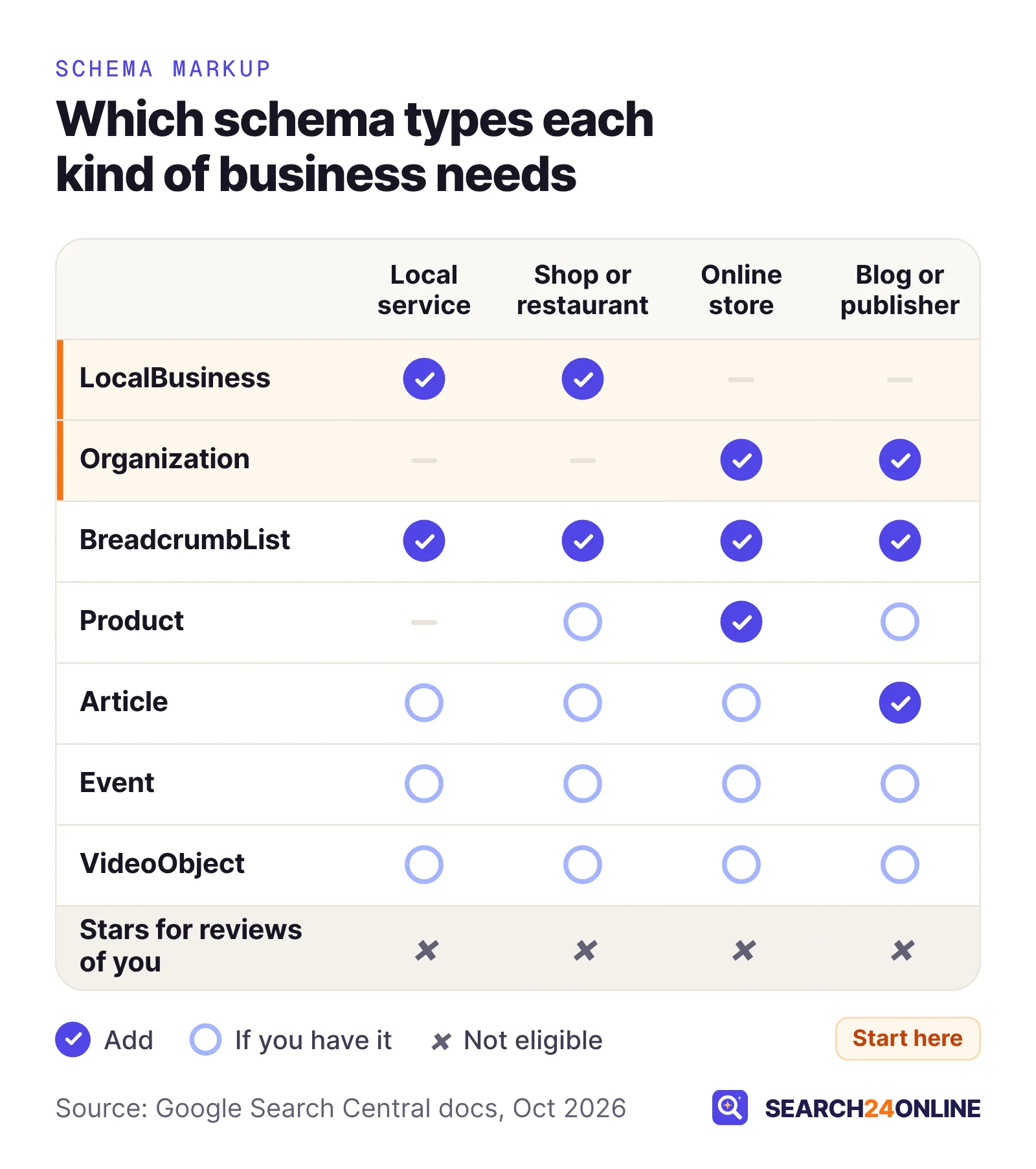
| Type | Put it on | What Google may show | Our advice |
|---|---|---|---|
| LocalBusiness subtype | Home or contact page; each location page | Business details such as hours, ratings and directions in the knowledge panel | Essential if customers visit you or you publish an address |
| Organization | Home or about page | Logo, legal name, address and contact details | Essential for online-only firms and publishers |
| Product | Each product page | Price, availability and review ratings | Essential for stores; keep it in sync with stock |
| Article | Blog posts and guides | Your post in Google’s article features | Worth it; most platforms add it for you |
| BreadcrumbList | Every page below the home page | The page’s position in your site | Cheap and useful on any site with sections |
| Event | One page per public event | A list of upcoming events | Only for real, bookable, in-person events |
| VideoObject | The page where the video plays | Video details, with the option to play it | Only for videos you host on that page |
Review snippets are missing on purpose: for most small businesses, the rule that matters is that you can’t use them for reviews of yourself (more below).
Should you use LocalBusiness or Organization markup?
Use LocalBusiness, in its most specific subtype, if customers come to you or you publish a street address. Use Organization if you are online-only or don’t show an address. Google’s Organization documentation says physical businesses such as stores and restaurants should use the most specific LocalBusiness subtype and add the Organization properties to it, and that online shops should use the OnlineStore subtype.
“Most specific” matters. Schema.org has subtypes such as Dentist, LegalService, RealEstateAgent and Store, and under HomeAndConstructionBusiness it lists Plumber, Electrician, HVACBusiness and RoofingContractor. Google’s general guidelines say to use the most specific type that applies, so a plumber should be a Plumber, not a generic LocalBusiness.
What Google requires and recommends
For LocalBusiness, Google requires only name and address. Its recommended properties include telephone (with country and area code), url, openingHoursSpecification, priceRange, and geo coordinates with at least five decimal places. Each location gets its own markup, ideally on its own location page. Organization markup has no required properties at all. Google suggests placing it on your home page or a single page that describes the organization, such as your about page.
Here is a LocalBusiness example for a fictional plumber, with placeholder URLs and a reserved 555 number. Replace every value with your own and delete any line that doesn’t apply.
<script type="application/ld+json">
{
  "@context": "https://schema.org",
  "@type": "Plumber",
  "@id": "https://www.example.com/#business",
  "name": "Example Plumbing Co.",
  "url": "https://www.example.com/",
  "logo": "https://www.example.com/images/logo.png",
  "telephone": "+1-614-555-0188",
  "priceRange": "$$",
  "address": {
    "@type": "PostalAddress",
    "streetAddress": "250 Example Avenue",
    "addressLocality": "Columbus",
    "addressRegion": "OH",
    "postalCode": "43215",
    "addressCountry": "US"
  },
  "geo": {
    "@type": "GeoCoordinates",
    "latitude": 39.96118,
    "longitude": -82.99879
  },
  "openingHoursSpecification": [{
    "@type": "OpeningHoursSpecification",
    "dayOfWeek": ["Monday", "Tuesday", "Wednesday", "Thursday", "Friday"],
    "opens": "07:00",
    "closes": "18:00"
  }],
  "sameAs": ["https://www.facebook.com/your-page"]
}
</script>
The @id line is a permanent label that other markup on your site can point to instead of repeating the details. The sameAs links tell Google which profiles belong to you; the Organization schema step in our entity SEO guide explains how to choose them.
If you hide your address on Google and your site, don’t put it in your markup. Google requires an address for LocalBusiness and says not to mark up anything readers can’t see. Organization markup with your name, phone, logo and profiles is the honest fit.
When do Product, Article and breadcrumb markup pay off?
Product markup pays off on any page where someone can buy something or read your review of it. Article and breadcrumb markup are low-effort additions that suit nearly any site with a blog or more than one level of pages.
Product: the type with the clearest payoff
Google splits product results in two. Merchant listing markup is for pages where shoppers can buy from you; product snippets cover other product pages too, such as reviews. For a product snippet, Google requires a name plus at least one of offers, review or aggregateRating. Pros and cons appear only for editorial review pages, not shop pages. A minimal example for a fictional store, with made-up values:
{
  "@context": "https://schema.org",
  "@type": "Product",
  "name": "Cedar Raised Garden Bed, 4 x 8 ft",
  "image": "https://www.example.com/images/cedar-bed.jpg",
  "sku": "CB-48",
  "offers": {
    "@type": "Offer",
    "price": "189.00",
    "priceCurrency": "USD",
    "availability": "https://schema.org/InStock"
  }
}
Price and stock change, so this markup has to change with them. Most store platforms generate it from the product record, which is the safest approach. Our e-commerce SEO guide covers variants, Merchant Center and out-of-stock pages. If you sell services, not products, don’t force Product markup onto a service page to chase stars or prices.
Article and BreadcrumbList
Article markup describes a blog post or guide; this page’s own Article markup carries its headline, publisher and published and updated dates. Breadcrumb markup describes where a page sits in your site. This page carries both, generated by the site’s template, which is how most small sites should handle them: set up once, correct everywhere. A short breadcrumb example:
{
  "@context": "https://schema.org",
  "@type": "BreadcrumbList",
  "itemListElement": [
    { "@type": "ListItem", "position": 1, "name": "Home", "item": "https://www.example.com/" },
    { "@type": "ListItem", "position": 2, "name": "Services", "item": "https://www.example.com/services/" },
    { "@type": "ListItem", "position": 3, "name": "Water Heater Repair", "item": "https://www.example.com/services/water-heater-repair/" }
  ]
}
The trail in the markup should match the breadcrumb links visitors see on the page. If your site has no visible breadcrumbs, add those first. Our view: they help visitors and internal linking more than the markup does.
Can you mark up your own reviews to get stars?
No, not for reviews of your own business. Google’s review snippet guidelines say pages are ineligible for stars when “the entity that’s being reviewed controls the reviews about itself.”
That covers a business marking up testimonials on its own site with LocalBusiness or Organization markup, including reviews pulled in through an embedded third-party widget.
Google’s LocalBusiness documentation says the same thing from another angle: its review and aggregateRating properties are meant for sites that review other local businesses, such as a directory or a city guide. A dentist, roofer or law firm is not that site.
Product reviews work differently. A store that collects customer reviews of the products it sells can mark them up on product pages, because the reviews are about the products. The rules still apply:
- Marked-up reviews must be readily available to visitors on the same page.
- Google recommends only accepting ratings that come with a review comment and the author’s name, a recommendation it added in January 2025.
- Since July 24, 2026, the guidelines explicitly say: “Don’t include fake or undisclosed incentivized reviews on your page or in your structured data markup.”
Your Google reviews live on your Business Profile. Our guide to getting more Google reviews within the rules covers how to ask. On your website, show testimonials for visitors, and leave them out of the markup.
When are Event and VideoObject markup worth adding?
Add them only when you have the real thing: public, in-person events with their own pages, or videos that play on your pages. Without that, they add nothing.
Event
Google’s event documentation, updated in September 2026, requires a name, a startDate and a location with an address. Events must be open for the public to book, and each needs its own page and URL. Members-only and invitation-only events are ineligible, and the current guidelines say “virtual experiences that have no real-world component aren’t supported.” Google also rules out marking up things that aren’t events: business hours, coupons, trip packages or “buy now” promotions.
A brewery with weekly trivia nights, a garden center running workshops or a venue selling tickets fits. A plumber’s spring tune-up special does not. When plans change, update eventStatus to cancelled, postponed or rescheduled rather than deleting the event, and keep the original startDate unless you have new dates.
VideoObject
Video markup describes a video embedded on the page. Google’s gallery describes the feature as video information in results, with options to play the video and to mark segments, and its guidelines say to put structured data on the page it describes. Google is still developing this type: its changelog shows a creator property added in September 2026. If you embed your own explainer or project videos on service pages, mark them up there. A video that plays only on a social platform gains little from markup on your site.
What happened to FAQ and HowTo rich results?
Both are gone from Google Search. FAQ rich results stopped appearing on May 7, 2026, and HowTo rich results were dropped in 2023. Neither appears among the 25 features in Google’s search gallery as of its October 2026 update.
The timeline, from Google’s documentation changelog:
- September 14, 2023Google removed its HowTo documentation because the rich result was no longer shown, and limited FAQ rich results to “well-known, authoritative government and health websites.”
- May 8, 2026A deprecation notice was added to the FAQ documentation: the feature would no longer appear in Google Search starting May 7, 2026.
- June 15, 2026The FAQ rich result documentation was removed entirely.
FAQ and HowTo are not unusual. The same changelog shows Google retiring course info, estimated salary, learning video, special announcement and vehicle listing documentation in September 2025, and practice problems in January 2026. Rich result types come and go; what stays is clear content and accurate facts about your business.
Our view: no need to rush. FAQPage is still valid schema.org vocabulary that other systems may read, though it no longer produces Google rich results, and Mueller has said markup used for other purposes won’t cause problems. Keep it only where it mirrors a real, visible FAQ, and don’t add new blocks expecting extra space in Google results.
Does schema markup help you appear in AI answers?
Not on Google in any special way. Google’s guide to generative AI features, updated in July 2026, says: “Structured data isn’t required for generative AI search, and there’s no special schema.org markup you need to add.” In the same passage it says continuing to use structured data is a good idea because “it helps with being eligible for rich results on Google Search.”
The same guide says Google’s AI features are rooted in its core ranking and quality systems, and that a page must be indexed and eligible to show with a snippet to be used as a source. In other words, AI Overviews and AI Mode draw on the same index and signals as regular results. Our guide to appearing in AI Overviews and AI Mode covers what Google says does matter.
Microsoft frames it a little differently. In an October 2025 post on optimizing for AI search answers, Bing principal product manager Krishna Madhavan described schema as code that “helps search engines and AI systems understand your content,” and included it in his checklist. That is a recommendation, not a stated requirement, and it doesn’t contradict Google’s point: none of the platform documentation we reviewed names a schema type that earns a citation.
Our view: the facts that matter to an AI answer (what you do, where, for whom, at what price) belong in the visible text of your pages. Markup that repeats them consistently is cheap insurance for any system that reads it. An “AI schema” package sells something Google says doesn’t exist.
How do you add schema markup and test it?
Generate the JSON-LD from your platform or by hand, test the live page with Google’s Rich Results Test, and recheck after site changes. Google suggests starting with that tool. It calls it “the official Google tool for testing your structured data.”
- Pick the types from the table aboveOnly for content visible on that page. One business block on the home or contact page, Product on product pages, Article on posts, breadcrumbs sitewide.
- Choose one source for each blockYour website platform, an SEO plugin or a hand-written block, but not all three. Turn off duplicate output in the theme or plugin you aren’t using.
- Test the live URL in the Rich Results TestIt shows which Google rich results the page can generate and flags problems. Fix every error: Google says items missing required properties aren’t eligible.
- Run the Schema Markup Validator tooSchema.org’s validator checks all schema.org markup “without Google feature specific warnings,” so it catches problems in types the Rich Results Test ignores.
- Confirm Google can reach the pageUse the URL Inspection tool in Search Console. Google says not to block structured data pages with robots.txt or noindex.
- Recheck after every redesign or plugin updateAnd look at the Manual Actions report in Search Console if rich results vanish site-wide.
Structured data is one line on a longer list; our technical SEO checklist puts it in order with indexing, crawling and speed. Judge the effect over months, not days: compare clicks to the marked-up pages in Search Console’s Performance report before and after.
What schema mistakes do we find most often in audits?
Missing or incorrect structured data is a recurring finding in our audits, usually alongside indexing and internal linking problems. The mistakes themselves repeat across industries:
1. Markup that no longer matches the page
Google’s rule is that markup must be “a true representation of the page content,” and that you shouldn’t mark up content readers can’t see. A common situation: a dental practice moves across town, updates its Business Profile and footer, and leaves the old address in a hard-coded schema block in the theme. Now the site gives Google two addresses. The same happens with old phone numbers, holiday hours and sale prices that ended months ago.
2. Star ratings for the business itself
Review widgets often inject aggregateRating into every page of a local business site. Under Google’s self-serving review rule, those pages aren’t eligible for stars, and spammy markup can lead to a manual action that removes rich result eligibility. Remove it from the markup and keep the testimonials visible.
3. Two or three conflicting blocks
A theme outputs Organization markup, an SEO plugin outputs LocalBusiness, and a reviews app adds its own, each with slightly different names or phone numbers. In online stores we often find a theme and an app both outputting Product markup, sometimes with different prices. Pick one source and switch the others off.
4. Generic types and wishful types
A plain LocalBusiness where Plumber or Dentist exists misses Google’s most-specific-type guideline. At the other end, sites pile on types no Google feature uses, expecting a ranking lift. Valid schema.org markup does no harm, but per Mueller, a visible change in Search is unlikely.
5. Stale time-sensitive markup
Events that ended last year and expired offers stay in the code long after they leave the page. Google says it won’t show a rich result for time-sensitive content that is no longer relevant, so stale markup is wasted at best.
To see where your site stands, our free SEO + GEO report analyzes your website, including its structured data, business schema and indexability. Every issue is ranked from critical to low, with how to fix it.
Common questions
Will adding schema markup improve my Google rankings?
Not directly. Google’s John Mueller has said structured data won’t make a site rank better; its job is to make pages eligible for rich results, such as product prices or event listings, which can make a listing more useful to searchers. Google does not promise those results will appear.
Do I need a developer to add schema markup?
Usually not for the basics. Most website platforms and SEO plugins can output Organization, LocalBusiness, Article and breadcrumb markup, and a single JSON-LD block can be pasted into a page. You may want help when plugins and themes add conflicting blocks, or for product markup that must stay in sync with prices and stock.
Should I delete my FAQPage markup now that Google dropped FAQ rich results?
There is no need to rush. FAQ rich results stopped appearing in Google Search on May 7, 2026, but FAQPage is still valid schema.org vocabulary, and markup that mirrors a visible FAQ does no harm. Just don’t add new FAQ markup expecting a Google search feature.
Can a service-area business without a public address use LocalBusiness schema?
Only with an address you are willing to show. Google lists address as a required property for LocalBusiness markup and says not to mark up content readers can’t see. If you hide your address, Organization markup with your name, phone, logo and profile links is the honest alternative.
How soon do rich results appear after I add structured data?
Google gives no timeline. The page has to be recrawled first, and even valid markup only makes a page eligible. Test the live URL with the Rich Results Test, check access with the URL Inspection tool in Search Console, and judge the effect over a few months rather than days.
Sources
- Google Search Central: Structured data markup that Google Search supports (search gallery, updated October 2026)
- Google Search Central: General structured data guidelines (updated July 2026)
- Google Search Central: Test your structured data
- Google Search Central: Local business (LocalBusiness) structured data (updated September 2026)
- Google Search Central: Organization structured data (updated September 2026)
- Google Search Central: Product snippet structured data (updated September 2026)
- Google Search Central: Review snippet structured data (updated September 2026)
- Google Search Central: Event structured data (updated September 2026)
- Google Search Central: Latest documentation updates (changelog)
- Google Search Central: Optimizing your website for generative AI features on Google Search (updated July 2026)
- Search Engine Roundtable (April 2025): Google again says structured data does not make your site rank better
- Microsoft Advertising Blog (October 2025): Optimizing your content for inclusion in AI search answers
Is your structured data helping or hurting? Check it free.
We’ll analyze your website, including its structured data, business schema and business details, create your SEO + GEO report and give you password-protected dashboard access to view it within 24 hours.
Free · No obligation · We only review your public pages.