
SaaS SEO: A Practical Playbook for Software Companies
How software companies turn search and AI answers into trials, demos and pipeline: which pages to build first, how to compare yourself to rivals honestly, and the technical traps that hide good products.
Key takeaways
- SaaS SEO works best when you map searches to the buying journey and build the pages closest to a purchase first: comparison, alternatives and integration pages, then category pages, then problem-led guides that show your product doing the job.
- AI assistants are now part of software research: in a G2 survey of 1,076 B2B software buyers in March 2026, 51% said they start research with an AI chatbot more often than with Google.
- Programmatic pages for integrations, templates or industries are fine when each page carries something its siblings don’t. Google’s spam policies call pages mass-produced to manipulate rankings “scaled content abuse”, however they were made.
- Google recommends server-side rendering or pre-rendering for JavaScript sites and treats subdomains versus subfolders as a business decision. Crawlable, linked docs and product pages matter more than the URL pattern.
- Judge SaaS SEO by organic signups, demo requests and pipeline per page type. Traffic and rankings are leading indicators, not the result.
On this page
What makes SEO for a software company different?
SaaS SEO is the work of getting a software product found by people researching a problem, choosing a category or comparing vendors, and turning those visits into trials, demos and revenue. The principles match any SEO; three things about software change the execution.
First, the buying journey is long and mostly self-directed. A buyer searches for the problem, learns a category of tools exists, compares vendors, checks pricing and confirms the product works with their other software. Each step is a different search, and most happen before anyone talks to sales.
Second, the searches closest to a purchase are crowded with review marketplaces, “best tools” listicles and competitors’ comparison pages. Third, a software company’s website is usually several sites stitched together: marketing pages on one platform, docs on a help-desk tool, the app on its own subdomain.
A pattern we see often in audits of software sites: hundreds of blog posts written for broad traffic, several feature pages competing for the same category phrase (cannibalization), and a docs portal Google has barely indexed. The traffic chart looks healthy. Organic signups don’t move, because the pages that attract visitors are not the pages that persuade buyers.
How should you map keywords to the buying journey?
Sort your target searches into five intent stages (problem, solution, comparison, alternatives and integrations), give each its own page type and conversion goal, and build from the bottom up. The bottom stages have fewer searches, but those searchers already have the problem, the budget and a shortlist.
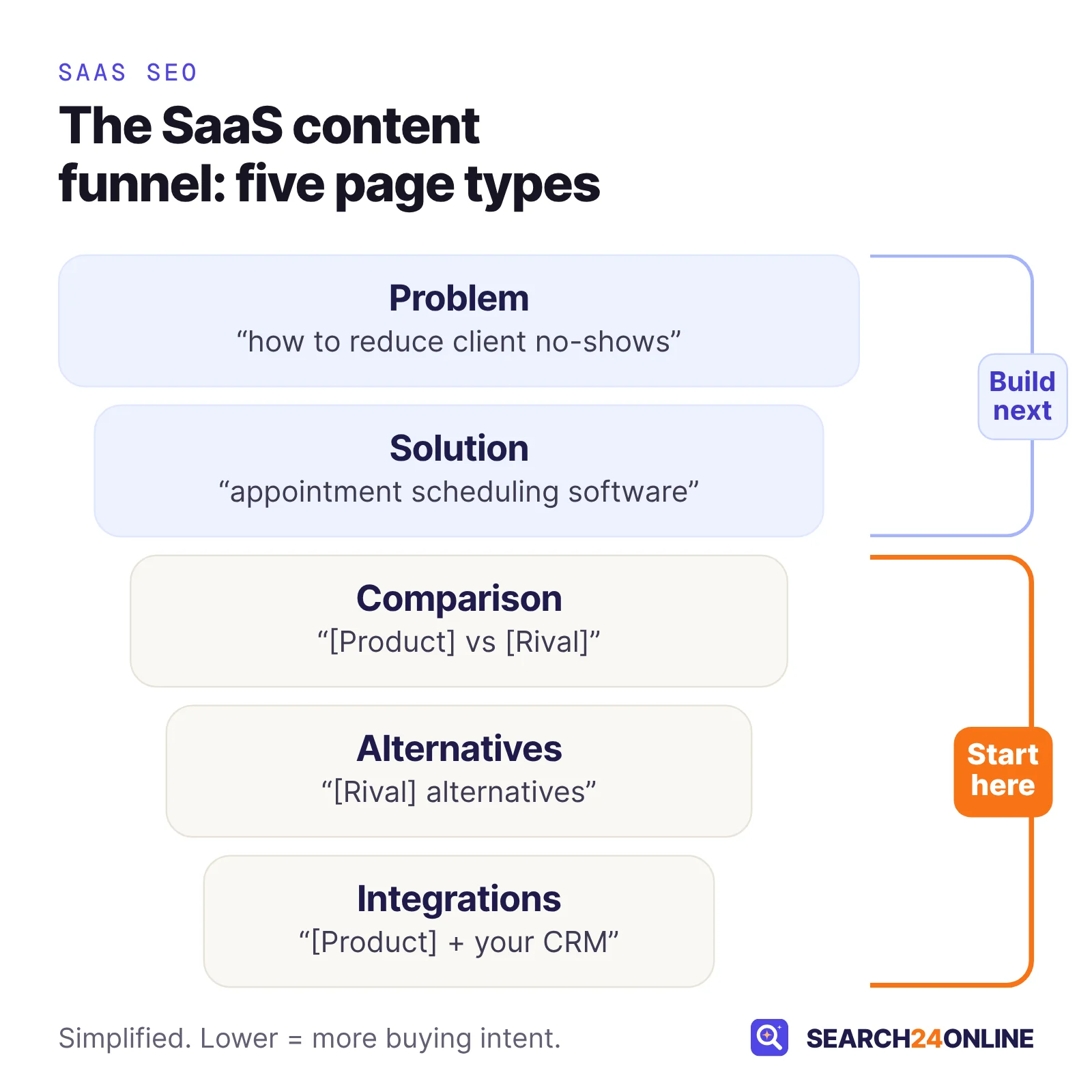
Here is how the stages look for an invented company that sells appointment scheduling software to service businesses.
| Stage | Example search | Page to build | What success looks like |
|---|---|---|---|
| Problem | “how to reduce client no-shows” | A guide that solves the problem, with your product as one way to do it | Template downloads, newsletter signups, assisted trials |
| Solution | “scheduling software for physical therapists” | Category or use-case landing page | Trials and demo requests |
| Comparison | “[your product] vs [rival]” | An honest head-to-head page | Trials and demo requests |
| Alternatives | “[rival] alternatives” | A fair list of options that includes you | Trials from people ready to switch |
| Integrations | “[your product] [CRM name] integration” | One page per integration with setup steps | Trials and activation of existing users |
Why build from the bottom up?
A young product rarely wins a head term like “scheduling software”; it is up against marketplaces and vendors with years of links. It can win “[smaller rival] alternatives” or “[your product] vs [rival]” much sooner, because few sites answer those well. Our view: five strong bottom-of-funnel pages usually do more for pipeline than fifty broad blog posts.
Where do the right queries come from?
Keyword tools are a weak starting point because the best software queries often show little or no volume. Better sources: rivals your sales team hears about on calls, lost-deal notes, support tickets, and Search Console queries containing “vs”, “alternative”, “integration” or “pricing”. Assign one primary query per page, and merge pages that compete for the same one.
What is product-led content, and how do you write it?
Product-led content is content where your product is the natural way to finish the task the reader searched for. It shows the real workflow, settings and result, rather than a generic article with a sign-up button bolted on.
Take “how to reduce client no-shows”. A generic post lists reminders, deposits and cancellation policies, like every other result. A product-led version shows the reminder schedule and message templates inside your tool, with screenshots. It offers a cancellation-policy template, and admits a calendar app can do a basic version. Everyone learns something; readers with the problem at scale see the shortcut.
This is also what Google asks for. Its AI optimization guide favors non-commodity content that “provides unique expert or experienced takes that go beyond common knowledge and the ordinary,” over generic listicles. Software companies have plenty: what support fixes every week, how customers configure the product, and anonymized usage patterns (where your privacy terms allow).
Before publishing, ask whether a competitor could run the same page by swapping in their logo. If they could, it is commodity content. Add the screenshots, settings, numbers or judgment only your team has.
Apply the same honesty to old blog archives: consolidate overlapping posts, update the ones that fit your product, and stop commissioning posts that only feed a traffic chart.
How do you write comparison and alternatives pages that stay honest?
Name the competitor, compare on clearly stated criteria, say where the rival is the better fit, date the facts you checked and support every claim. Buyers expect a vendor to favor itself; they stop trusting one that fakes neutrality or gets a rival’s pricing wrong.
Naming rivals is not off limits in the US. The Federal Trade Commission’s 1979 policy statement on comparative advertising “encourages the naming of, or reference to competitors.” It expects clear comparisons and claims that are “truthful and not deceptive.” Google’s guidance on writing reviews sets a useful editorial bar: “discuss the benefits and drawbacks” from your own research, and explain “which might be best for certain uses or circumstances.” Google wrote that for reviews; we apply it to vendor comparisons because buyers read them the same way.
- Say who is writingMake it obvious your company published the page. “Independent review” framing undermines everything else on it.
- Compare what buyers actually weighPricing model, setup time, integrations, limits, support and who each product suits. Skip criteria chosen only because you win them.
- Verify and date the rival’s factsCheck their public pricing, docs and changelog. Add a line such as “Competitor details checked October 2026.”
- Say when the rival is the better choiceOne honest paragraph on who should pick the other product earns more trust than a table of green ticks.
- Re-check every quarterAnd whenever a rival changes pricing. A stale comparison is a false one.
Alternatives pages follow the same rules: several real options, including you, with a sentence on who each suits. Don’t invent scores or rank yourself first for every type of buyer; review sites will contradict a one-sided page.
Competitor trademarks in titles, pricing claims and performance comparisons can carry legal risk. Have counsel review comparison pages before launch, especially if you make measurable claims about a rival.
How do docs and help-center pages help SEO?
Docs answer the most specific questions buyers and users type: whether the product supports single sign-on, how to connect it to a CRM, what the API rate limit is. Those searches carry high intent, and the answers are what AI assistants need when asked whether a tool can do something. But docs only help if search engines can crawl and index them.
What we usually find in software docs
- Docs that Google can’t read. The help center runs on a third-party platform that renders articles with JavaScript, sits behind a login, or ships with a noindex setting nobody changed.
- Every version indexed. Version 1, 2 and 3 of the same page compete with each other, and an outdated version ranks.
- No links between docs and the marketing site. Feature pages don’t link to the setup guide, and the setup guide doesn’t link back.
- Answers locked in videos or PDFs. A walkthrough video with no text version gives search engines and assistants little to quote.
How to fix it
Run a sample of help articles through Search Console’s URL Inspection tool and check the rendered HTML, as Google’s JavaScript guide suggests. For versioned docs, point older versions to the current page with a canonical tag. Google calls rel="canonical" “a strong signal” (redirects are strong too; sitemaps are weak). It warns against robots.txt for this job, since Google “may still index URLs that are disallowed in robots.txt.”
Then connect the two halves of the site: feature pages link to setup guides, and guides link back to features and related integrations. Write one question per article, answer it in the first paragraph and show a “last updated” date. For writing passages that assistants can lift cleanly, see how to write content AI assistants want to quote.
When do programmatic pages cross into scaled content abuse?
Programmatic pages cross the line when they exist mainly to catch search variations rather than to give each visitor something distinct. Templates are not the problem: integration directories, template galleries and industry pages can be a SaaS site’s most useful pages when each carries real information of its own.
Google’s spam policies say “scaled content abuse is when many pages are generated for the primary purpose of manipulating search rankings,” however they were made. One listed example is using generative AI to create many pages “without adding value for users.” Doorway abuse covers pages “created to rank for specific, similar search queries.” It is far cheaper to get scaled content abuse right before you publish thousands of pages than to clean it up afterward. Our plain-English guide to Google’s spam policies covers the rest.
| Scaled and thin | Done right | |
|---|---|---|
| Integration pages | The same paragraph with the partner’s name swapped in | What syncs, which direction, setup steps, limits and a screenshot for that partner |
| Template pages | A title, 80 words and a sign-up wall | A usable preview, how to adapt it and when not to use it |
| Industry pages | “Scheduling software for [industry]” with the word changed | Workflows, settings and requirements that genuinely differ by industry |
| Launch | Thousands of pages at once | A batch, then checking indexing and conversions before expanding |
| Thin variants | Indexed anyway | Kept out of the index (noindex) until they have their own data |
Our working rule: if you can’t write three sentences for a page that would be false on its sibling, it shouldn’t be a separate indexable page. If AI helps you draft at scale, Google’s generative AI guidance says to fact-check everything manually before publishing, including titles, meta descriptions, structured data and alt text.
Which technical problems hold SaaS sites back?
The recurring ones: content that only appears after JavaScript runs, a site split across subdomains nobody monitors together, and app or staging pages leaking into search. Each is easy to check, and often missed because marketing, docs and engineering each own a different piece. Our technical SEO checklist covers the general audit; these are the software-specific parts.
JavaScript rendering
Google processes JavaScript apps in three phases: crawling, rendering and indexing. Pages wait in a queue to be rendered by a headless Chromium browser when Google’s resources allow; its documentation says a page may stay in that queue for a few seconds, or longer. Google still recommends server-side rendering or pre-rendering, partly because “not all bots can run JavaScript.”
The same documentation lists the mistakes we find most in single-page apps. Use the History API for routing, not #/fragment URLs. Make links real <a href> elements. And never ship noindex in the initial HTML expecting JavaScript to remove it, because Google may skip rendering when it sees noindex.
AI crawlers raise the stakes. A December 2024 study by Vercel and MERJ of traffic on Vercel’s network concluded that “none of the major AI crawlers currently render JavaScript,” including OpenAI’s, Anthropic’s and Perplexity’s. Gemini was the exception, because it uses Googlebot’s infrastructure. The study is almost two years old and covers one network, so treat it as a warning, not a rule. The safe design is the same either way: pricing, features, integrations and docs in the HTML the server sends. Test by loading the page with JavaScript turned off.
Subdomains or subfolders?
Google’s position is that this is a business decision. Its SEO Starter Guide lists the question under “Things we believe you shouldn’t focus on”. It says: “From a business point of view, do whatever makes sense for your business.” Subdirectories may be easier to manage, it adds, while subdomains can make sense depending on the site’s topic or industry.
Many SEO practitioners still prefer subfolders and cite cases where moving a blog into one was followed by gains. Those are anecdotes; migrations change content, templates and links at once, so cause and effect are hard to separate. Our view: put the blog and docs in subfolders when your platforms allow it, because one site is simpler to link, crawl and report on. Apps, logins and status pages on subdomains are normal. Don’t migrate only for this; a migration carries its own risks.
Whatever you choose, monitor everything in one place. A Search Console Domain property “includes all subdomains,” while a URL-prefix property for www does not cover docs or blog subdomains.
App, login and staging pages
Login screens, in-app URLs and staging copies of the marketing site turn up in search results more often than teams expect. Blocking them in robots.txt is not enough, since Google can index blocked URLs without their content. Use a noindex tag on pages that must stay public, and password protection on staging.
How do software companies get recommended by AI assistants?
By being easy to find, read and verify in the sources assistants search: your pages and docs, review marketplaces and third-party comparisons. All of them should say the same clear things about who the product is for, what it costs and what it connects to. This is GEO (generative engine optimization) applied to software.
G2 surveyed 1,076 B2B software buyers and decision-makers in March 2026 and published the results in April. Its 2025 report put the share starting with a chatbot at 29%, though the article does not say whether the two surveys used the same method. G2 runs a software review marketplace and benefits from this story, so read the figures as directional.
Google says there is nothing exotic to do for its own AI features. Its AI optimization guide calls optimizing for generative AI search “still SEO”, says Google Search doesn’t use llms.txt files and needs no special schema, and warns that chasing inauthentic mentions isn’t as helpful as it might seem. A supporting link in AI Overviews or AI Mode must be indexed and eligible to show with a snippet. These features may use query fan-out, running several related searches; for software, those can touch pricing, integrations and alternatives.
What helps software products specifically
- A one-sentence answer to “who is it for?” on the homepage and key pages, using the category words buyers use.
- Pricing in plain HTML. An assistant asked for tools under a budget can only include you if your pricing model and starting price are readable.
- Integration lists as text, not logo images. A row of logos tells a crawler very little.
- Consistent facts everywhere. Your site, review profiles and partner listings should describe the same category, plans and integrations.
- Crawler access. Check that your robots.txt and CDN settings let the AI search crawlers you want reach your pages; our guide to AI crawlers explains which is which.
Then measure it. Pick 20 to 30 real buyer questions, such as “best scheduling software for a two-person physical therapy practice”, and record monthly whether you are mentioned, cited and described accurately. Our guide to tracking AI visibility shows how to set that up.
Which metrics show SaaS SEO is working, and where should you start?
Track organic signups, demo requests and the pipeline and revenue they become, grouped by page type, and treat rankings and traffic as early signals. A thousand visits to a problem guide and ten to a comparison page can produce the same number of trials; only conversion tracking tells you.
Three layers of measurement
- Leading signals: Search Console impressions and clicks for bottom-of-funnel queries, by page type (Google counts AI Overviews and AI Mode traffic in the Performance report under the Web search type), plus your monthly AI visibility checks.
- Conversions: trial or freemium signups for self-serve products, demo requests for sales-led ones, recorded against the landing page that started the session. Our guide to seeing AI assistant traffic in GA4 covers the referral side.
- Business results: organic signups that activate, demo requests that become qualified opportunities, organic pipeline value and closed revenue. This needs your CRM, not just analytics.
Attribution will be imperfect. Buyers read a comparison page, ask an assistant, return weeks later by typing your brand name, and book a demo. A free-text “How did you hear about us?” field on the demo form catches some of what analytics misses. Our guide to measuring SEO ROI walks through turning these numbers into a return, and the B2B SEO guide covers judging lead quality for longer sales cycles.
Where to start: the first 90 days
- Make the money pages indexablePricing, feature, integration and top docs pages: rendered, indexed, canonical and linked from the main navigation.
- Fix cannibalizationGive each feature and category page one primary query and merge or re-target pages that compete.
- Build five to ten bottom-of-funnel pagesYour most-requested comparisons, one alternatives page per main rival and your top integrations.
- Wire up conversion trackingSignups and demo requests by landing page and page type, with CRM stages attached.
- Then move up the funnelCategory pages next, then product-led guides for the problems your best customers had before they found you.
For a starting list, our free SEO + GEO report analyzes your website’s indexability and canonicals, which AI crawlers can read it and whether content is visible without JavaScript. Every issue is ranked from critical to low, with how to fix it.
Common questions
How long does SaaS SEO take to produce signups?
There is no fixed timeline, and nobody can promise one. In our experience, comparison, alternatives and integration pages tend to produce signups sooner than broad category pages, because fewer strong sites compete for those searches and the searchers are closer to buying.
Should a SaaS blog chase high-volume top-of-funnel keywords?
Only when the topic connects to a problem your product solves. A popular post read by people who will never need your software adds traffic but not pipeline. Build bottom-of-funnel pages first, then problem-led guides where your product is a natural part of the answer.
Is it legal to name competitors on a comparison page?
In the US, generally yes, if the comparison is truthful and not misleading. The FTC’s 1979 policy statement encourages naming competitors when the basis of comparison is clear. Trademark use and specific claims still carry risk, so have counsel review comparison pages before they go live. This is not legal advice.
Should SaaS documentation live on a subdomain or a subfolder?
Google says either can work and calls it a business decision. We prefer a subfolder when your docs platform supports it, because one site is simpler to link, crawl and measure, but a well-linked, crawlable subdomain is far better than a subfolder that Google cannot render.
Do software companies need llms.txt to show up in AI answers?
Not for Google. Google’s AI optimization guide says Google Search does not use llms.txt files and that no special markup is needed for AI features. What helps is the same work as SEO: crawlable pages, clear facts about pricing, integrations and fit, and content that goes beyond common knowledge.
Sources
- Google Search Central: SEO Starter Guide (subdomains versus subdirectories)
- Google Search Central: Understand the JavaScript SEO basics
- Google Search Central: Spam policies for Google web search (scaled content abuse, doorway abuse)
- Google Search Central: Guidance on using generative AI content on your website
- Google Search Central: Write high quality reviews
- Google Search Central: AI optimization guide
- Google Search Central: AI features and your website
- Google Search Central: How to specify a canonical URL with rel="canonical" and other methods
- Search Console Help: Add a website property (Domain and URL-prefix properties)
- Federal Trade Commission: Statement of Policy Regarding Comparative Advertising (1979)
- G2 (April 15, 2026): In the Answer Economy, Don’t Win the Click — Win the Answer
- Vercel and MERJ (December 17, 2024): The rise of the AI crawler
Can Google and AI assistants read your product pages and docs? Find out free.
We’ll analyze your website, create your SEO + GEO report and give you password-protected dashboard access to view it.
Free · No obligation · We only review your public pages.