
SEO for Manufacturers and Industrial Companies: Getting Found by Engineers and Buyers
Engineers and procurement teams shortlist suppliers by searching for processes, materials, tolerances and part numbers long before they send an RFQ. Here is how to build a site that answers those searches, based on current research into how technical buyers work and on Google’s own documentation.
Key takeaways
- Manufacturing SEO makes your capabilities, specifications and documents findable for the spec-driven searches engineers run before contacting anyone. The 2026 State of Marketing to Engineers report found that 62% of the buying process happens online before technical buyers engage with sales.
- Search engines remain the main research tool: 77% of technical buyers named traditional search engines as their most-used search tool and 8% named generative AI, although 69% used generative AI at some point in the purchasing process.
- Specific pages win: one capability page per process with tolerances, materials and certifications in HTML text, and an HTML page for each key datasheet and CAD file, because Google’s list of indexable file types includes PDF but no CAD formats.
- Measure RFQs and orders, not visits. GA4’s recommended generate_lead, qualify_lead and close_convert_lead events let you follow an organic visit through to a purchase order.
On this page
How do engineers and procurement teams search for suppliers?
They search by specification, and they do most of the evaluation before they talk to you. The 2026 State of Marketing to Engineers report by TREW Marketing, GlobalSpec and Elektor surveyed more than 1,000 engineers and technical professionals worldwide. It found that 62% of the buying process happens online before technical buyers engage with sales.
Online technical publications (76%) and supplier websites (74%) are the sources technical buyers use routinely. When they finally make contact, the most common trigger is a question about pricing or inventory (26%), followed by wanting to validate what they found online (23%). So your website is not a brochure that persuades people to call; it is the evaluation material. A tolerance, certification scope or lead time a buyer can’t find becomes either a question in their first email or a reason to shortlist someone else.
What spec-driven queries look like
A design engineer rarely types “machine shop”. She types something closer to “swiss turning 316L medical ±0.0005”, “AS9100 sheet metal fabrication Ohio” or a competitor’s part number plus “equivalent”. Those are illustrations, but in our experience Search Console query reports for industrial sites are full of long, specific strings like them, each searched a handful of times a month.
| Query element | Example | Where your site answers it |
|---|---|---|
| Process | 5-axis machining, fiber laser cutting | One capability page per process |
| Material | 316L, 6061-T6, PEEK, Inconel 718 | Material lists on capability pages |
| Tolerance or spec | ±0.0005 in, Ra 16 finish, IP67 | Capability and spec tables, in numbers |
| Certification | AS9100, ISO 13485, ITAR registered | Quality and capability pages, with scope |
| Industry or application | Surgical instruments, hydraulic manifolds | Industry and application pages |
| Part number | Your series numbers, cross-references | Product pages and ordering-code tables |
Keyword tools often show zero volume for these phrases, which is the trap: one qualified RFQ for a production part can be worth more than thousands of visits to a generic article. Our view: build your keyword list from your last 50 RFQs and the questions your applications engineers answer, then use tools to fill gaps. Our guide to B2B SEO that produces leads rather than traffic covers the wider strategy; this article stays with what is specific to manufacturing.
What should a manufacturing capability page include?
One process per page, described in numbers an engineer can check against a drawing. Within a minute, a buyer should know whether you can make the part: size envelope, tolerances, materials, finishes, volumes, certifications and how to send a drawing.
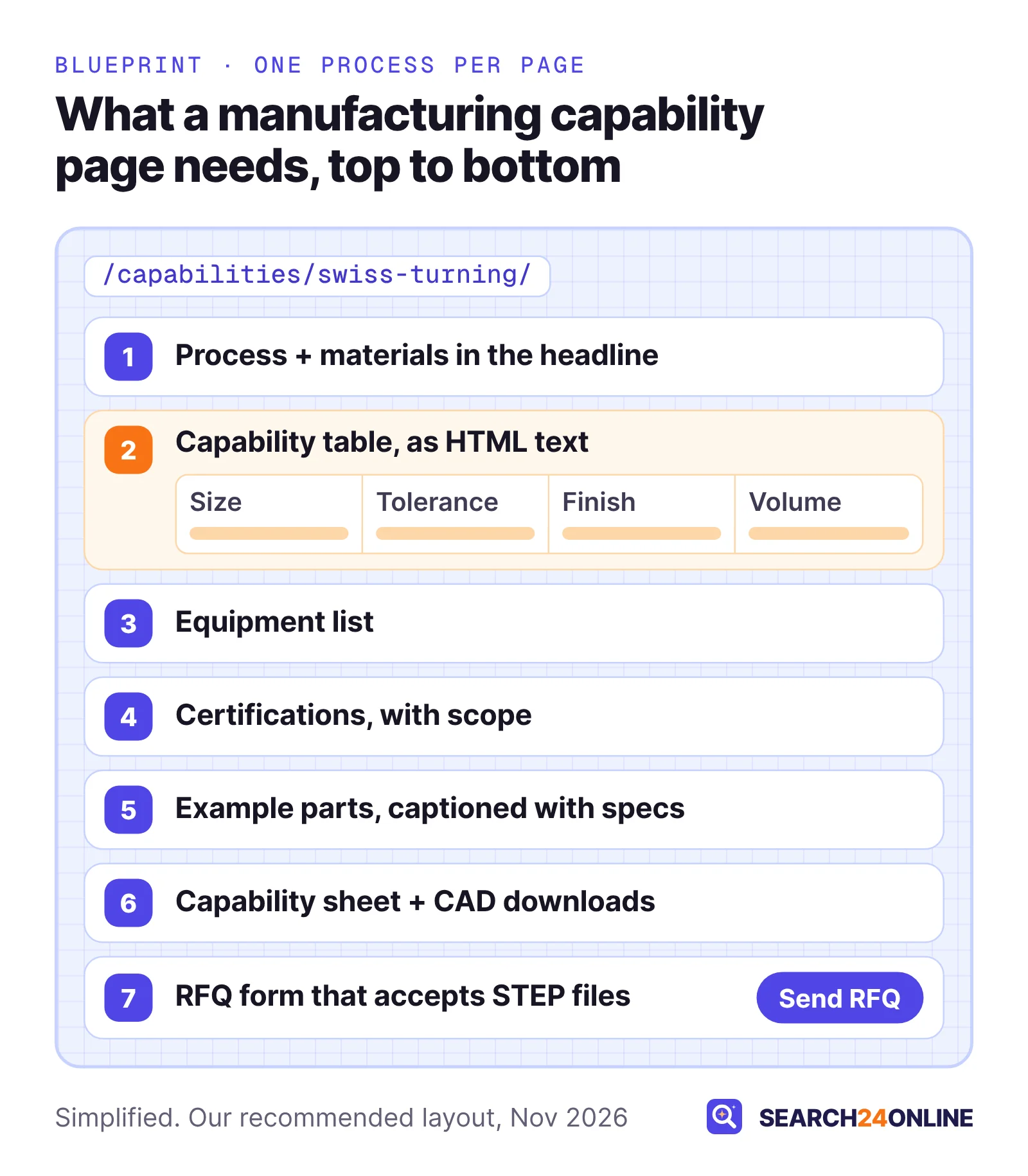
- A headline naming the process and its strengths“CNC Swiss Turning for Stainless Steel and Titanium Medical Components” says far more than “Precision Machining Services”. Follow it with a two-sentence summary of what you make, for whom, in what size and volume range.
- A capability table in HTML textEnvelope, typical and best tolerances, finishes, materials, secondary operations, volume range and lead time. Not an image, and not only a PDF.
- EquipmentMachine types, axes and counts. Engineers use it to judge whether your stated capability is believable.
- Quality and certificationsEach certification with its scope, inspection equipment such as CMMs, and the paperwork you supply, such as first article inspection reports.
- Example partsPhotos captioned with material, tolerance and industry. Customer names are not needed.
- Downloads and the RFQA capability sheet, design guidelines, and an RFQ form that accepts STEP files, offers an NDA and says when you reply.
“Tight tolerances” and “quick turnaround” match no search and answer no question. “±0.0002 in on diameters up to 1.25 in” and “prototypes in 5 to 7 working days” do both. Use your real figures.
The audit finding we see most often: a contract manufacturer has one “Capabilities” page listing fourteen processes as bullets, and a homepage that also targets “precision machining”. The two compete for the same searches (keyword cannibalization), and neither has the detail to answer “5-axis machining Inconel”. The fix is a capabilities hub linking to one substantial page per process, with the homepage left to the company name and broadest offer.
How should product and spec pages work for engineers?
Every product or model family needs its own indexable URL with the specifications as HTML text. When specs live only in a PDF, an image of a table or a JavaScript configurator, search engines and AI assistants have little on the page to match against a buyer’s query.
Include the full spec table with units (metric and imperial if your buyers use both), part numbers in plain text, the standards met, such as UL listings or IP ratings, compatible accessories and drawings. Add a short paragraph above the table saying what the product is for, so the page makes sense to someone arriving from search.
Part numbers, configurators and discontinued items
Engineers search exact part numbers, including old ones. If products are built from ordering codes, publish a model-family page with an ordering-code table that explains each character and lists base part numbers in text; the thousands of configurator combinations rarely deserve their own URLs. Our view on discontinued products: when a replacement exists, keep the old number findable with a “replaced by” notice or a redirect, because maintenance engineers search for the number printed on the failed part.
Structured data for quote-only products
Google’s product snippet documentation requires a product name plus one of review, aggregateRating or offers. Many industrial products are sold by quote with no public price or reviews, so those pages may not qualify for product rich results. Don’t invent a price or rating to get them; markup must describe what the page visibly shows. Our schema markup guide covers which types are worth adding.
How do you make datasheets, PDFs and CAD files findable?
Give every important download an HTML page that describes it, and treat the file as an attachment. Google’s list of indexable file types includes PDF, Word, Excel and PowerPoint, but names no CAD formats, so a STEP, IGES or DWG file can’t be found through its contents. The words on the page around it do all the work.
Make the PDF itself readable
- Export from the source file. Google describes PDFs as files that need a parser to extract the human-readable text. A scan is a picture of text; an exported PDF contains real text.
- Name files for people. “series-400-pump-datasheet.pdf” beats “DS_0412_rev3_final.pdf”. Fill in the title in the file properties too.
- Put a way back inside the file. A visitor landing on a PDF from search sees no menu. Print the product page URL, revision date and a contact line on page one.
- Keep one current version at a stable URL, so links and rankings carry over when rev 3 becomes rev 4.
Choose which version appears in search
When an HTML page and a PDF carry the same specs, they compete, and in our experience the HTML page is the better result because it has navigation and an RFQ button. PDFs can’t carry meta tags, so Google’s documentation uses HTTP headers instead. An X-Robots-Tag header with noindex keeps a file out of the index. A rel=“canonical” HTTP header can name the preferred URL for non-HTML documents such as PDFs. Pick one of the two per file. On an Apache server, a canonical header looks like this:
<Files "series-400-pump-datasheet.pdf">
  Header set Link "<https://www.example.com/products/series-400-pump/>; rel=\"canonical\""
</Files>
If a datasheet has no HTML equivalent yet, leave it indexable and make its first page work as a landing page.
Should you gate CAD files and datasheets?
Mostly no. The 2026 State of Marketing to Engineers report found that 85% of technical buyers will share their details for technical content they value. But only 34% said a CAD drawing would get them to fill in a form, behind ebooks and guides (47%) and white papers (37%), and 15% never fill in a form for content. Our view: keep datasheets and standard CAD models open, track downloads as events and save forms for in-depth design guides. Content behind a form is also content search engines can’t read.
Do industry and application pages help manufacturers get found?
Yes, when each says something the others can’t. Engineers often search with the end use in mind: “medical device contract machining” or “food-grade stainless conveyor”. An industry page connects your capabilities to the standards, documents and part types that industry expects. An application page starts from the problem, for example machining hydraulic manifolds: cross-drilled ports, burr control, pressure testing and the documents shipped with each lot.
Ten industry pages sharing one paragraph with only “aerospace” swapped for “medical” are thin, near-duplicate content. A test: if you can’t list three facts unique to that industry, such as a standard, a part type and a process step, don’t publish the page yet.
Link the page types to each other: capabilities to the industries they serve, industries to the capabilities and products involved, products back to the processes that make them. In audits we often find industrial sites where these pages exist but never link to one another, which leaves search engines guessing which page answers which search. Certifications, plant locations and company facts should also read the same on your site and external profiles; our guide to entity SEO explains why that consistency helps Google and AI assistants recognize your business.
Are Thomasnet and other industrial directories still worth it?
Usually yes for a complete free profile; paid placement depends on your category and the RFQs it produces. Directories reach buyers who search inside them and give third parties a consistent record of what you do.
Thomasnet is run by Thomas, a Xometry business. In January 2026, Thomas launched Smart Search, which lets buyers run complex, multi-capability searches in their own words, and Performance-Based Listings, where advertisers pay only for buyers who interact with their profiles. Xometry’s release says the platform connects buyers with more than 500,000 North American suppliers. Our view: natural-language search rewards what Google rewards: a profile that spells out specific processes, materials and certifications.
- Certification registries. IAQG’s OASIS database lists suppliers certified or registered to the 9100 series of aerospace quality standards and serves supplier selection. Make sure your entry matches your site.
- Trade association member directories, which buyers check for a vetted shortlist.
- Distributor sites carrying your products. Ask them to use current part data and link to the matching product page.
- A Google Business Profile for each plant, so name and location searches show accurate details.
Treat each profile like a short capability page, linking to the matching pages on your site. For paid listings, ask for RFQ counts rather than impressions, tag links with UTM parameters (labels that tell analytics where a visit came from) and review after a fixed trial. We found no independent figures on directory traffic, so your own RFQ data is the judge.
How do you handle technical SEO for a large industrial catalog?
Control which URLs get crawled, make sure the important ones are indexed and keep each product at one stable address. Google’s crawl budget guide targets sites with roughly 1 million or more unique pages changing about weekly, or 10,000 or more changing daily. Most manufacturers are smaller; their trouble usually comes from filters and duplicates.
Faceted navigation
Filters for material, thread size or voltage can turn a 3,000-product catalog into millions of URL combinations. Google warns that crawlers may request a very large number of these before recognizing them as useless, which slows discovery of new pages. If you don’t need filtered URLs indexed, block the filter parameters in robots.txt. If you do, use the standard “&” separator, keep filters in a consistent order and return a real 404 for combinations with no results.
Our view: turn the few filter combinations that match real searches, such as stainless steel hex bolts, into proper category pages with their own introduction, and keep the rest out of the crawl.
- One URL per product, whatever category path led to it.
- XML sitemaps with lastmod dates, kept current, as Google’s crawl budget guide recommends.
- No noindex as crawl control. Google still requests those pages before dropping them.
- 404 or 410 for products removed for good with no successor, and no long redirect chains.
- Specs visible without JavaScript, or at least present in the rendered HTML crawlers receive.
The costliest version of this problem is important pages that are not indexed. In audits we often find product pages reachable only through site search or a configurator, so no crawler finds them. Compare your sitemap’s URL count with the indexed count in Search Console’s Page indexing report, then inspect a sample. Our technical SEO checklist walks through each check.
How do you track RFQs from organic search?
Count RFQs and the orders they become, not sessions. A capability page with 40 visits a month can be your best source of production work, but you only see that if each RFQ carries its origin through to the sale.
- Fire a lead event on every RFQGA4 lists generate_lead as a recommended event for when a user “submits a form or a request for information”. Mark it as a key event and record the form type.
- Pass the source into the formHidden fields for landing page and source let your CRM show which page started each RFQ.
- Track downloads separatelyCAD and datasheet downloads are buying signals, not leads.
- Record what happens nextGA4’s qualify_lead and close_convert_lead events are meant for online and offline lead funnels such as B2B, and feed the Lead acquisition report. Send them when sales accepts an RFQ and when the purchase order arrives.
- Catch email contacts59% of technical buyers in the 2026 report prefer email for first vendor contact, so track email link clicks and ask “How did you find us?” on the form.
Review by quarter: a quote sent in March may become an order in September. AI assistants now send some of these visits; our guide to seeing ChatGPT and other AI traffic in GA4 shows how to separate them.
How are AI assistants changing supplier research?
AI tools are part of most technical buyers’ research now, but buyers check what the tools say. In the 2026 State of Marketing to Engineers report, 69% used generative AI during the purchasing process, and the share who never use it fell to 31% from 42% a year earlier. Their average trust in these tools was 4.7 out of 10, and only 10% rated generative AI very or extremely trustworthy as a content source, against 66% for engineering experts at a vendor company.
Seventy-five percent had noticed AI summaries at the top of search results; of those, 69% read the summary and kept looking, and only 6% said it is usually enough. Our reading: AI answers increasingly shape the shortlist, and your pages are where engineers verify it. Both depend on the same specific, crawlable facts.
Google says there are “no additional requirements to appear in AI Overviews or AI Mode, nor other special optimizations necessary”. A supporting link must be indexed and eligible to show with a snippet. These features may also use query fan-out, running several related searches to build one answer.
Picture a buyer asking who can hard-anodize 7075 aluminum to MIL-A-8625 Type III near Chicago. A fan-out could search the process, the specification and the location separately. A shop with a page per finishing process, the specification named in the text and certifications listed with scope matches several of those searches; one with “anodizing” in a bullet list matches one at best. Our explainer on how AI assistants choose the sources they cite covers the mechanics.
Search Console’s Generative AI performance report, rolled out to all websites as of August 31, 2026, shows impressions in AI Overviews and AI Mode by page. For ChatGPT, Perplexity and Copilot, ask your top supplier questions monthly and record who is named.
Where should a manufacturer start?
Start with the pages closest to an RFQ, fix whatever stops them being found, then widen. Our team brings over 20 years of digital marketing experience and has served 500+ brands, and with industrial companies the gap is rarely the product. It is capability details buried in PDFs, product pages that were never indexed and one page trying to rank for everything.
- Mine your RFQsList the processes, materials, specs, industries and part numbers in your last 50 RFQs.
- Check indexingConfirm capability, product family and datasheet pages are indexed in Search Console and Bing Webmaster Tools.
- Rebuild your top three capability pagesOne process each, following the blueprint above.
- Give your top 20 datasheets an HTML homeSpec table as text, a summary and the downloads.
- Align directory profilesMake Thomasnet, registries and association listings match your site.
- Set up RFQ trackingLead events, hidden source fields and CRM stages.
- Test AI answers monthlyAsk your top 20 supplier questions and note who gets cited.
To see where your site stands, our free SEO + GEO report analyzes your website, including indexability, canonicals, structured data, whether content is visible without JavaScript and which AI crawlers can read it, with password-protected dashboard access within 24 hours. For help with the rebuild and ongoing work, see our SEO + GEO services. No one can promise a ranking or a citation; you can make sure engineers find the numbers they need.
Common questions
How long does SEO take for a manufacturing company?
Expect months rather than weeks, and no one can promise a timeline. In our experience, pages that were never indexed can start appearing soon after a fix and a recrawl, while new capability pages usually need several months to rank steadily. Because industrial sales cycles are long, judge progress on RFQ quality over two or three quarters.
Should manufacturers gate datasheets and CAD files behind a form?
Keep datasheets open and gate only material worth a form fill. In the 2026 State of Marketing to Engineers survey, only 34% of technical buyers said a CAD drawing would get them to fill in a form, and 15% never fill in forms for content. Track downloads as events instead.
Is a Thomasnet listing a substitute for SEO?
No, the two do different jobs. A directory profile reaches buyers who search inside that directory, while SEO makes your own capability and product pages findable on Google, Bing and in AI answers. Most industrial companies benefit from both: a complete free profile linking to their matching pages, with any paid placement judged on RFQs.
Do industrial companies need a blog?
Not a news blog, but most need technical content. Design guides, material comparisons, tolerance explanations and application notes answer the questions engineers research before they shortlist suppliers, and they give AI assistants specific passages to cite. Company news and trade show recaps rarely earn search traffic on their own.
Should manufacturers publish prices on their website?
Publish what you can, even if it is only lead times, minimum order quantities or price ranges for standard items. Pricing and inventory questions were the most common reason technical buyers first contacted a vendor in the 2026 State of Marketing to Engineers report, at 26%, so any answer you give on the page removes a step from their evaluation.
Sources
- TREW Marketing, GlobalSpec and Elektor (2026): 2026 State of Marketing to Engineers
- Google Search Central: File types indexable by Google
- Google Search Central: How to specify a canonical URL with rel="canonical" and other methods
- Google Search Central: Robots meta tag, data-nosnippet and X-Robots-Tag specifications
- Google Search Central: Managing crawling of faceted navigation URLs
- Google Search Central: Large site owner’s guide to managing your crawl budget
- Google Search Central: Product snippet (Product, Review, Offer) structured data
- Google Search Central: AI features and your website
- Search Console Help: Generative AI performance report
- Google Analytics Help: Recommended events
- Xometry (January 15, 2026): Thomas launches new platform tools helping industrial buyers source the right suppliers
- IAQG: OASIS, the Online Aerospace Supplier Information System
Can engineers find your capabilities? Check your site free.
We’ll analyze your website, including indexability, structured data and whether your content is visible without JavaScript, create your SEO + GEO report and give you password-protected dashboard access to view it.
Free · No obligation · We only review your public pages.