
Local SEO: The Complete Guide for Small Businesses
How Google decides which nearby businesses to show, which tasks actually move each ranking factor, what breaks the rules, and a 90-day plan you can follow yourself or hand to someone else.
Key takeaways
- Local SEO is the work of appearing when nearby customers search for what you sell: in Google’s map results, the regular results below them and AI answers. Google says local results rest mainly on relevance, distance and prominence, and that there is no way to pay for a better local ranking.
- Distance is largely fixed by where you are. Relevance (an accurate, complete Business Profile and matching website pages) is the fastest lever; prominence (reviews, links and mentions across the web) takes months to build.
- Reviews are judged on count, recency and rating: BrightLocal’s 2026 survey of 1,002 US consumers found 47% won’t use a business with fewer than 20 reviews and 74% look for reviews written in the last three months.
- AI is now a real local discovery channel: 45% of consumers in the same survey used ChatGPT or other AI tools for local recommendations, up from 6% a year earlier. Google says its AI Overviews and AI Mode need no special optimizations.
On this page
What is local SEO, and where do local results appear?
Local SEO is everything that helps a business show up when people nearby search for what it sells: “emergency plumber,” “dentist near me,” “best tacos in Fresno.” Two things set it apart. Results change with the searcher’s location, and much of what Google shows comes from your Google Business Profile (the free listing behind your map pin), not your website.
Local customers find you in four places, and the same groundwork feeds all of them:
- The map pack, the block of listings with a map near the top of many local searches, built from Business Profiles (see how to rank in the map pack).
- Google Maps, including Ask Maps, the conversational feature Google launched in March 2026.
- Local organic results, the regular links below the map, where your website’s service and location pages compete.
- AI answers: Google’s AI Overviews and AI Mode, plus assistants such as ChatGPT.
The mix is shifting. BrightLocal’s Local Consumer Review Survey 2026, published in February and based on 1,002 US adults, found that 71% of consumers used Google for local business recommendations, down from 83% in 2025. Use of ChatGPT and other generative AI tools rose from 6% to 45%, and Apple Maps from 14% to 27%. Google is still the biggest channel by far. Our view: don’t build a separate strategy for every new surface. Accurate facts, a strong profile, real reviews and useful pages travel to all of them.
How does Google decide which local businesses to show?
Google’s Business Profile help center names three main factors: relevance, distance and prominence. (Its summary line says “popularity” for the third, then heads the section “Prominence.”) It also says plainly: “There’s no way to request or pay for a better local ranking on Google.”
- Relevance is “how well a Business Profile matches what someone is searching for.” Google’s advice is to provide complete and detailed business information.
- Distance is “how far each business is from the customer who’s searching.” If the searcher doesn’t share a location, Google uses what it knows about where they are.
- Prominence “means how well-known a business is.” Google says it draws on information such as how many websites link to your business and how many reviews you have, and that more reviews and positive ratings can help your local ranking.
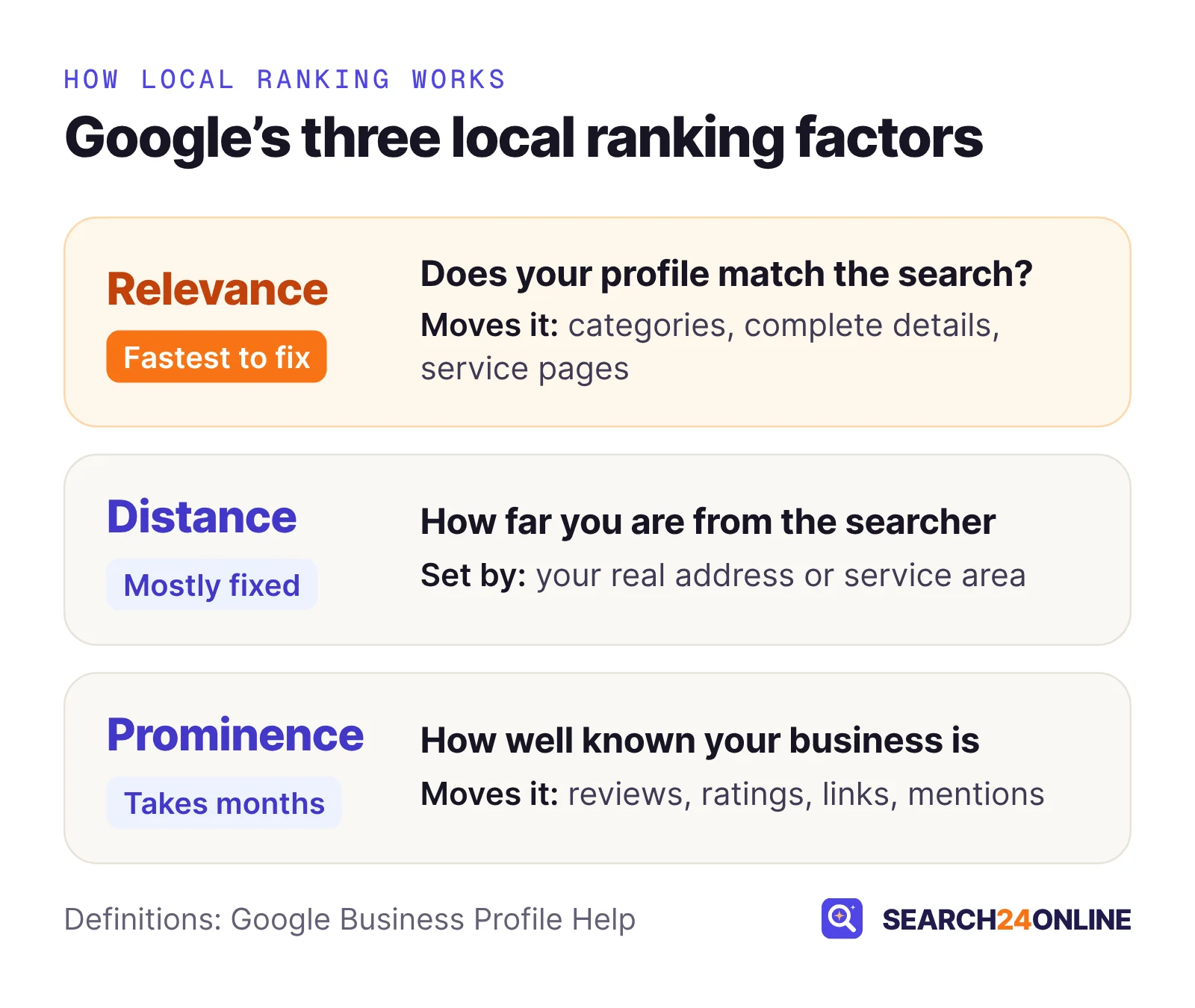
Distance is mostly decided by where you are, so your effort goes into the other two. Fixing a wrong category or a thin profile takes an afternoon; reviews, links and press mentions accumulate over months.
Whitespark’s 2026 Local Search Ranking Factors report, published November 6, 2025, asked 47 local SEO specialists to score 187 factors. Their map pack top five: primary Business Profile category, distance from the searcher, keywords in the business name, a physical address in the searched city, and being open at the time of the search. High star ratings came sixth and the number of Google reviews with text ninth. Review and behavioral signals gained weight compared with the previous edition.
Experts rank keywords in the business name highly, and you will see competitors doing it. Google’s guidelines prohibit adding location or service details to the name, and violations can lead to suspension. Use your real-world name and win on the factors you can defend.
One consequence of distance: what you see from your office is not what a customer sees five miles away, so a single rank check tells you little.
How do you set up a Google Business Profile that can rank?
Claim and verify it, then make every field accurate and complete within Google’s guidelines. Verification counts on its own: Google says confirming you’re authorized to represent the business makes it more likely to appear in results. The essentials, in the order we check them:
- Business nameExactly as it appears on your signage, stationery and website. Google says the name “should reflect your business’s real-world name” and bars taglines, phone numbers and location or service details.
- Primary categoryThe single choice experts rate most important. Google’s rule: “Use as few categories as possible,” chosen to describe what your business is, not everything it offers.
- Address or service areaA storefront shows its address. A service-area business with no premises customers visit (many plumbers, cleaners, mobile groomers) hides it and lists the areas it serves, which Google says shouldn’t extend farther than about two hours of driving time from your base.
- Hours, phone and websiteCustomer-facing hours, including holidays. A phone number under your direct control that reaches this location. A website link to the page for this location, not just your homepage, if you have several.
- Services, products, photos and videosGoogle’s ranking tips name photos and videos, and retailers in eligible regions can add in-store products. Real photos of your team and work beat stock images.
- Ongoing upkeepRespond to reviews, update hours before holidays, and check the live listing every month to confirm nothing has changed that you didn’t change.
P.O. boxes and mailboxes at remote locations aren’t acceptable, and a virtual office where you don’t actually operate isn’t eligible. A co-working space qualifies only with clear signage, in-person customer service during business hours and your own staff on site.
Category research, photos, attributes and duplicates are covered in our step-by-step guide to optimizing your Google Business Profile. Running several branches? Google’s guidelines allow one profile per location and require the same name across all locations in a country, with limited exceptions; see multi-location SEO.
How many reviews do you need, and how do you get them within the rules?
Aim for a steady flow of recent reviews, not a one-off burst: customers weigh count, recency and rating together. BrightLocal’s 2026 survey put numbers on each:
That last figure was 55% in 2025, and the share insisting on 4.5 stars or more rose from 17% to 31%. A business with 300 reviews, the newest from last spring, can lose the customer to one with 40 from the past two months. Reviews also feed Google’s prominence factor, so they serve rankings and conversions at once.
What the rules allow
Two sets of rules apply, and Google’s is the stricter. The FTC’s Consumer Reviews and Testimonials Rule took effect on October 21, 2024, and courts can impose civil penalties for knowing violations. Google’s policy goes further on incentives and on who you ask.
| Practice | Google Maps policy | FTC rule | What to do |
|---|---|---|---|
| Discount or gift for leaving a review | Prohibited for any review, positive or not | Allowed only if not tied to the review’s sentiment; undisclosed incentives can still breach the FTC Act | Offer nothing in exchange for Google reviews |
| Asking only happy customers | Prohibited (“selectively solicit positive reviews”) | Not banned by the rule itself, but the FTC says it may violate the FTC Act | Ask every customer the same way |
| Reviews from staff or owners | Prohibited as a conflict of interest, including former employees | Insider reviews must clearly disclose the relationship | Keep staff off your own listing |
| Pressuring critics | Discouraging or prohibiting negative reviews is not allowed | Suppression through threats, intimidation or false accusations is banned | Reply calmly and fix the problem |
How to get more of them
Ask every customer when the value is obvious: the job is finished, the appointment ends, the order arrives. A direct review link or QR code makes it easy. Build the request into the process (invoice email, follow-up text, a card at checkout) so it doesn’t rely on memory. BrightLocal found 78% of consumers were asked for a review in the past year, so asking is normal.
Then reply, especially to the critical ones. In the same survey, 89% said they expect owners to respond and half were put off by templated replies. Mention the specific job, fix what you can and keep it short. Our guide to getting more Google reviews without breaking the rules has request scripts and timing.
What does your website need to do for local SEO?
It needs a page that clearly matches each core service and each real location, indexed, fast on a phone and consistent with your profile. The website wins the regular results below the map, gives AI assistants something to quote and earns the links that feed prominence.
Service and location pages
Give each main service its own page that answers what a buyer actually asks: what’s included, rough price range or what drives the price, how fast you can come, which areas you cover, licenses and warranties. Give each physical location its own page with its address, phone, hours, directions and local details, and link that location’s Business Profile to it.
A common situation in our audits: a regional HVAC company with 40 service pages that all target “HVAC repair,” plus dozens of city pages that are the same text with the town name swapped. The pages compete with each other (cannibalization), none of them is clearly the best answer, and the city pages are thin. Merging overlapping pages and rewriting city pages around real local work (jobs done there, local permit rules, response times) does more, in our experience, than adding another 20 pages. If you serve areas without an office, our guide to ranking in cities where you don’t have an office covers how to build those pages properly.
Technical basics and structured data
The checks that matter most locally start with indexing: we often find location pages orphaned, with no internal links pointing at them. Then name, address and phone (NAP) identical to your profile, a tap-to-call number and fast mobile pages. Our technical SEO checklist walks through each.
Add LocalBusiness structured data, code that states your business details in a format search engines read reliably. Google requires only name and address and recommends telephone, url, opening hours and coordinates. A minimal example for one location:
<script type="application/ld+json">
{
  "@context": "https://schema.org",
  "@type": "Plumber",
  "name": "Example Plumbing Co.",
  "url": "https://www.example.com/fresno/",
  "telephone": "+1-559-555-0100",
  "address": {
    "@type": "PostalAddress",
    "streetAddress": "123 Main St",
    "addressLocality": "Fresno",
    "addressRegion": "CA",
    "postalCode": "93721"
  }
}
</script>
One trap: Google says the review and aggregate rating properties are for sites that collect reviews about other local businesses. Marking up your own testimonials to get stars in results is not what that markup is for. Our schema markup guide covers which types fit which business.
Do citations and local links still matter?
Yes, but for consistency and trust rather than volume. A citation is any mention of your business name, address and phone number on another site: directories, Yelp, the Better Business Bureau, your chamber of commerce, industry associations. Matching details confirm your facts to Google and AI systems; conflicting ones (an old address, a former phone number) create doubt.
In Whitespark’s 2026 edition, citations lost about half a percentage point of weight for the map pack. In the same report, though, 3 of the top 5 factors for AI search visibility were citation factors. That fits how assistants work: they cross-check facts across many sources, and directories are a big part of the web’s record of local businesses. Our guide to local citations lists which still matter and how to clean up old ones.
Start with listings that are discovery channels in their own right: Google, Bing Places and Apple Business, which replaced Apple Business Connect on April 14, 2026 (Apple Maps use rose to 27% in BrightLocal’s survey). Then add Facebook, Yelp and your industry’s leading directories. Most businesses skip the Bing and Apple ones; see Bing Places and Apple Business.
Local links
Google says prominence is based partly on how many websites link to your business. The best local links are real ones: a youth team or charity event you sponsor, trade association and chamber member pages, suppliers that list installers, local news coverage and genuine partners. In our experience, one link from your city’s newspaper does more than dozens from directories nobody visits. Avoid paid link packages; in audits, an unnatural backlink profile is one of the problems we most often have to clean up.
How do AI assistants answer local questions?
They draw on the same business data and web pages that classic local search uses, then summarize it. Google says there are “no additional requirements to appear in AI Overviews or AI Mode, nor other special optimizations necessary,” and lists keeping your Business Profile information up to date among the basics.
Google Maps now answers questions in conversation too. Ask Maps, announced March 12, 2026 for Android and iOS in the US and India, answers complex questions about places. Google says it draws on information about more than 300 million places and reviews from more than 500 million contributors, and personalizes answers using places you have searched for or saved.
Reviews matter more in AI answers, not less. BrightLocal found 82% of consumers read AI-generated review summaries and 23% would rely on the summary alone. Reviews that mention the service, the neighborhood and the outcome give those summaries better material than a page of “great service!”
Ask ChatGPT, Gemini and Google AI Mode the questions your customers ask (“best emergency electrician in [your town],” “is [your business] open Sundays?”). Wrong hours, an old address or a missing service usually trace back to a stale listing or a vague page you can fix.
Trust is split: 40% of BrightLocal’s respondents trust AI platforms for business recommendations, while 32% don’t. In our view, the practical response is the same work done more carefully: consistent facts everywhere, pages that state specifics an assistant can quote, and a steady flow of detailed reviews. Our guides to GEO and getting your business mentioned in ChatGPT go further.
How do you track local SEO results?
Track actions and leads first, rankings second. Your Business Profile’s Performance view shows interactions, calls, messages, bookings, direction requests, website clicks, views and the searches that led to your profile, with only the metrics that apply to your business displayed.
Read those numbers with their definitions in mind. Views count unique visitors, and Google says a person can only be counted once a day. Search data updates at the start of each month and can take up to five days to appear. You can also link your profile to Google Analytics 4, which shows interactions, calls, website clicks, directions, messages and bookings next to your website data. It only covers the last six months, and it combines all linked profiles, without filtering by location.
- Tag your profile’s website link with UTM parameters (labels added to the URL) so visits from your profile show up as their own source in analytics, separate from regular organic traffic.
- Use a rank grid for map positions. Rank-grid tools check your position from a grid of points across your area and color each point by rank. Because distance is a ranking factor, the grid shows where you fade out.
- Count real outcomes: calls, form submissions and booked jobs per month, by source. A ranking gain that doesn’t change these is a vanity metric.
More on reporting in what a monthly SEO report should include.
What does a 90-day local SEO plan look like?
Foundations in the first month, pages and reviews in the second, prominence and measurement in the third. Each phase builds on the one before, so resist skipping to links before the profile and pages are right.
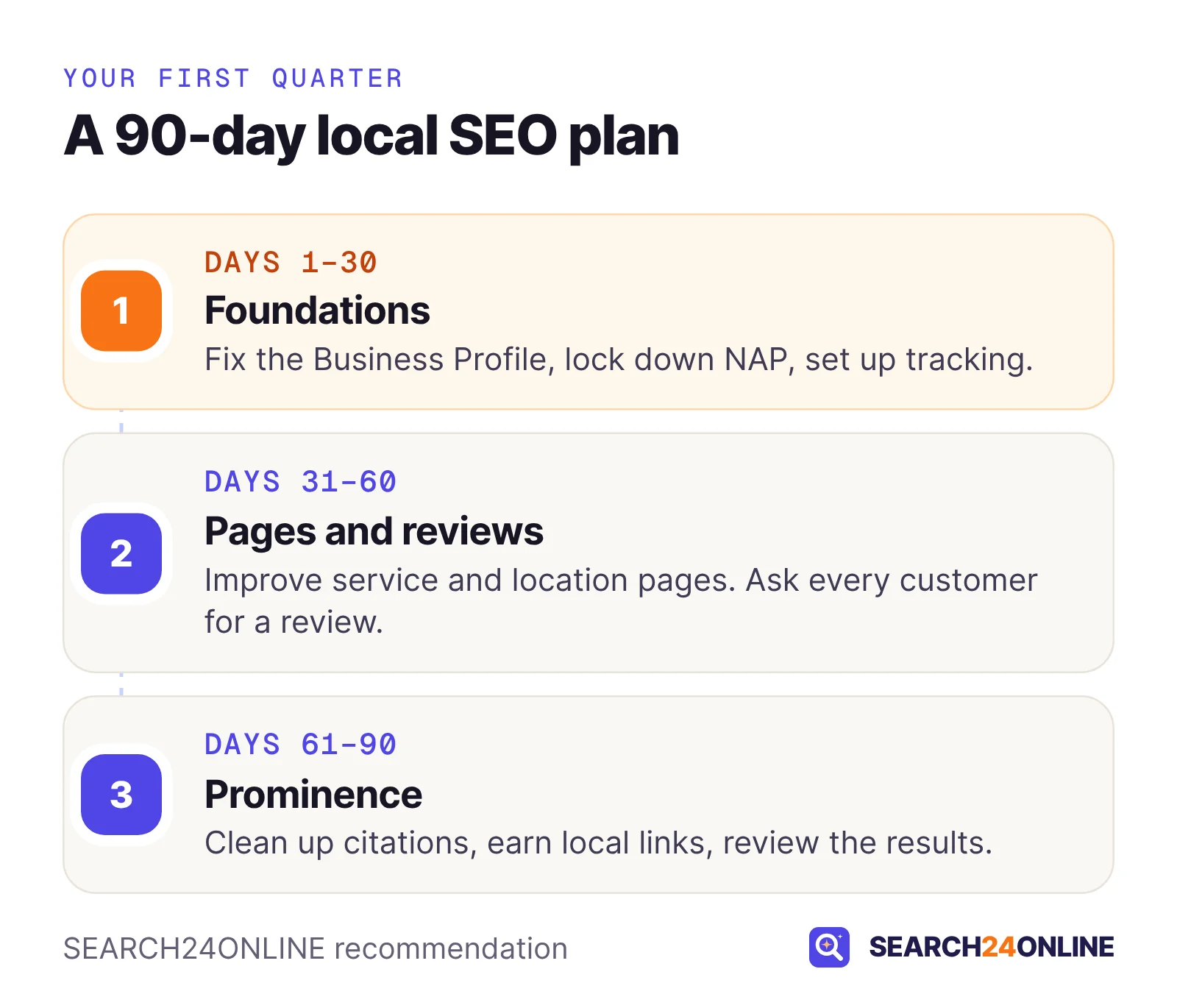
Days 1 to 30: foundations
- Audit and fix the profileVerify it, correct the name, primary category, hours, service area and website link, and add real photos.
- Lock down your NAPWrite down the exact name, address and phone format and use it on the website, the profile and every listing.
- Set up measurementNote a baseline from Performance, tag the profile link, run a first rank grid and start counting calls and leads by source.
Days 31 to 60: pages and reviews
- Fix the website basicsMake sure service and location pages are indexed and internally linked, add LocalBusiness markup and a tap-to-call number.
- Rewrite the key pagesMerge pages that compete for the same search, and rebuild location and service pages around specifics.
- Start the review habitAsk every customer, with a link or QR code built into your process, and reply to every review.
Days 61 to 90: prominence and review
- Clean up citationsClaim Bing Places and Apple Business, then correct the top directories for your industry.
- Earn three to five local linksAssociations, sponsorships, suppliers and partners you already have relationships with.
- Compare against the baselineRerun the rank grid, compare actions and leads, ask the AI assistants again, and set next quarter’s priorities.
Expect early signs in the first quarter, not a finished result. Reviews and links keep paying off as long as you keep at them. Nobody can promise a map pack position.
For a month-one starting point, our free SEO + GEO report analyzes your website: NAP, click-to-call, business schema, indexability and mobile page speed among other checks. Every issue is ranked from critical to low. If you would rather hand the plan over, our Starter plan covers Business Profile and Bing Places work and 10 citations a month.
Common questions
How long does local SEO take to work?
There is no fixed timeline: it depends on your competitors, your starting point and how far customers are from you. In our experience, Business Profile corrections are the quickest wins, while reviews, local links and new pages take months to change where you appear. Judge progress over a quarter, not a week.
Do I need a website if I already have a Google Business Profile?
Yes, if you want to compete beyond your own street. The profile drives map results, but the regular results below the map and most AI answers draw on web pages, and Google says prominence also reflects how many websites link to your business. A profile with no website to link to leaves both of those on the table.
Can I put my main keyword in my Google business name?
Only if the keyword is part of your real-world business name, as shown on your signage and paperwork. Google’s guidelines bar adding location or service details to the name, and violations can lead to suspension. Experts rate keywords in the name as a strong ranking factor, which is why it is tempting and why the risk is real.
Can I rank in a city where I do not have an office?
Yes, in the regular search results and AI answers, through service-area pages with genuinely local content, but it is much harder in the map pack because distance from the searcher is one of Google’s three main local factors. Google’s guidelines also say a service area should not extend farther than about two hours of driving time from your base. Virtual offices are not eligible for a profile.
How much does local SEO cost?
It ranges from a few hours of your own time each month to an agency retainer, depending on competition and how many locations you have. SEARCH24ONLINE’s Starter plan is $500 a month and includes Google Business Profile and Bing Places work plus 10 citations a month; details are on our pricing page.
Sources
- Google Business Profile Help: Tips to improve your local ranking on Google
- Google Business Profile Help: Guidelines for representing your business on Google
- Google Maps User Contributed Content Policy: Prohibited and restricted content
- Google Business Profile Help: Understand your Business Profile performance and insights
- Google Analytics Help: Connect Google Business Profile to Google Analytics
- Google Search Central: AI features and your website
- Google Search Central: Local business (LocalBusiness) structured data
- The Keyword (Google blog), March 12, 2026: Ask Maps and Immersive Navigation
- BrightLocal: Local Consumer Review Survey 2026
- Whitespark: 2026 Local Search Ranking Factors
- Apple Newsroom, March 24, 2026: Introducing Apple Business
- FTC: The Consumer Reviews and Testimonials Rule, Questions and Answers
See how your website’s local signals stack up — free.
We’ll analyze your website, including NAP, click-to-call and business schema, create your SEO + GEO report and give you password-protected dashboard access to view it.
Free · No obligation · We only review your public pages.