
SEO for Plumbers, HVAC and Home Services: How Trades Win the Call
A burst pipe and a furnace replacement are both “plumbing and HVAC searches”, but they are won in different places by different things. Here is how a trade business plans its service area, service pages, Business Profile, reviews, ads and tracking around that difference.
Key takeaways
- SEO for plumbers, HVAC companies, electricians and roofers means winning two kinds of search. Emergencies are decided in minutes in the map results and ads, by distance, opening hours and an answered phone. Planned jobs are decided over days on your website, by prices, proof and trust.
- Google’s guidelines say a service-area business should hide its address and set a service area of no more than about 2 hours’ driving, and its spam policies treat city pages that funnel visitors to one page as doorway abuse.
- Customers screen hard on reviews: in BrightLocal’s 2026 survey of 1,002 US adults, 68% said they only use businesses rated four stars or more, and 74% look for reviews from the last three months.
- Local Services Ads charge per lead, not per click, and rank on your bid, responsiveness and profile quality. They don’t touch your organic or map rankings, which Google says can’t be bought.
- The Business Profile “Calls” figure counts taps on the call button, not answered calls or booked jobs, so trades need call tracking to know which pages and searches actually pay.
On this page
What does SEO for plumbers, HVAC and other trades come down to?
It comes down to being the business a nearby homeowner can find, trust and reach at the moment they need you. In practice that means five things: an accurate Business Profile, one strong page per service, a defensible service area, recent reviews and real job photos, and call tracking that shows which of those produced booked work.
What makes trades different is the phone. An accountant can live with web forms; a plumber whose customer is standing in water cannot. Every decision below, from the categories you pick to the first screen of each service page, is tested against one question: does it make the right customer call sooner?
The general mechanics of local search are in our complete local SEO guide. This article covers what changes when the business drives to the customer.
How do emergency and planned searches differ?
Emergency searches are won in minutes by whoever is close, open and answering; planned searches are won over days by whoever explains the job, the price and the risk best. Most trade businesses need both, but they need different pages, different proof and different measurements for each.
| Emergency jobs | Planned jobs | |
|---|---|---|
| Typical searches | “burst pipe plumber”, “no heat tonight”, “power out half the house”, “roof leaking in storm” | “tankless water heater cost”, “heat pump vs furnace”, “200 amp panel upgrade”, “roof replacement financing” |
| Where the choice happens | Map results, ads and call buttons, often without visiting a website | Your service pages, cost guides, reviews and comparisons, often across several visits |
| What decides it | Distance, open now, star rating, someone picking up | Clear prices or price drivers, credentials, warranties, financing, proof of similar jobs |
| The page it needs | Short: what you fix, hours, response area, a tap-to-call button at the top | In depth: options, costs, process, timelines, brands and questions answered |
| What to measure | Answered calls and missed calls by hour | Estimate requests, booked consultations, closed jobs by value |
Expert opinion lines up with this split. Whitespark’s 2026 Local Search Ranking Factors survey asked 47 local search experts to rank 187 factors. For the map results, “business is open at time of search” came fifth, behind the primary category, proximity, keywords in the business name and an address in the city searched. That is opinion, not Google’s formula, but it matches what emergency searchers do: they call whoever is open.
The money usually sits on the planned side: a replacement system or a new roof is worth many service calls, and the customer researching it reads. In audits we often find the reverse investment: a polished emergency page and a thin, three-paragraph “installation” page that never mentions cost, options or how long the job takes.
How should a trade business handle its service area?
Set the service area honestly on your Business Profile, then earn visibility in each town with real local proof rather than copies of the same page. Google’s guidelines say a business that serves customers at their locations “should hide your business address from customers.” Its service area “shouldn’t extend farther than about 2 hours of driving time”, though larger areas can suit some businesses.
Hiding the address has a cost. Whitespark’s experts ranked “address is showing on GBP (not SAB)” seventh among map factors, and Google lists distance as one of its three local ranking factors. A service-area business will usually rank most easily near its base. Renting a virtual office to create a second address is not the fix; in our experience it is one of the quickest routes to a suspended profile.
City pages without doorway pages
Google’s spam policies define doorway abuse as pages “created to rank for specific, similar search queries”, and give as an example pages “targeted at specific regions or cities that funnel users to one page”. Forty pages reading “We offer expert roofing in [Town]” with the town name swapped are exactly that.
A town page earns its place when it holds facts that only apply there. Good material for trades:
- Jobs you have completed in that town, with photos and the problem you solved.
- Housing stock and local conditions: older homes with galvanized pipes, hard water, slab foundations, ice dams, hail exposure.
- Permit and inspection notes for that city or county, where they differ.
- Realistic response times from your shop, and whether emergency calls are covered there.
- Reviews from customers in that town, quoted with permission.
If you cannot fill a page with that, leave the town on your service-area list and your main service pages, and build the page later when you have jobs there. Our guide on how to rank in cities where you don’t have an office covers the full approach.
What should a home service page include?
One service per page, with the answer, the phone number and the proof all near the top. A page that tries to cover “plumbing services” in general ranks for nothing in particular; a page about water heater replacement can answer what it costs, how long it takes and which brands you install.
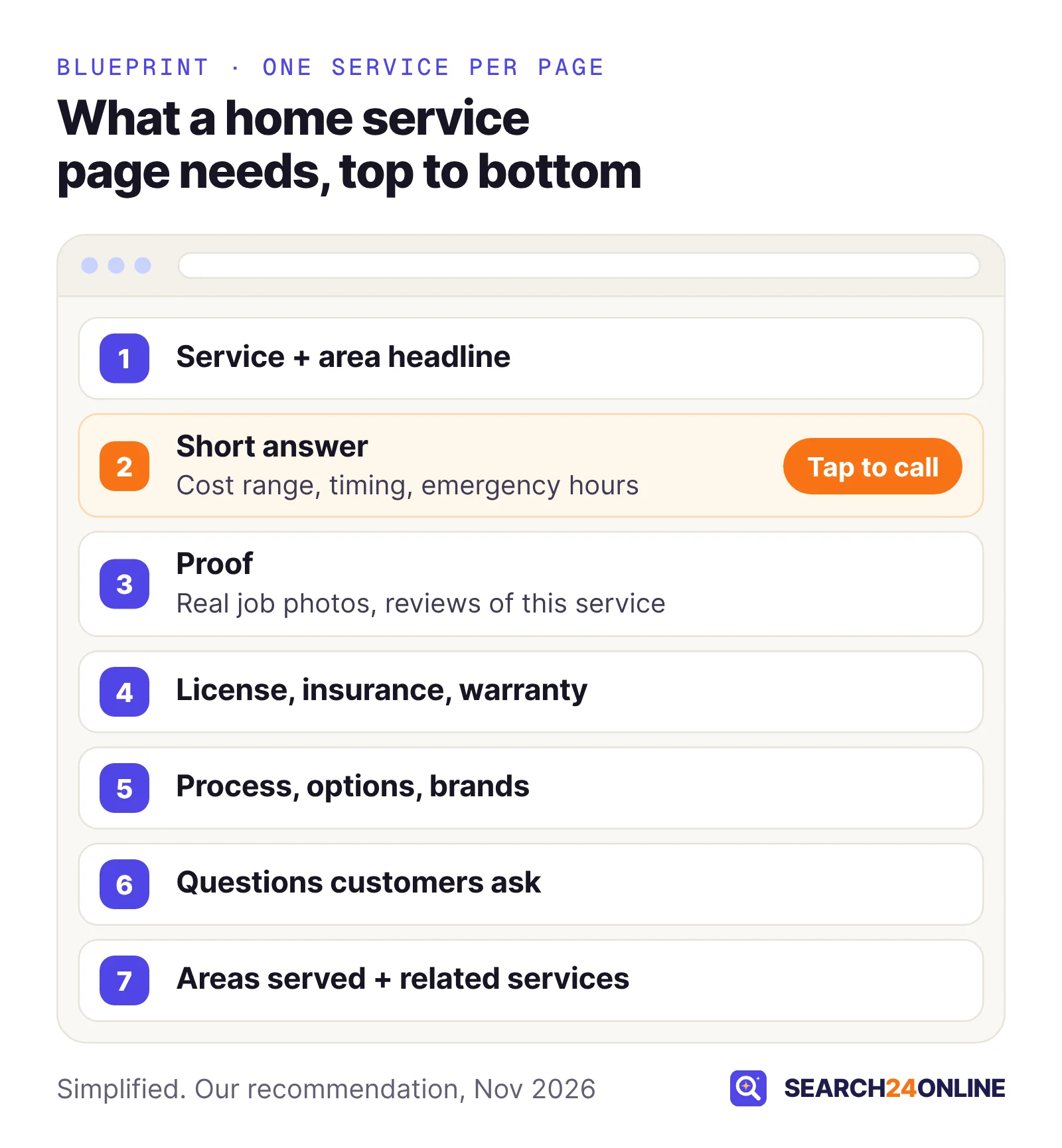
- Headline: the service and the area“Water heater replacement in Mesa and the East Valley” tells people and search engines what the page is for. Make the page title match.
- The short answer, then the call buttonTwo or three sentences on typical cost or what drives it, how soon you can come, and whether you handle emergencies. Then a tap-to-call button that works on a phone, plus hours.
- Proof from real jobsPhotos of this service from your own jobs and two or three reviews that mention it. Customers trust a rusted tank next to its replacement more than a stock image.
- CredentialsLicense numbers where your state issues them, insurance, warranties and any manufacturer certifications you actually hold.
- Process, options and brandsWhat happens on the day, how long it takes, repair versus replace, and the equipment brands you service.
- Questions customers askThe ones your office hears on the phone, answered plainly.
- Areas and related servicesWhere you do this work, with links to related service pages and any town pages that exist.
Prices are the section owners resist most. You don’t need a price list: a range for a typical job and the three or four things that move it is enough. It is what the customer came to find out.
An electrician with separate pages for “panel upgrade”, “electrical panel replacement” and “breaker box replacement”: three pages for one job, each thin, competing with each other (keyword cannibalization). Merge them into one strong page, redirect the others to it, and spend the effort on content the merged page lacks.
Two technical checks matter too. Check in Search Console that the service pages are actually indexed, and mark up the business with LocalBusiness structured data so the name, phone and hours on the site are machine-readable. Pages built by a plugin, or with the phone number only inside an image, are recurring problems in our audits.
Which Business Profile categories and settings matter most for trades?
The primary category matters most, followed by accurate hours and a complete services list. Whitespark’s experts ranked the primary category first of 187 map factors. Google’s guidelines ask for “as few categories as possible”, each “as specific as possible, but representative of your main business.” The full setup is in our step-by-step Business Profile guide; here is what is specific to trades.
- Primary category = the work that pays the bills. A company that is mostly heating and cooling should not lead with a plumbing category because it also fixes water heaters. Search your main services in Google Maps and note the category label under the businesses that rank, then pick the most specific one that is true.
- Secondary categories only for real lines of work. Add one when you sell that service as a business (drain cleaning, water heater installation, generator installation) and Google offers a matching category. Google says not to use categories as keywords.
- Hours that reflect reality. List 24-hour service only if someone answers and dispatches at 2 a.m. An emergency customer whose call goes to voicemail calls the next listing, and on Local Services Ads, missed calls can hurt your responsiveness.
- Services named the way customers say them. “AC repair” and “furnace tune-up” rather than “climate solutions”.
- The real business name. Google’s guidelines say the name should reflect your real-world name. “Smith Plumbing – 24/7 Emergency Plumber” risks suspension.
How do reviews and real job photos turn searches into calls?
They are the proof a stranger needs before letting you into their home, and customers screen on them hard. Google says more reviews and positive ratings can help your local ranking, but in our experience their bigger effect is on whether people call at all.
Those figures come from BrightLocal’s Local Consumer Review Survey 2026 (1,002 US adults, published February 2026), which covers local businesses in general rather than trades specifically. The same survey found 31% will only use businesses rated 4.5 stars or higher, up from 17% a year earlier, and 89% expect owners to respond to reviews. Recency is the trap for trades: a company with 300 reviews, most of them from three years ago, can look less active than a newer competitor collecting a few every week.
The practical system for a trade business: the office sends a review request by text when the work order closes, to every customer, not only the ones the technician expects to be happy. Reply to every review, and mention the service in your reply where it fits naturally. Our guide to getting more Google reviews within the rules has templates and the FTC rules on incentives.
Photos of real jobs
Google’s Business Profile photo guidelines ask for sharp, well-lit images with “no significant alterations or excessive use of filters”. They add that “the image should represent reality”. For trades that is an advantage: the job site is the content. Ask technicians to take three photos on every job worth showing: before, during, after.
Use them twice. Upload the best to the Business Profile (Google asks for JPG or PNG between 10 KB and 5 MB, and recommends 720 × 720 pixels). Then add them to the matching service and town pages with a plain caption: “Replaced a 1990s 40-gallon tank with a high-efficiency unit, Tempe, October 2026.” Get permission before showing house numbers, faces or license plates.
How should trades plan seasonal content?
Publish and refresh seasonal pages before demand peaks, not during it. ENERGY STAR tells homeowners to check the cooling system in spring and the heating system in fall, because “contractors get busy once summer and winter come”. Search follows the same rhythm, so a furnace tune-up page refreshed in November is late.
A seasonal calendar for each trade, to adjust for your climate:
- HVAC: AC tune-ups and repairs before summer; furnace and heat pump checks before winter; replacement and rebate guides in the shoulder seasons when customers have time to compare.
- Plumbing: frozen and burst pipe prevention before the first hard freeze in cold regions; sump pumps and backflow before the spring thaw and rainy season.
- Roofing: storm and hail damage, inspections and insurance claim guidance ahead of your region’s storm season.
- Electrical: generator installation and surge protection ahead of storm and hurricane season.
Keep each seasonal page at a stable address and update it every year (prices, rebates, the date) instead of publishing “Fall furnace tips 2026” as a new post, so it keeps the links and history it has built. Check last year’s Search Console data for when impressions start climbing in your market, and refresh a few weeks earlier.
Should you run Local Services Ads, invest in SEO, or both?
Most trade businesses that can answer the phone reliably benefit from both: Local Services Ads buy leads now, SEO builds visibility you don’t pay for per call. They work differently, and paying for ads doesn’t improve your organic or map ranking.
How Local Services Ads work, per Google’s current help pages: you pay only for leads related to your business and services, not for clicks. The ad is “shown prominently in Google Search results” when people search for your services in the areas you choose. Customers can call, message or book through the ad. Businesses that pass Google’s screening get a “Google Verified” badge; providers that have passed only the preliminary checks can receive leads but appear below those with the badge (Google excludes locksmiths and garage door services from this option).
Ads are ranked on three inputs, Google says: your bid, how likely you are to produce a lead (responsiveness, relevance and whether you accept messages or bookings), and profile quality, including rating, review count, response time and completed verification checks. So the same reviews and responsiveness that win organic calls also make your leads cheaper.
Local Services Ads suit a new business, a new service area or a quiet week, and they fit emergency work well because the customer calls straight from the ad. SEO suits planned, high-value jobs that need explaining, and costs nothing per lead once it works. Google’s own help is clear that “there’s no way to request or pay for a better local ranking,” so ad spend doesn’t carry over when you stop.
For the wider budget question, including regular Search ads, see SEO vs Google Ads: where a small business should spend first.
How do you track which searches turn into booked jobs?
With call tracking connected to your job records, because Google’s own number is not enough. The Business Profile performance report defines Calls as “the number of times a customer clicked on the call button on your Business Profile.” A tap is not an answered call, and an answered call is not a booked job.
Here is a setup that works for most trades, in our experience.
- One tracking number per sourceSeparate numbers for the Business Profile, the website and each ad channel, so a booked job can be traced back to where the customer found you.
- Keep your main number in the recordGoogle’s guidelines require a number under your direct control that reaches your business, and allow up to 2 numbers beyond the primary. Many businesses use the tracking number as primary and list the main number as an additional one, and keep the main number on the website’s contact page and in its structured data.
- Tag the website linkAdd UTM parameters to the Business Profile website link so those visits show separately in analytics.
- Close the loopEach month, match tracked calls to booked jobs in your field-service software, by service. That is the number that tells you whether the water heater page or the furnace page earns its keep.
- Watch missed calls by hourIf calls go unanswered at lunch or after 5 p.m., that is lost revenue no ranking improvement will fix.
If you record calls, check your state’s consent rules first.
How do AI assistants recommend local trades?
Mostly from the same public information Google uses: Business Profiles, review sites and business websites. No AI company publishes a formula for local recommendations, so the best evidence is studies of what the answers cite.
BrightLocal’s 2026 consumer survey found 45% of US respondents had used ChatGPT or other AI tools for local business recommendations, up from 6% the year before, making AI tools the third most popular source. Google still led, at 71%.
BrightLocal’s August 2026 study of nearly 61,000 checks across Google AI Overviews, AI Mode and ChatGPT shows where the answers come from. For plumbers, Google Business Profiles made up 54% of citations, Yelp 13.8%, Facebook 3.1% and Angi 2.2%, with HomeAdvisor and the BBB at 0.9% each. Even the most-cited sources appeared for only 28 plumber locations in BrightLocal’s table, so treat the exact shares with caution. Across all sectors, BrightLocal says about 93% of cited domains were individual business websites.
What that means in practice:
- Your Business Profile is the main input, so everything in the sections above counts twice.
- Claim and complete the trade directories that get cited: Yelp, Angi, the BBB and Facebook, with the same name, phone number and services everywhere.
- Make your website easy to quote. A cost range, service area and emergency hours written as plain text on the service page give an assistant something specific to cite.
- Don’t block AI crawlers by accident. Security plugins and firewall settings can shut them out without anyone noticing.
Answers vary from one asking to the next, and no one can promise you a mention. Our guide on getting your business mentioned in ChatGPT covers testing and tracking.
For a quick baseline, our free SEO + GEO report checks your website’s local and trust signals (name, address and phone consistency, click-to-call, business schema) and which AI crawlers can read it.
Across more than 500 brands we have served, the trades that do well in search rarely have a trick. They have a profile that tells the truth, a page for every job they want more of, reviews from last month, and a phone someone answers.
Common questions
Should a plumber or HVAC company create a page for every city it serves?
Only for towns where you can say something true and specific, such as the jobs you do there, local housing or code issues, and real response times. Google’s spam policies list pages targeted at specific regions or cities that funnel users to one page as an example of doorway abuse, so dozens of near-identical city pages are a risk rather than an asset.
Do Local Services Ads improve my Google Maps ranking?
No. Google’s Business Profile help states there is no way to request or pay for a better local ranking. Local Services Ads run in their own auction based on your bid, how likely you are to produce a lead and your profile quality, and the leads stop when you stop paying.
Can a home service business show its home address on Google?
Not if customers don’t visit it. Google’s guidelines say service-area businesses should hide their address and set a service area, which generally shouldn’t extend farther than about 2 hours of driving time from where the business is based.
Will a call tracking number hurt my local SEO?
In our experience, not when it is set up carefully. Google requires a phone number that connects to your business and is under your direct control; many businesses put the tracking number in the primary slot and keep their main number as one of the up to 2 additional numbers Google allows, and keep the main number consistent on the website.
How long does SEO take for a plumbing, HVAC or roofing company?
There is no fixed timeline, and nobody can guarantee rankings. Profile corrections and fixes to pages Google is not indexing can help within weeks, while outranking established competitors on high-value terms such as replacement work usually takes months of better pages, reviews and local links.
Sources
- Google Business Profile Help: Guidelines for representing your business on Google
- Google Business Profile Help: Tips to improve your local ranking on Google
- Google Business Profile Help: Understand your Business Profile performance & insights
- Google Business Profile Help: Edit your Business Profile
- Google Business Profile Help: Manage your Business Profile photos & videos
- Google Search Central: Spam policies for Google web search (updated August 28, 2026)
- Local Services Help: Getting started with Local Services Ads (United States)
- Local Services Help: About ad rankings
- Whitespark (November 6, 2025): 2026 Local Search Ranking Factors
- BrightLocal (February 11, 2026): Local Consumer Review Survey 2026
- BrightLocal (August 26, 2026): Top sources and directories for local AI search
- ENERGY STAR: Maintenance checklist for heating and cooling
See whether your trade website is ready to win the call — free.
We’ll analyze your website, including click-to-call, business schema, indexability and mobile speed, create your SEO + GEO report and give you password-protected dashboard access to view it within 24 hours.
Free · No obligation · We only review your public pages.