
Google Spam Policies in Plain English: What Each One Means for Your Business
Google lists 16 spam policies for web search. Here is what each one actually forbids, how a penalty shows up, how to recover from one, and which vendor offers quietly put your site at risk.
Key takeaways
- Google’s spam policies are 16 rules against tricking searchers or manipulating Google’s systems, from cloaking and link spam to scaled content abuse. The list was last updated on August 28, 2026, and it now covers attempts to manipulate Google’s generative AI responses as well as rankings.
- Sites that break them “may rank lower in results or not appear in results at all.” Most enforcement is automated; a manual action happens when a human reviewer at Google confirms a violation.
- Search Console reports manual actions and security issues, not algorithmic demotions. Fix every affected page, then request a review; Google says most reviews take several days or weeks.
- Algorithmic demotions have no review button. Google says its systems learn “over a period of months” that a cleaned-up site complies.
- Google is clear that you answer for your vendors: “Ultimately, you are responsible for the actions of any companies you hire.”
On this page
What are Google’s spam policies?
They are Google’s written rules for what a site must not do to stay eligible for web search. Google defines spam as techniques used to deceive users or manipulate its systems into featuring content prominently. That covers ranking manipulation and, in Google’s words, “attempting to manipulate generative AI responses in Google Search” too. Content that breaks the rules can be demoted or dropped, and the policies apply to all web search results, including Google’s own properties.
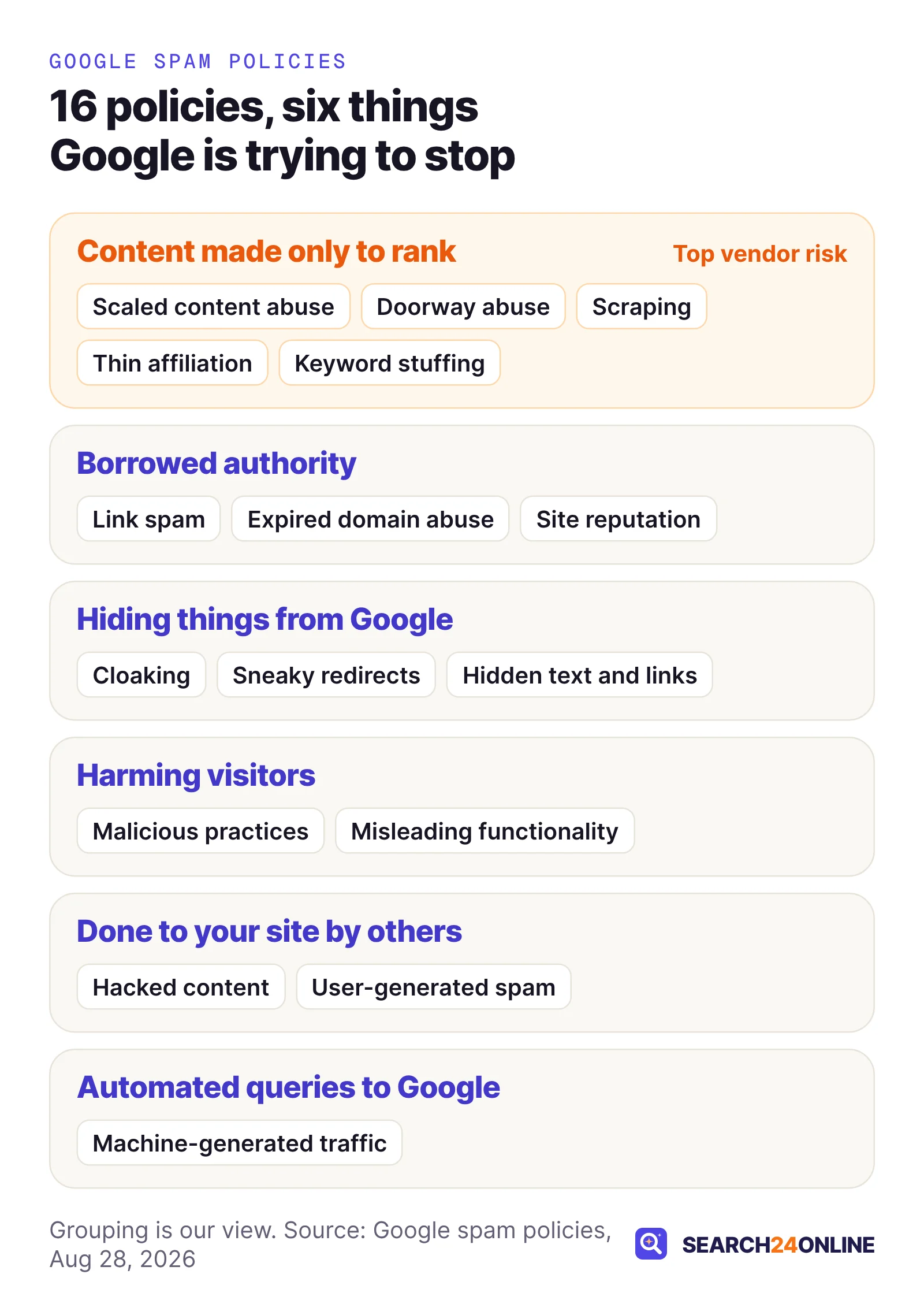
The official page, “Spam policies for Google web search”, was last updated on August 28, 2026. It lists 16 policies: cloaking, doorway abuse, expired domain abuse, hacked content, hidden text and link abuse, keyword stuffing, link spam, machine-generated traffic, malicious practices, misleading functionality, scaled content abuse, scraping, site reputation, sneaky redirects, thin affiliation and user-generated spam. A closing section adds four more reasons for demotion or removal: legal removals, personal information removals, policy circumvention, and scam and fraud.
Read as a list, the policies feel abstract. Grouped by what they are trying to stop, they make more sense, and it becomes obvious which ones a business owner is likely to run into.
Google’s documentation log records several changes this year. April 13: “back button hijacking” was added to the malicious practices policy. April 14 and 23: Google said it may use spam reports to take manual action. May 15: it clarified that the policies cover generative AI responses in Search. August 28: it changed how the site reputation policy is enforced in the European Economic Area. October 26: it updated its guide to preventing user-generated spam.
Which policies cover content made only to rank?
Five policies target pages that exist for search engines rather than readers: scaled content abuse, doorway abuse, scraping, thin affiliation and keyword stuffing. The common thread is volume without value. None of them bans a type of page outright; they ban pages that add nothing for the person who lands on them.
Scaled content abuse
Google applies this policy “no matter how it’s created”: the problem is many pages made mainly to manipulate rankings, with little value for users. Google’s examples include using generative AI tools to produce many pages without adding value, stitching together content from other pages, and creating several sites to hide how much content is mass-produced. AI is not banned: Google’s generative AI guidance, updated October 1, 2026, says AI can help with research and structure, but asks you to manually fact-check AI content before publishing.
For a small business, this usually arrives as a “100 blog posts a month” package. In audits we often find dozens of near-identical articles answering the same question in slightly different words. That makes the site look thin and splits traffic between pages competing for the same keyword.
Doorway abuse
Doorways are sites or pages built to rank for similar searches that lead visitors to a less useful intermediate page. For local businesses, the example that matters is “pages targeted at specific regions or cities that funnel users to one page,” as Google puts it. City pages are fine when each one says something true and useful about that town; we cover how to build them in our guide to service-area business SEO.
Scraping and thin affiliation
Scraping is republishing other sites’ content, often automatically, without original value, including lightly reworded copies and pages that only embed other people’s videos or images. Thin affiliation is the affiliate-site version: product descriptions copied from the merchant with nothing added. Google is explicit that “not every site that participates in an affiliate program is a thin affiliate”; original reviews, testing, price information and comparisons count as added value.
Keyword stuffing
Filling a page with keywords or numbers to manipulate rankings. Google’s examples include “blocks of text that list cities and regions that a web page is trying to rank for” and lists of phone numbers without added value. The long list of 40 suburbs at the bottom of a service page, written for Google and read by nobody, is the classic local version.
Which policies cover links and borrowed authority?
Three policies deal with faking the trust signals Google relies on: link spam, expired domain abuse and the site reputation policy. Each one tries to borrow authority a site hasn’t earned, either by buying links, buying an old domain’s history, or renting space on someone else’s respected site.
Link spam
Google defines link spam as creating links to or from a site “primarily for the purpose of manipulating search rankings,” and its examples read like a cheap link vendor’s menu. They include buying or selling links (for money, goods, services or free products), excessive link exchanges and automated link-building programs. Low-quality directory or bookmark links, keyword-rich links in widgets or site footers, and optimized anchor text in guest posts or press releases are on the list too. Paid placements are allowed as advertising, but only when the link is marked rel="sponsored" or rel="nofollow".
Weak or unnatural backlink profiles are one of the most frequent findings in our audits. A common situation: a contractor paid a past vendor for “30 backlinks a month” and inherited hundreds of links from unrelated blogs and directories, many with the exact same keyword as anchor text.
Expired domain abuse
This is buying an expired domain and reusing it mainly to rank low-value content on the back of its old reputation. Google’s examples include affiliate content on a former government agency site and casino content on a former elementary school’s domain. Buying a domain is not the problem. Using it as a costume for unrelated content is.
Site reputation policy
Google now calls this the site reputation policy; its documentation previously called it the site reputation abuse policy. It applies when third-party content is published on a host site mainly to exploit that host’s ranking signals, such as a medical site hosting a low-quality “best casinos” page. Google now weighs whether the host shows enough “editorial oversight, or contribution” for the content to count as integrated: matching design, quality, clear authorship and whether the same content appears on many other sites.
Wire services, syndicated news, forums, opinion columns and native advertising aimed at the publication’s own readers rather than at rankings are not violations in themselves. Since August 28, 2026, manual actions under this policy apply only to results shown to users outside the European Economic Area. For most small businesses the risk runs the other way: a vendor offering to place your content on a big publisher’s “partner” section that exists only to rank.
Which policies cover showing Google something different?
Cloaking, sneaky redirects and hidden text all break the same promise: that Google and your visitors see the same thing. These are less common in honest small-business marketing, but they often show up after a hack or a bad plugin.
Cloaking means showing search engines different content from what users see, such as a travel page for Google and a discount drug page for people. Paywalls are not cloaking if Google can see the full content any subscriber could and the site follows Google’s flexible sampling guidance. Sneaky redirects send visitors somewhere other than what Google indexed, for example a normal page on desktop but a spam domain on mobile. Google lists moving to a new address, merging pages and sending logged-in users to an internal page as legitimate redirects.
Hidden text and link abuse covers white text on a white background, text behind an image, text positioned off-screen, zero font size or opacity, and links hidden on a single character. Normal design is safe: Google says accordions, tabs, sliders, tooltips and screen-reader-only text are fine.
Which policies cover harm to visitors and things done to your site?
Five policies cover deception, harm and abuse that often isn’t the owner’s doing: malicious practices, misleading functionality, hacked content, user-generated spam and machine-generated traffic. You can break two of them without lifting a finger, which is why basic site security belongs in any SEO plan.
Malicious practices and misleading functionality
Malicious practices covers malware, unwanted software and back button hijacking (added in April 2026 and enforced from June 15, 2026): interfering with browser navigation so visitors can’t return to the page they came from. Unwanted software includes programs that change browser settings without consent. Misleading functionality means promising a tool or service the site doesn’t deliver, such as a fake app-credit generator or a “PDF merger” that only serves deceptive ads. Our view: if an ad script, pop-up tool or plugin on your site does any of this, assume it counts against you, and remove it.
Hacked content
Hacked content is anything placed on your site without permission through a security hole. Google describes four forms: code injection (malicious scripts), page injection (new spam pages), content injection (hidden text or links added to real pages) and redirects that only fire for some visitors. A common pattern we see: an outdated plugin lets someone add hundreds of pages selling counterfeit goods, which the owner never notices because the homepage looks normal.
User-generated spam and machine-generated traffic
User-generated spam is junk added through features meant for users: forum posts, blog comments, accounts on hosting services anyone can join, and file uploads. Google’s prevention guide, updated October 26, 2026, recommends nofollow or ugc on links in user content, noindex for new users until they earn trust, CAPTCHA on sign-ups and moderation. Machine-generated traffic means sending automated queries to Google, such as scraping results for rank checking without permission. That one is about tools, so ask any vendor how its rank tracking gets its data.
The closing section of the page is worth knowing too. Policy circumvention, such as moving violating content to new subdomains or sites, can lead to wider removal. Scam and fraud pages, such as those impersonating an official business, are targeted by automated systems that try to keep them out of results.
What is the difference between a manual action and an algorithmic demotion?
A manual action is a penalty applied by a person at Google and reported to you in Search Console; an algorithmic demotion is applied by automated systems and comes with no notice. Google says it detects violations “both through automated systems and, as needed, human review that can result in a manual action.” Its Manual actions help page adds that in most cases spam is found and removed automatically.
| Manual action | Algorithmic demotion | |
|---|---|---|
| Who decides | A human reviewer at Google | Automated systems such as SpamBrain |
| Do you get told? | Yes: Manual actions report and Search Console message center | No message; you see it in traffic and rankings |
| Scope | Listed URL patterns or the whole site | Not reported to you |
| How to fix | Fix all affected pages, then Request Review | Fix the problem; there is no review to request |
| Recovery timing | Most reviews take several days or weeks | Systems learn compliance over months |
Google describes SpamBrain as its “AI-based spam-prevention system” and says its automated systems run constantly. When Google makes a notable improvement to them, it announces a spam update. Google’s Search Status Dashboard lists four spam updates so far in 2026, starting March 24, June 24, August 18 and September 24. If your traffic fell during one of those windows rather than during a core update, look at spam issues first.
Links are the exception to “fix it and recover.” Google’s spam updates page says ranking benefits from spammy links “cannot be regained” once its systems remove their effects. If rankings were propped up by bought links, the honest goal after cleanup is a stable baseline, not a return to the old peak.
A core update is a different animal: a broad change to how Google assesses quality, not a penalty. If your drop lines up with one, read what to do after a core update traffic drop instead.
How do you check whether your site has a spam problem?
Start in Google Search Console, which is free and is where Google reports manual actions and security issues. If you don’t have access to your site’s Search Console property, get it before anything else; a vendor holding it alone is a problem in itself.
- Open the Manual actions reportA green check mark means no manual actions. Otherwise each action is named (for example “Unnatural links to your site” or “Major spam problems”) with the affected URL patterns, and some descriptions say they affect the entire site.
- Open the Security issues reportThis is where hacked content, malware and unwanted software, and social engineering such as phishing are reported. It is separate from manual actions.
- Read the message centerGoogle says it notifies you of manual actions in the report and in the Search Console message center. Make sure someone in your business, not only a vendor, has owner access and sees those messages.
- Match the drop to a dateIn the Performance report, find when clicks fell and compare it with the Search Status Dashboard. A drop during a spam update window points to automated spam systems.
- Look for pages you didn’t createSearch
site:yourdomain.comand scan for odd topics or foreign-language titles, and watch the Page indexing report for sudden spikes in indexed pages.
If nothing turns up and your pages are simply missing from Google, the cause is more likely technical. Our guide to why a website is not showing on Google walks through the indexing checks.
How do you recover with a reconsideration request?
Fix the problem everywhere it occurs, make sure Google can reach the fixed pages, then click Request Review in the report and explain what you did. Partial work doesn’t pay off. Fixing the issue on just some pages, Google says, “will not earn you a partial return” to search results. The fixed pages must not sit behind a login, a paywall, a robots.txt block or a noindex tag.
Google says a good request does three things: explains the exact quality issue, describes the steps you took to fix it, and documents the outcome. In practice that means a short, factual note with evidence: a spreadsheet of links you asked to have removed and the replies, a list of pages deleted or rewritten, or the plugin that was patched. Google sends an email when your request arrives and another when the review is done. Don’t resubmit while a request is still pending.
For an “Unnatural links to your site” action, Google asks you to make a good-faith effort to have links removed before disavowing them. It warns that simply disavowing all backlinks without attempting removal “might lead to rejection of your request,” so keep a record of your outreach.
A worked example
Say a regional plumbing company finds an “Unnatural links to your site” action after two years with a cheap link vendor. The cleanup has four parts: export the links from Search Console, sort out the paid and directory links from real ones, email the site owners asking for removal (logging every attempt), then disavow the domains that won’t respond. The request lists the numbers, attaches the log and says plainly that the vendor relationship has ended. Then the owner waits: Google says most reviews take several days or weeks, and link cases can take longer.
Security problems follow the same pattern through the Security issues report: clean every affected page, close the hole, then request a review, which Google says can take from a few days to a few weeks. For algorithmic demotions there is nothing to submit. You fix the cause, keep publishing genuinely useful pages, and let the systems catch up over months.
What should you watch for when hiring an SEO or web vendor?
Watch for anything priced by volume, anything secret, and anything that keeps you away from your own accounts. Google’s hiring guidance says “you are responsible for the actions of any companies you hire,” and warns that if an SEO creates deceptive content for you, your site could be removed entirely from Google’s index.
Having worked with more than 500 brands, we’ve found that owners rarely choose spam tactics knowingly. They arrive bundled in a package. These are the offers that map most directly onto a policy:
- “50 backlinks a month” or a guaranteed number of high-authority links: link spam. Ask exactly where each link comes from and whether money changes hands.
- “100 AI articles a month” or a page for every city and service combination: scaled content abuse and doorway abuse. Ask who reviews and fact-checks each page, and what makes each one useful.
- “We’ll build you a network of microsites” or buy aged domains to point at you: doorway abuse, link spam or expired domain abuse.
- Placement on a big site’s coupon or “partners” section that exists only to rank: the site reputation policy.
- Hidden “SEO text”, footer keyword blocks or different versions for Google and users: hidden text, keyword stuffing or cloaking.
- Review generation that rewards or filters customers: not a web search spam policy, but against Google’s review rules. Our guide to getting more Google reviews the right way covers what is allowed.
Two warnings from Google’s own hiring advice catch most bad actors early: “No one can guarantee a #1 ranking on Google,” and be wary of firms that email you out of the blue. For the full list of warning signs, see 12 SEO promises that mean you should walk away.
Ask for three clauses: a monthly list of every link acquired and how; no content published without human review; and owner access to Search Console, analytics and your domain from day one. A vendor working within the rules loses nothing by agreeing.
Before a new vendor touches your site, take a baseline so you can tell later what changed. Our free SEO + GEO report analyzes your website, covering security, technical SEO, on-page basics and structured data, and gives you password-protected dashboard access within 24 hours. It doesn’t audit backlinks, so pair it with the Search Console checks above.
Common questions
Is AI-generated content against Google’s spam policies?
No, not by itself. Google’s guidance on generative AI says it can help with research and structure, but using it to generate many pages without adding value for users may violate the scaled content abuse policy. The test is the value to the reader, not the tool.
How long does a reconsideration request take?
Google says most reconsideration reviews take several days or weeks, and requests involving links can take longer. You get an email when the request is received and when the review is done. Don’t resubmit while a request is still pending.
Will Google tell me if an algorithm demoted my site for spam?
Not in the way it tells you about a manual action. Google’s documentation describes Search Console notifications for manual actions and security issues, while automated spam systems simply rank pages lower. You usually spot algorithmic demotion as a traffic drop that lines up with a spam update date.
Are city or location pages considered doorway pages?
Only when they are near-copies built to catch searches and funnel visitors to one page. Google’s doorway examples include pages targeted at specific cities that funnel users to one page. A city page with genuinely local details, work and reviews is a different thing.
Can I report a competitor that is using spam tactics?
Yes, through Google’s spam report form. Since April 2026 Google says it may use these reports to take manual action, and it may send the text of your submission to the site owner, so leave out personal information.
Sources
- Google Search Central: Spam policies for Google web search (last updated August 28, 2026)
- Search Console Help: Manual actions report
- Search Console Help: Security issues report
- Google Search Central: Google Search spam updates and SpamBrain
- Google Search Status Dashboard: Ranking incident history
- Google Search Central: Latest documentation updates
- Google Search Central: Report spam, phishing or malware
- Google Search Central: Prevent user-generated spam on your site (updated October 26, 2026)
- Google Search Central: Do you need an SEO?
- Google Search Central: Using generative AI content on your website
- Maps User Generated Content Policy Help: Prohibited and restricted content
- Search Engine Roundtable: Google back button hijacking spam policy, enforcement from June 15 (April 2026)
Get a clean baseline of your site before anyone else works on it.
We’ll analyze your website, create your SEO + GEO report and give you password-protected dashboard access, with every issue ranked from critical to low and how to fix it.
Free · No obligation · We only review your public pages.