
Google Search in 2026: A Year in Review for Business Owners
Two core updates, four spam updates, a Discover update, AI Mode past a billion users, and new AI reports in Search Console and GA4. Here are the changes that matter most for businesses, each confirmed at a Google source through November 2, 2026, what each one means for your business, and what to do about it in 2027.
Key takeaways
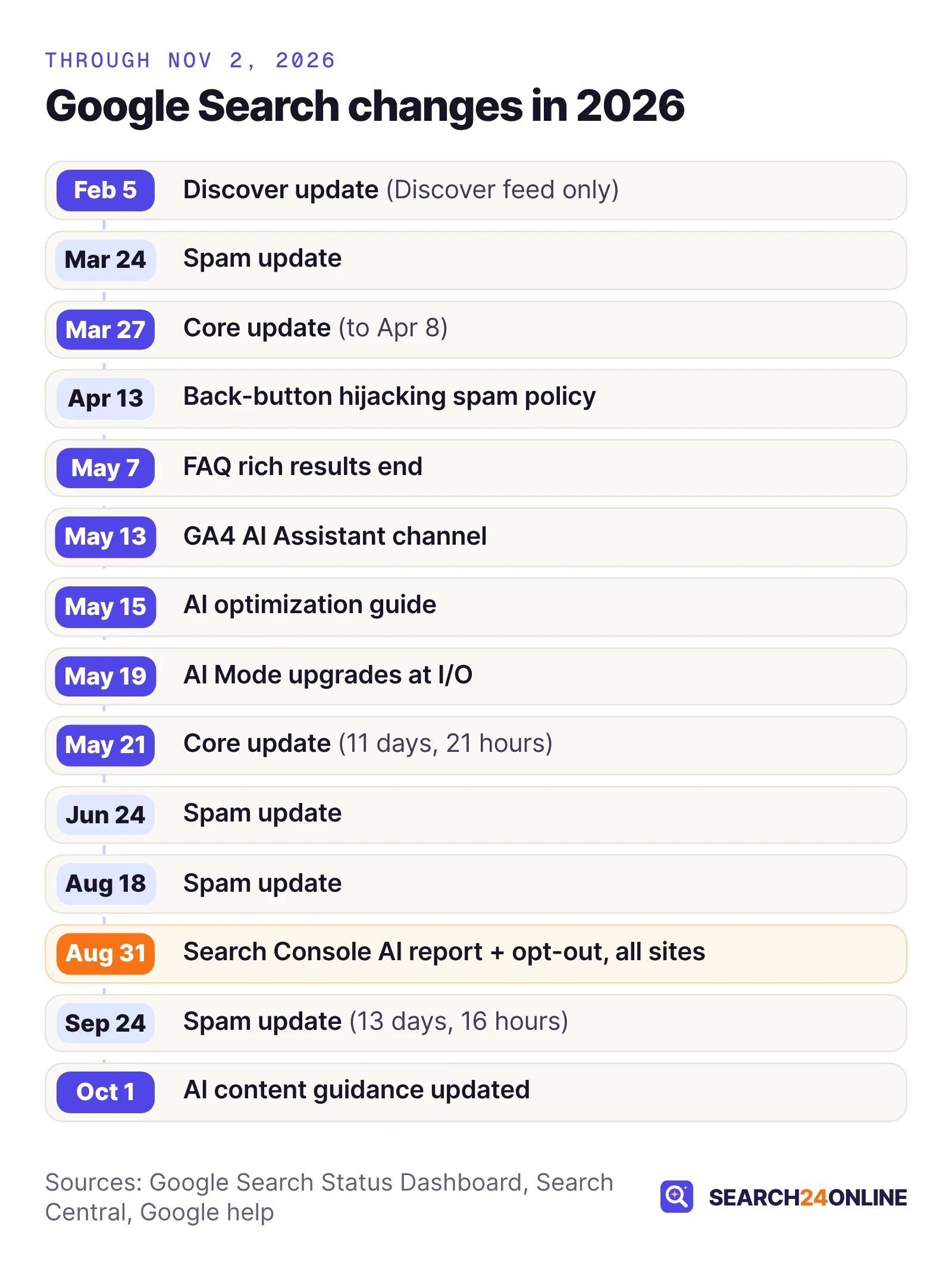
- Google confirmed two core updates in 2026 as of November 2: March 27 to April 8, and May 21 for 11 days and 21 hours. It also ran four spam updates (starting March 24, June 24, August 18 and September 24) and a Discover-only update from February 5, per its Search Status Dashboard.
- AI answers became the main event. Google said on May 19 that AI Mode had passed one billion monthly users, and its June 3 post put AI Overviews at over 2.5 billion monthly active users.
- Measurement caught up: GA4 added an AI Assistant channel on May 13, 2026, and Search Console’s Generative AI performance report and Search generative AI control reached all sites on August 31, 2026.
- The rules got stricter, not trickier. Google’s new AI optimization guide says optimizing for generative AI search is still SEO, FAQ rich results stopped appearing on May 7, and its AI content guidance, updated October 1, demands manual fact-checking.
On this page
What changed in Google Search in 2026?
Three things changed, and one did not. Google’s AI answers moved from a feature to the default way many people search, Google finally gave site owners reports and a switch for those AI features, and it tightened its rules on spam and AI-written content. What did not change: Google still says the way to show up, in AI answers or the classic blue links, is ordinary, well-executed SEO.
This review covers changes through November 2, 2026. Every date and figure below comes from a Google source we opened on that date: the Search Status Dashboard for ranking updates, the Search Central documentation changelog, Search Console and Google Analytics help pages, and Google’s own blog. We left out anything we could only find in third-party reports. Where an item has its own in-depth article on this site, we summarize it and link there.
Which core updates did Google release in 2026?
Google released two core updates in 2026, according to the ranking history on its Search Status Dashboard. A core update is a broad change to how Google’s ranking systems assess content; it doesn’t target any one site or tactic. The year actually opened just after one: the December 2025 core update started December 11 and ran for 18 days and 2 hours, finishing in late December, so it can still show up when you compare January with earlier months.
- March 2026 core update: released March 27. Google’s dashboard note said the rollout could take up to two weeks, and it reported the rollout complete as of April 8.
- May 2026 core update: started May 21 and lasted 11 days and 21 hours, finishing at the start of June.
- February 2026 Discover update: started February 5 and lasted 21 days and 17 hours. It changed the Discover feed (the article feed in the Google app and on Android), not regular search results. On the same day, Google added advice to its “Get on Discover” documentation for site owners.
As of November 2, the dashboard listed no core update after May. That matters if your traffic moved in September or October: a confirmed core update is not the explanation, so look elsewhere first, starting with the spam update below and your own site changes.
What it means for your business
Core updates reshuffle who ranks for what, but they rarely explain as much as people assume. In audits we often find that a drop blamed on “the Google update” lines up better with something else: a redesign, pages that fell out of the index, or new thin pages competing with old ones for the same searches. A real core update loss usually hits a whole type of page at once and starts during a rollout window.
What to do
Annotate the rollout windows above in your reporting, compare your Search Console data for a week or two before and after each, and only then decide whether you have a core update problem. Our guide to diagnosing a traffic drop after a core update walks through that comparison and Google’s self-assessment questions step by step.
What changed in spam updates and spam policies?
Google ran four spam updates and made five notable changes to its spam rules in 2026. The updates, from the dashboard’s ranking history:
- March 24: lasted 19 hours and 30 minutes, three days before the March core update began.
- June 24: lasted 2 days and 1 hour.
- August 18: lasted 2 days and 16 hours.
- September 24: the longest of the year at 13 days and 16 hours, finishing in early October.
The policy changes, all dated in Google’s documentation changelog:
- April 13, back button hijacking: a new section in the malicious practices policy, aimed at pages that interfere with the browser’s back button so visitors can’t return to the page they came from.
- April 14 and 23, spam reports: Google clarified that it may use spam report submissions to take manual action against violations, then explained when and why after feedback.
- May 15, AI answers: Google clarified that its spam policies also apply to generative AI responses in Google Search, so trying to manipulate AI Overviews or AI Mode is treated like any other spam.
- July 24, reviews: a new review snippet guideline on fake and undisclosed incentivized reviews.
- August 28, site reputation policy (formerly site reputation abuse): Google adjusted how it enforces this policy within the European Economic Area. The policy covers third-party content placed on an established site mainly to borrow its ranking strength.
What it means for your business
Most legitimate businesses never trip a spam update. The risk usually arrives through a vendor: an ad or “exit offer” script that hijacks the back button, a bulk batch of AI-written location pages, or a review widget that marks up reviews you collected in exchange for discounts. The spam-report change also means a competitor’s report can now lead to a human looking at your site.
What to do
Test your own site the way a visitor would: arrive from Google, then press back. Ask every vendor who adds scripts, pages or review markup what exactly they install. Our plain-English guide to Google’s spam policies covers each policy and how a manual action appears in Search Console, and our review guide covers how to ask for reviews without incentives.
How did AI Overviews and AI Mode change in 2026?
They merged into one conversation and got much bigger. At Google I/O on May 19, 2026, Google’s VP of Search, Elizabeth Reid, announced what Google called the biggest upgrade to its Search box in over 25 years. She said AI Mode had passed one billion monthly users a year after its debut. Google’s June 3 post (updated August 31) added that AI Overviews has over 2.5 billion monthly active users.
The May 19 announcements that matter most for businesses:
- Follow-ups from AI Overviews: people can ask a follow-up directly from an AI Overview and continue into AI Mode with their context kept. Google said this was live on desktop and mobile worldwide that day.
- A new Search box: it expands to give you room to describe what you need and accepts text, images, files, videos or Chrome tabs, rolling out in all countries and languages where AI Mode is available.
- A new default model: Gemini 3.5 Flash became the default model in AI Mode for everyone (Google has since added newer models for paying subscribers).
- Agents: information agents that monitor the web and send updates, first for paying Google AI Pro and Ultra subscribers. Google is also expanding agentic booking to local experiences and services; for categories such as home repair, beauty and pet care, Google can call businesses on the user’s behalf. Google said booking and calling would roll out to everyone in the U.S. over the summer.
Google also said in June that it had increased inline links within AI responses, added website previews and was testing new link designs. And in the same post it said it had brought Preferred Sources into AI Overviews and AI Mode, which we cover with the other site-owner controls below.
What it means for your business
More searches now start with an AI answer and continue as a conversation, which means one customer question can trigger many related searches behind the scenes (Google calls this query fan-out). Pages that answer one narrow follow-up clearly can be cited even when they don’t rank for the head term. Fewer people click, and the clicks that do arrive tend to come later in the decision. U.S. home-repair, beauty and pet-care businesses may also get calls placed by Google for a customer. Those calls only turn into jobs if someone answers and your prices and availability are easy to confirm.
What to do
Write down the ten questions customers ask before they buy, check whether a page on your site answers each one directly, and fill the gaps. Our guide on how to appear in AI Overviews and AI Mode turns Google’s own guidance into a checklist, and our zero-click search guide covers how to win customers who never visit your site.
What new reports measure AI search traffic?
Two arrived in 2026, and together they close the biggest blind spot of the last two years. One shows how often Google’s AI features display your site; the other shows visits from other AI assistants.
Search Console: Generative AI performance report
Google announced the Generative AI performance report in June and said that, as of August 31, 2026, it had rolled out to all websites worldwide. It counts impressions: how many times links to your site were shown in a generative AI feature on Google Search, meaning AI Overviews and AI Mode. You can break the data down by page, country, device and date, and filter between text searches and multimodal ones (image-based searches such as Google Lens and Circle to Search). Search Labs experiments are excluded. Google’s help page for the report doesn’t mention clicks, click-through rate or average position, so treat it as a visibility report, not a traffic report.
GA4: the AI Assistant channel
On May 13, 2026, Google Analytics added an AI Assistant channel to the Default Channel Group. GA4’s “What’s new” entry says it identifies visits from chatbots like ChatGPT, Gemini and Claude, sets the medium to “ai-assistant” when the referrer matches a recognized assistant, and labels the campaign “(ai-assistant)”. On June 11, GA4 added a Source Group field that groups emerging AI sources such as ChatGPT and Perplexity. One catch: GA4’s channel definitions keep Google’s own AI Overviews and AI Mode out of the AI Assistant channel; those visits count as Organic Search.
“Is Google showing us in AI answers?” is a Search Console question. “Are people arriving from ChatGPT or Gemini, and do they become leads?” is a GA4 question. Neither report covers both, and neither shows AI answers that mention you without a link.
What to do
Record a baseline now: your top pages in the Generative AI performance report and your monthly AI Assistant sessions and key events in GA4. Revisit both each month. Our guide to seeing AI assistant traffic in GA4 shows where the channel sits and why it undercounts, and our AI visibility tracking method covers the mentions no report captures.
What did Google’s guidance say about AI content and optimization?
Google published two pieces of guidance this year that every business publishing content should read, and both point the same way: no shortcuts. One explains how to optimize for AI search; the other sets the rules for content you create with AI.
The AI optimization guide (May 15, updated July 10)
On May 15 Google added a new guide to optimizing for generative AI features in Search; the page shows it was last updated July 10, 2026. Its central line is that optimizing for generative AI search is optimizing for the search experience, “and thus still SEO.” It says you don’t need new machine-readable files, AI text files, special markup or Markdown. There’s no requirement to break content into tiny pieces for AI, and no special schema.org markup for AI features. A June 15 note added that llms.txt files aren’t needed for Google Search. What it does recommend: non-commodity content with expert or experienced takes that go beyond common knowledge, and for local businesses and retailers, keeping a Google Business Profile and Merchant Center data accurate.
The generative AI content guidance (updated October 1)
Google updated its guidance on using generative AI content on October 1, 2026. It says it is critical to manually fact-check and review all AI-generated content before publishing, including title elements, meta descriptions, structured data and image alt text. It warns that generating many pages without adding value for users may violate the spam policy on scaled content abuse, and it suggests telling readers how content was created where that makes sense.
Rich results that went away
The changelog records that the FAQ rich result stopped appearing in Google Search on May 7, 2026, with a deprecation notice added May 8 and the documentation removed June 15. Earlier, on January 6, Google removed the practice problem structured data documentation because that result no longer appeared either. Valid FAQ markup does no harm, but it no longer earns the expandable result, so it isn’t worth paying anyone to add.
Paying for “GEO” add-ons that Google’s own guide calls unnecessary: llms.txt files for Google, AI-specific schema, or rewriting pages into tiny chunks. If a proposal leads with these, ask what it does for Google Search specifically. Our llms.txt explainer covers what the file can and can’t do elsewhere.
What to do
Put a named human between your AI tool and the publish button, and make them check every fact, title and alt text. Then look for pages that say what every competitor says and give them something only you could write: your prices, your process, your data, your judgment. Our guide on writing content AI assistants want to quote shows what that looks like on a page.
What new controls do site owners have?
Two: a switch that decides whether Google’s AI features may use your site, and a way for readers to tell Google they want to see more of you.
The Search generative AI control (all sites, August 31)
In Search Console under Settings, the Search generative AI control lets you include your site’s links and content in Google’s generative AI features (the default) or exclude them. Google began testing it on June 3 with a subset of U.K. site owners and says it rolled out to all websites worldwide as of August 31, 2026. Excluding removes your links and content from AI Overviews, AI Mode and generative AI features in Discover, usually within a few days. Google says the control isn’t used as a ranking signal for the rest of Search and doesn’t affect AI training; for training on Gemini, the separate Google-Extended token applies, and Google says Google-Extended doesn’t affect inclusion in Google Search either.
Preferred Sources
Preferred Sources lets a searcher pick sites they want to see more of. The changelog traces its year: site-owner documentation on January 30, all Google Search languages on April 30, a rollout into AI Overviews and AI Mode from May 27, and a custom website button on August 20. Google’s documentation says content from a selected site can carry a “preferred” badge, and that to qualify in AI Mode and AI Overviews your site must be included in Search generative AI features in Search Console. Excluding your site therefore costs you this too.
What to do
For a business that wants customers, leave the control on Include unless you have a specific legal or licensing reason, and make that decision in writing so nobody flips it casually. If you publish regularly and have loyal readers, add the preferred sources button or link to your newsletter and articles. Our AI crawler guide explains the related robots.txt choices for other companies’ bots.
What should business owners prioritize in 2027?
Fix the basics that every 2026 change rewarded, measure AI visibility from a baseline, and keep vendors from adding risk. Google’s 2026 guidance kept repeating one message. The sites that struggled in our audits this year mostly struggled for old reasons: important pages not indexed, several pages competing for one search, thin service pages, and missing structured data where it still earns a rich result. In order of impact for most businesses:
- Confirm Google can find and index your money pagesCheck Search Console’s page indexing report for your service, product and location pages. Every 2026 AI feature draws on Google’s index; a page that isn’t indexed can’t be cited.
- Set your AI baselineExport three months of the Generative AI performance report and GA4’s AI Assistant channel, with key events. You can’t judge 2027 work without a 2026 starting point.
- Consolidate pages that compete with each otherWhere several thin pages target the same service, merge them into one strong page and redirect the rest. One clear answer beats five weak ones in both rankings and AI citations.
- Add non-commodity substance to your top 20 pagesReal prices or price ranges, process, photos, credentials and answers to the follow-up questions customers ask. This is what Google’s optimization guide asks for.
- Audit vendor scripts, AI-written pages and review markupRemove anything that touches the back button, mass-produced pages with no added value, and markup for incentivized reviews.
- Get ready for agentsKeep your Google Business Profile, hours, phone line and booking options accurate, because Google’s booking agents and calls rely on them. Watch the shared AI training signal (AIPREF), which Google says it intends to support in early 2027.
Also expect at least one core update. Google shipped two in 2026 and three in the last 12 months counting December 2025; keep a dated log of your site changes so you can separate your own changes from Google’s. If you want a starting point, our free SEO + GEO report checks your site’s indexability, technical SEO, structured data and AI readiness, with every issue ranked from critical to low.
2026 made Google’s position unusually explicit: AI search runs on the same index and ranking systems as classic search. The businesses that will do well in 2027 are the ones that stop looking for an AI trick and do the unglamorous work properly.
Common questions
How many core updates did Google release in 2026?
Two, as of November 2, 2026: the March 2026 core update (March 27 to April 8) and the May 2026 core update (starting May 21 and lasting 11 days and 21 hours), according to Google’s Search Status Dashboard. Google also ran a Discover-only update starting February 5, which affected the Discover feed rather than search results.
Was there a Google core update in October 2026?
No. Google’s Search Status Dashboard listed no core update after the May 2026 core update as of November 2, 2026. The most recent ranking change listed was the September 2026 spam update, which started September 24 and ran for 13 days and 16 hours.
Do FAQ rich results still work in Google Search?
No. Google’s documentation changelog says the FAQ rich result stopped appearing in Google Search on May 7, 2026, and Google removed the documentation for it on June 15, 2026. Questions and answers on a page can still help readers; they just no longer produce the expandable FAQ result.
Can I see AI Overviews traffic in Search Console now?
You can see impressions. Search Console’s Generative AI performance report, rolled out to all sites as of August 31, 2026, counts how often links to your site were shown in AI Overviews and AI Mode, by page, country, device and date. Google’s help page for the report does not list clicks, click-through rate or position.
Should I opt my site out of Google’s AI features?
For most businesses that want customers, no. Google says excluding your site removes your links and content from AI Overviews, AI Mode and generative AI features in Discover, so those features send you no impressions or traffic. It is not a ranking signal for the rest of Search and does not affect AI training, which Google-Extended controls.
Sources
- Google Search Status Dashboard: Ranking incident history
- Google Search Central: Latest Google Search documentation updates (changelog)
- Google Keyword blog (May 19, 2026): A new era for AI Search
- Google Keyword blog (June 3, 2026, updated August 31, 2026): New controls and insights for website owners
- Search Console Help: Generative AI performance report (Search)
- Search Console Help: Search generative AI control
- Google Search Central: Google’s guide to optimizing for generative AI features on Google Search
- Google Search Central: Google Search’s guidance on using generative AI content on your website
- Google Search Central: Help your readers find your site through preferred sources
- Google Analytics Help: What’s new in Google Analytics
- Google Analytics Help: Default channel group
- Google crawler documentation: Google’s common crawlers (Google-Extended)
See how your site is set up for Google in 2027 — free.
We’ll analyze your website, from indexability and structured data to AI readiness, create your SEO + GEO report and give you password-protected dashboard access to view it.
Free · No obligation · We only review your public pages.