
How to Rank in the Google Map Pack: What Google Says, What Experts Rank and What You Can Change
Google names three local ranking factors and keeps the rest private. Here is how relevance, distance and prominence play out in practice, which levers you control, how to measure the pack honestly and what to do about competitors who cheat.
Key takeaways
- Google ranks the map pack mainly on relevance, distance and prominence. You can improve the first and last; distance depends on your real address and where the searcher is.
- Your primary Business Profile category is the strongest lever you control. Google says categories affect local ranking, and the 47 experts in Whitespark’s 2026 ranking factors survey put it first, just ahead of proximity.
- Reviews work on ranking and on choice. Google says more reviews and positive ratings can help, and 68% of US consumers in BrightLocal’s 2026 survey will only use a business rated four stars or higher.
- A map pack position is only true for one spot. Measure across a grid of points around your business, alongside your Business Profile performance data.
- There is no way to pay Google for a better local ranking. Competitors who fake addresses or stuff keywords into their names can be reported through Maps edits or Google’s Business Redressal Complaint Form.
On this page
What is the Google map pack?
The map pack, also called the local pack, is the block of business listings with a small map that Google shows for searches with local intent, such as “emergency plumber”, “dentist near me” or “roof repair Tulsa”. Every listing in it is a Google Business Profile, showing the name, star rating, category and hours, with buttons to call, get directions or visit the website.
The same profiles compete in the Google Maps app; Google’s help pages say local results appear on both Maps and Search. Sponsored listings can appear around them, but they are labeled, and Google Maps help says payment from other companies does not influence its results. This article is about the unpaid positions.
The pack is where many local buyers decide, often without visiting a website, and it now feeds AI answers too. In BrightLocal’s 2026 survey of 1,002 US consumers, use of ChatGPT and other generative AI tools for local recommendations rose from 6% to 45% in a year. Profile setup is covered in our step-by-step Business Profile guide and the wider strategy in the complete local SEO guide. Here the question is narrower: what moves you up the pack, and what does not.
What does Google say decides map pack rankings?
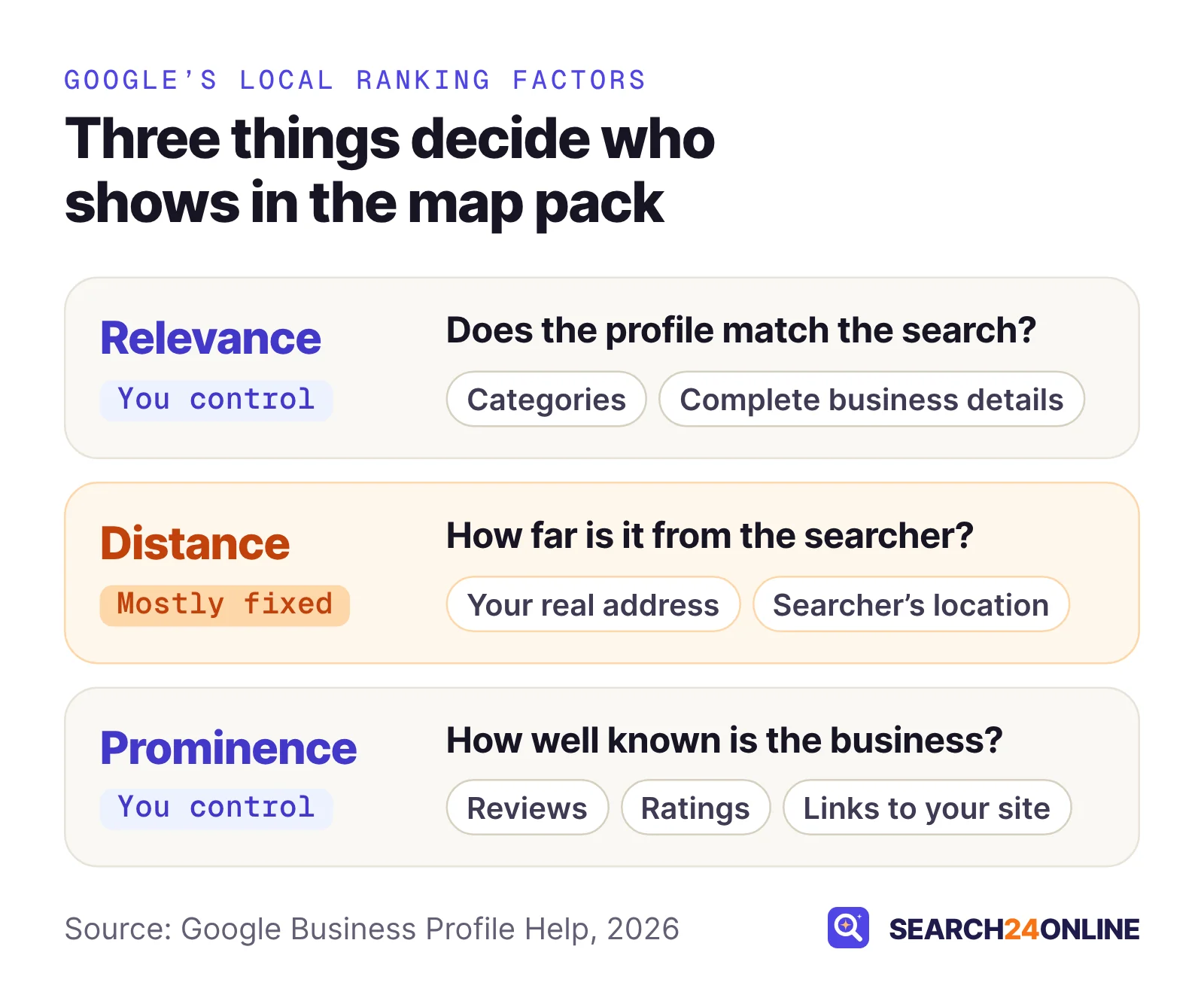
Google says local results are mainly based on three factors: relevance, distance and prominence (its summary line now says “popularity”; the definition still says prominence). Almost every local SEO tactic is an attempt to influence one of them, so Google’s one-line definitions are worth reading closely.
- Relevance is “how well a Business Profile matches what someone is searching for.” Google’s advice is to provide complete and detailed business information.
- Distance “refers to how far each business is from the customer who’s searching.” If the searcher does not share a location, Google uses what it knows about where they are.
- Prominence “means how well-known a business is.” Google adds that it draws on information like how many websites link to your business and how many reviews you have.
Google’s Maps help adds two details. Distance is not absolute: if what you want is more likely at a business farther away, Google might rank it higher. And results can be personal, drawing on a signed-in user’s recent searches, saved and rated places, and home and work addresses. Google keeps the rest of the algorithm confidential and says plainly that “There’s no way to request or pay for a better local ranking on Google.”
What practitioners rank highest
Beyond those three words, the most cited public evidence is Whitespark’s Local Search Ranking Factors report. For the 2026 edition, published November 6, 2025, 47 local search specialists scored 187 factors; Whitespark notes that none has inside access to Google’s algorithm. Read it as informed opinion, not measurement. Here is its map pack top 10, mapped (our interpretation) to Google’s three factors.
| Rank and factor (Whitespark 2026) | Google’s factor | Can you change it? |
|---|---|---|
| 1. Primary Business Profile category | Relevance | Yes, in minutes |
| 2. Proximity of address to the searcher | Distance | No |
| 3. Keywords in the business name | Relevance | Only if it is your real-world name |
| 4. Physical address in the city searched | Distance | Only by opening a real location |
| 5. Open at the time of the search | Relevance | Only by changing your actual hours |
| 6. High star rating (4–5) | Prominence | Yes, through service and steady review requests |
| 7. Address shown on the profile (not a service-area business) | Distance | Only if customers visit you |
| 8. Additional categories | Relevance | Yes |
| 9. Number of Google reviews with text | Prominence | Yes, over months |
| 10. Correct placement of the map pin | Distance | Yes, if it is wrong |
Half the list is about where and what you are, which you cannot fake within Google’s rules. The rest is fixable, and the cheapest fixes (categories and pin placement) sit near the top.
How much does distance really matter?
Distance matters more than most owners expect, and it explains most “why can’t I rank across town” questions. The experts ranked proximity to the searcher second and a physical address in the city searched fourth. Your visibility is strongest near your door and fades as the searcher moves away.
How fast it fades depends on competition, not a fixed radius. An illustration, not a measurement: a downtown dental practice with a dozen rivals nearby may hold a top-three spot for “dentist” for only a few blocks. A rural heating contractor with two competitors may hold its spot for miles.
A common situation in local audits: a contractor in a suburb 25 miles out wants to own the pack in the big city. Its reviews and profile are good, but city searchers have dozens of relevant businesses closer to them. Without a real location there, that pack is mostly out of reach. The organic results below it, which depend on your website, are not limited the same way.
Google’s guidelines say a rented mailing address you don’t operate from isn’t eligible, P.O. boxes and remote mailboxes aren’t acceptable, and a co-working office needs clear signage and must receive customers during business hours. Breaking these rules risks suspension, which removes you from every search, not just the far-off one.
What you can do: win the area around your real address first, check that your pin sits exactly on your building, and use your website to compete organically in the towns you serve. If you work at customers’ premises, Google’s guidelines say to hide your address; our guide to ranking where you don’t have an office covers the realistic options, and multi-location SEO covers a genuine second branch.
Why is your primary category the biggest lever?
Your primary category tells Google what kind of business you are. Google states that “The categories you select affect your local ranking on Google.” Its example: a “Pizza restaurant” may show for searches like “Restaurants,” “Italian Restaurants” or “Pizza.” Experts ranked the primary category first and additional categories eighth.
It is also the most common mistake we see in underperforming profiles: a category picked years ago, broader than the business. A personal injury firm listed as plain “Lawyer” tells Google something vaguer than the truth.
- Write down what earns the moneyList your top services by revenue and the words customers actually use for them.
- Look at who wins nowSearch your main term from your location and note the primary categories of the businesses in the top three. A pattern is a strong hint.
- Choose the most specific accurate categoryGoogle’s example is “Nail salon” rather than “Salon”. If no specific option exists, pick the closest general one; you can’t create your own.
- Add departments, not productsUse additional categories for genuine departments or service lines. Google’s example is a grocery store adding “Bakery” and “Deli”, and it warns against a category for every product or service.
- Change one thing, then measureMake the category change on its own and compare geo-grid scans over the following weeks, so you know what caused any movement.
What about keywords in the business name?
This is the uncomfortable one. The experts ranked keywords in the business name third, which is why so many profiles read like “Smith Plumbing – 24/7 Emergency Plumber Dallas”. Google’s guidelines say your name should reflect your real-world name and that adding unnecessary information isn’t permitted, with examples such as taglines, location details and service descriptions. Non-compliant names can lead to suspension.
Our view: if keywords are genuinely part of the name on your signage, invoices and website, use it exactly. If not, adding them is a bet that nobody suggests an edit or reports you. A real rebrand is legitimate, but make it for the brand, not as a ranking trick.
How do reviews affect map pack rankings?
Reviews feed prominence. Google says “More reviews and positive ratings can help your business’s local ranking.” Whitespark’s experts put a high star rating sixth, the number of Google reviews with text ninth, recency eleventh and a steady flow over time, rather than bursts, fourteenth.
Two popular beliefs rank lower: keywords inside reviews came 36th, and owner responses to most reviews 122nd. Replies still matter to buyers: BrightLocal’s 2026 survey found 89% of consumers expect owners to respond. It also found that 68% will only use a business with four or more stars, 47% won’t use one with fewer than 20 reviews and 74% look for reviews from the last three months.
So the goal is not a review spike before a busy season. It is a system that asks every customer, every week: ask right after the job, send a direct link and reply to every review in plain language.
Stay inside the rules while you do it. Google’s Maps content policy bans reviews paid for “directly or in kind”, including discounts and free goods, and bars businesses from selectively soliciting positive reviews or discouraging negative ones. That rules out “review gating”, where only happy customers get the link. Our guide to getting more Google reviews has the request scripts and timing.
What do your website, links and citations add?
Your website supports relevance and your links and citations support prominence, though none outweighs category, distance and reviews. The top website signals in the Whitespark survey were name, address and phone number in the HTML matching the profile (15th) and keywords in the title tag of the page your profile links to (17th). City or neighborhood relevance of your content (18th) and a dedicated page for each service (24th) followed.
Website: the page your profile links to
The page linked from your profile, usually the homepage or a location page, counts most. In audits we often find the same problems on it:
- The address and phone number appear only inside an image, or the site shows a different phone number from the profile.
- The title tag says “Home” instead of what you do and where, such as “Water Heater Repair in Mesa, AZ | Desert Plumbing”.
- All services are crammed onto one page, so no page is the obvious answer for any of them.
- Dozens of near-identical city pages compete with each other for the same searches, a cannibalization problem that can also slide into the doorway pages described in our plain-English guide to Google’s spam policies.
The fixes are unglamorous. Build one page per core service and put real local detail on location pages: projects, staff, directions, photos of your actual work. Repeat the same details in LocalBusiness structured data (see which schema types matter) and use a click-to-call number. Our free SEO + GEO report checks several of these on your website, including name, address and phone details, click-to-call and business schema.
Links and citations
Google counts how many websites link to your business toward prominence. The experts ranked links from locally relevant sites 27th, overall link quality 31st and industry links 39th. Realistic local sources: the chamber of commerce, sponsorships, local news, suppliers’ dealer locators and trade associations.
Citations (listings of your business details on other sites) are hygiene more than a growth lever. Consistency on Google, Bing and Apple Maps ranked 28th and on sites like Yelp and Yellow Pages 63rd. Fix wrong numbers and duplicates, then move on; our guide to local citations explains which still matter, and the Bing Places and Apple Business (formerly Apple Business Connect) guide covers the two maps besides Google’s.
Which map pack tactics are myths or risks?
Most tactics sold as map pack secrets either break Google’s rules or rest on weak evidence. The table separates what is documented from folklore.
| Tactic | What the evidence says | Our advice |
|---|---|---|
| Keywords added to the business name | Experts think it works (3rd); Google’s guidelines prohibit it | Don’t; report competitors who do |
| Virtual office or mailbox address | Not eligible under Google’s guidelines | Don’t |
| Listing longer hours than you keep | Being open ranked 5th, but Whitespark’s Darren Shaw warns against listing hours other than your real ones | Keep hours accurate; add holiday and special hours |
| Geotagging photos | Not mentioned in Google’s local ranking guidance | Upload real photos for customers; skip the location metadata tricks |
| Click or direction bots | Experts rank genuine click-through 13th; Google says you can’t pay for better local ranking | Avoid: it is manufactured engagement |
| Keyword-stuffed description or posts | Whitespark lists description stuffing as a negative factor | Write for customers |
| Daily Google Posts for ranking | Not mentioned in Google’s local ranking guidance | Post when you have real news or offers |
| Paid reviews or review gating | Banned by Google’s Maps content policy | Ask every customer the same way |
Our rule: if a tactic only works because Google hasn’t caught it yet, it is a liability, not an asset.
How do you measure map pack rankings properly?
Measure across a grid of locations, not from your desk. Because distance and personalization change the results, a search from your office only tells you how you rank in your office. Geo-grid tracking is the common way to see the rest of the map.
You set a center point, usually your business, and a grid of evenly spaced points around it. For example, 7 by 7 points half a mile apart suits a dense city; a rural service area needs a mile or more between points. For each keyword, a tracking tool records your position in local results as if the search came from each point. The output is a map of colored dots, plus figures such as your average position and the share of points where you are in the top three.
How to read the map
- Strong in the middle, fading outward: normal proximity. Work on prominence to widen the strong area.
- Weak everywhere, even next door: usually a relevance problem, such as the wrong primary category, or a problem with the profile itself, such as a suspension or a duplicate.
- Strong on one side, weak on the other: often a cluster of competitors, or a misplaced pin.
- Strong for your brand name, weak for your service: the profile exists but doesn’t match how people search.
Keep the method honest
A grid scan simulates searches from set coordinates. It misses personalization, results move daily and tools can disagree. Use the same grid, keywords, device type and time of day every time, scan every two to four weeks, and judge trends over several scans rather than reacting to one.
Then connect rankings to outcomes. Google’s Business Profile performance report shows calls, direction requests, website clicks and profile views (a person is counted once a day). It also lists the search terms people used to find you, updated at the start of each month. If your grid improves but calls don’t, the gain isn’t reaching buyers; our SEO ROI guide shows how to tie actions to revenue.
Why isn’t my business showing in the map pack?
Work through the causes in order, starting with those that hide you completely.
- The profile isn’t verifiedGoogle says only verified businesses can show their business information on Maps and Search.
- It’s new or just editedGoogle says a new business can take up to a month to appear, and edits can take up to three days.
- It’s suspended or disabledA profile that breaks the guidelines won’t show until the issue is resolved. Check your account for Google’s notice.
- You’re judging from the wrong placeYou may rank well near your address and nowhere else. Run a grid scan before assuming the worst.
- The category or details don’t match the searchGoogle warns that inaccurate information can keep a profile out of relevant local searches. Recheck the primary category first.
- The address is hiddenExperts ranked a visible address (not a service-area profile) seventh, so service-area businesses often find the pack harder. Still, only show the address if customers visit.
- Duplicates split your strengthIn audits we often find an old listing from a previous address still live, dividing reviews between two profiles.
- You’re closed when people searchBeing open at search time ranked fifth, so evening searches favor competitors who are open.
- Spam is crowding you outFake listings and keyword-stuffed names can push real businesses down. See the next section.
How do you report fake listings and competitors who cheat?
Use Google Maps’ Suggest an edit for wrong details, and Google’s Business Redressal Complaint Form for fraud involving a business’s name, address, phone number or website. Spam is common: on April 16, 2026, Google said it removed over 13 million fake Business Profiles in 2025, blocked or removed over 292 million policy-violating reviews and blocked 79 million inaccurate or unverified edits.
Route 1: Suggest an edit
For a keyword-stuffed name, a wrong category or a closed business, start in Google Maps. Sign in, open the place, select Suggest an edit and choose the detail to change, such as name, category, location, hours or open or closed status. You can add a supporting photo. Google says it reviews every edit and changes may take time to appear. Suggesting the real name, with a photo of the signage, is often enough.
Route 2: The Business Redressal Complaint Form
The form, in Google Business Profile Help, is for misleading information or fraudulent activity related to a business’s name, phone number or URL. As of November 2026 you choose the problem (title, address, phone number, website or “This business doesn’t exist”), paste the Google Maps URL of each listing and explain, quoting the exact content, why it is misleading. You can add several URLs or upload a spreadsheet; Google suggests 10–100 at a time for faster processing.
Set expectations: Google says it may not act on a complaint, won’t update you on its status and won’t process incomplete ones. Simple corrections belong in the edit process, not this form.
Collect screenshots of the listing, Street View of the address, the state business registry entry and photos of signage or its absence. Report facts, not rivals you dislike. And watch your own profile: Google said in April 2026 that verified, active owners would get email alerts to review important edits before they go live.
Common questions
How long does it take to rank in the Google map pack?
There is no fixed timeline. Google says a newly verified business can take up to a month to appear in search results and that profile edits can take up to three days to show. Catching entrenched competitors on reviews and local links usually takes months.
Do Google Ads or Local Services Ads improve map pack rankings?
No. Google states there is no way to request or pay for a better local ranking, and Google Maps help says payment from other companies does not influence its results. Ads are labeled as sponsored and stop when the budget does.
Should I add keywords to my Google Business Profile name?
Only if they are part of your real-world name, the one on your signage, website and paperwork. Google’s guidelines say unnecessary information in the name is not permitted and can lead to suspension.
How many Google reviews do I need to get into the map pack?
There is no threshold, because you are judged against nearby competitors. As a practical floor, 47% of US consumers in BrightLocal’s 2026 survey said they would not use a business with fewer than 20 reviews, so aim past that and keep reviews arriving steadily.
Why do I rank in the map pack on my phone but my customers don’t see me?
Because you search from near your business, and Google may personalize results using your history. Your customers search from elsewhere. A geo-grid scan shows how your position changes across the area you serve.
Sources
- Google Business Profile Help: Tips to improve your local ranking on Google
- Google Maps Help: Search for places on Google Maps (how local results show up)
- Google Business Profile Help: Guidelines for representing your business on Google
- Google Business Profile Help: Choose a business category
- Google Business Profile Help: Find your business on Google
- Google Business Profile Help: Understand your Business Profile performance and insights
- Google Business Profile Help: Business Redressal Complaint Form
- Google Maps Help: Edit place info on Google Maps
- Google Maps User Contributed Content Policy: Prohibited and restricted content
- Google, The Keyword: New ways we’re protecting businesses on Maps (April 16, 2026)
- Whitespark: 2026 Local Search Ranking Factors (published November 6, 2025)
- BrightLocal: Local Consumer Review Survey 2026 (published February 11, 2026)
Is your website backing up your Business Profile?
We’ll analyze your website, including its name, address and phone details, click-to-call and business schema, create your SEO + GEO report and give you password-protected dashboard access to view it within 24 hours.
Free · No obligation · We only review your public pages.