
Traffic Dropped After a Google Core Update? How to Diagnose It and What to Do
Plenty of drops blamed on a core update turn out to have a simpler cause, and the real ones rarely respond to quick fixes. Here is how to tell which you have, using Google’s own rollout dates and your Search Console data, and what recovery realistically looks like.
Key takeaways
- A Google core update is a broad change to Google’s ranking systems, made several times a year, that doesn’t target specific sites. It is the likely cause of a traffic drop only when your positions fell across many pages starting inside a rollout window on Google’s Search Status Dashboard, and you have ruled out technical, seasonal and search-layout causes.
- Google’s Search Status Dashboard lists two core updates in 2026: March 2026 (March 27 to April 8) and May 2026 (from May 21, rolling out for 11 days and 21 hours). None has been listed since, as of November 2, 2026.
- Google recommends waiting at least a full week after a rollout completes, then comparing your Search Console data with the week before the rollout began.
- Google says some improvements take effect within days, but its systems may need several months to confirm them, and sometimes the next core update is the next chance to see a change.
- Rewriting pages that still perform, deleting content in bulk and buying links are common reactions that make a drop harder to recover from.
On this page
What is a Google core update, and what does it change?
A core update is a significant, broad change to Google’s search algorithms and systems. Google’s Search Central documentation says it makes them “several times a year” to keep surfacing helpful, reliable results, and that they don’t target particular sites or pages. Nothing was flagged; the way Google weighs pages against each other changed.
Google compares it to revising a list of favorite restaurants: new places have opened and are now candidates, and the ones that move down “aren’t necessarily ‘bad’.” That framing matters for what you do next. A manual action follows a human review that finds a violation of Google’s spam policies, and it shows up in Search Console’s Manual actions report. Spam updates, listed separately on Google’s dashboard, are also about policy violations. A core update reassesses how helpful your pages are compared with everything else competing for the same searches, so there is no single error to fix and no request to file.
Google also makes smaller core updates it doesn’t announce because they “aren’t widely noticeable,” and says they are “another way that your content can see a rise in position” after you improve it.
The ranking updates Google has listed in 2026
Google announces core updates on the ranking section of its Search Status Dashboard. Here are its dates and rollout lengths, including spam and Discover updates, because a drop that starts on one of those dates needs a different diagnosis.
- December 2025 core update: began December 11, 2025; rolled out over 18 days and 2 hours.
- February 2026 Discover update: began February 5; 21 days and 17 hours. Relevant if your losses are in Discover.
- March 2026 spam update: began March 24; 19 hours and 30 minutes.
- March 2026 core update: began March 27 and was complete on April 8 (12 days and 4 hours). The dashboard’s launch note said the rollout “may take up to 2 weeks to complete.”
- May 2026 core update: began May 21; 11 days and 21 hours, finishing at the very start of June.
- June, August and September 2026 spam updates: began June 24 (2 days, 1 hour), August 18 (2 days, 16 hours) and September 24 (13 days, 16 hours).
As of November 2, 2026, no core update has been listed since May. The dashboard has an RSS feed if you want to know when the next one starts.
How do you confirm a core update caused your drop?
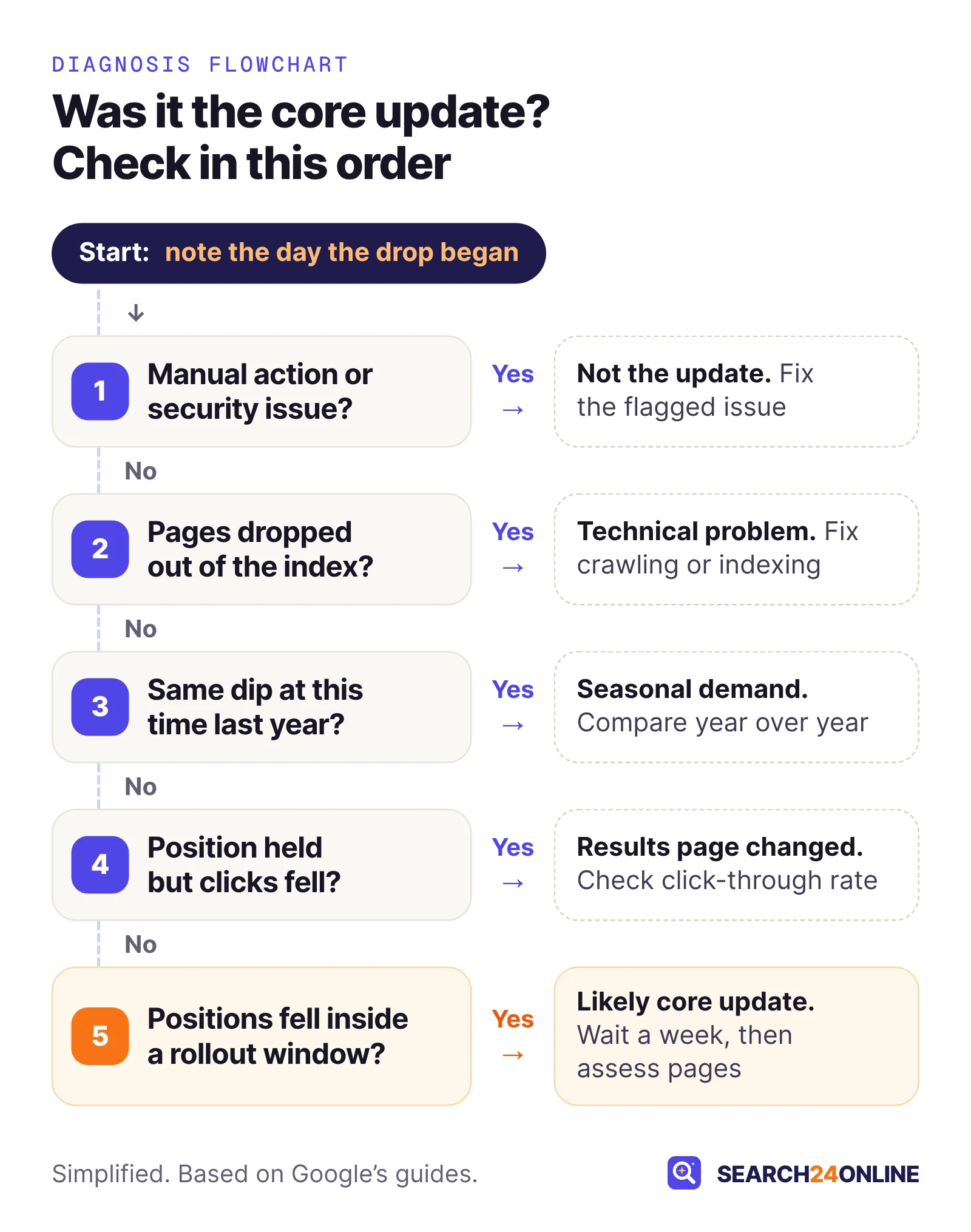
Match the day your decline started against the dashboard’s rollout window, then check that your positions fell, not only your clicks. Google’s core update guide sets out the sequence: note the start and end dates of the update, wait, compare, then review your top pages and queries.
- Find the first day of the declineIn Search Console, open Performance > Search results, set the date range to the last 16 months, and turn on clicks, impressions and average position. Note the first day the line bends, not the lowest day.
- Line it up with the dashboardA drop that started before a rollout began wasn’t caused by it. Rollouts take days to weeks, so a genuine core update drop can begin on any day inside the window.
- Wait a full week after completionGoogle recommends “waiting at least a full week after a core update completes before analyzing your site in Search Console.” Until then, the numbers are still moving.
- Compare two clean weeksUse the date comparison to set a week after that waiting period against the week before the rollout started. Use matching weekdays so a weekend doesn’t distort the result.
- Check which metric movedFalling average position across many queries points to a ranking change. Flat position with falling clicks points elsewhere, as the next section explains.
- Split by search typeGoogle suggests checking whether the drop happened in Web Search, Google Images, Video or News. Discover traffic has its own report in Search Console.
A worked example with the May 2026 update: it began on May 21 and finished at the start of June. The earliest clean comparison is a week beginning about June 9 set against May 14 to 20. For the March 2026 update, which finished on April 8, compare a week from April 16 onward with March 17 to 23. The obvious baseline, the week right before March 27, includes the March 24 spam update, and you want that out of your “before” picture.
The March 2026 spam update started on March 24 and the core update on March 27. If your drop began between those dates, look at Google’s spam policies before anything else: a spam problem has a different fix. Our guide to Google’s spam policies in plain English explains each one.
One habit worth starting now: Search Console’s custom annotations let you pin a note of up to 120 characters to a date on the Performance chart (up to 200 per property, shared with everyone on it). Mark each rollout window and each change you make to the site, so you have a record later.
What else could have caused the drop?
Technical problems, manual actions or security issues, seasonal demand, changes to the results page and reporting glitches can all look like a core update hit. Google’s guide to debugging traffic drops lists most of these alongside algorithm updates; results-page changes are the one it doesn’t cover. In audits we often find the timing was a coincidence: a redesign went live the same month, or a staging “noindex” tag survived the launch.
| Likely cause | What the data usually shows | Where to confirm it |
|---|---|---|
| Core update | Positions slip across many pages and queries, starting inside a rollout window | Search Status Dashboard, Performance report comparison |
| Technical problem | Specific pages or sections lose almost all impressions from a specific date | Page indexing report, Crawl stats report, URL Inspection |
| Manual action or security issue | Sudden drop across the site or a section, with a message in Search Console | Manual actions and Security issues reports |
| Seasonality or falling demand | Positions steady, impressions down, same pattern in the same months last year | Performance report over 16 months, Google Trends |
| Results page change | Impressions and position steady, clicks and click-through rate down | Performance report, Generative AI performance report |
| Reporting glitch | An odd drop in the data that your analytics doesn’t show | Search Console’s data anomalies notes |
Technical problems
A technical problem usually knocks specific pages out entirely rather than nudging them down. Google’s debugging guide says to check the Crawl stats and Page indexing reports for a spike in issues that matches the drop. The common culprits are a site redesign or migration with missing redirects, a noindex tag or robots.txt rule left over from development, wrong canonical tags and server errors. Our walkthrough of why a website is not showing up on Google covers each check, and the migration checklist covers redesigns. For a quick outside look, our free SEO + GEO report checks robots.txt, the XML sitemap, indexability, canonicals and broken links on your site.
Seasonality and demand
If people search less, you get fewer impressions even at the same position. Google suggests viewing the last 16 months to see whether the drop repeats every year, comparing the last three months year over year, and checking Google Trends to see whether interest in your main queries fell for everyone. A pool installer losing traffic in October is not looking at a core update.
Changes to the results page
Your ranking can hold while your clicks fall, because the page around your listing changed. In a Pew Research Center study of 900 US adults’ browsing in March 2025, people clicked a traditional result in 8% of visits when Google showed an AI summary, against 15% when it didn’t. Search Console counts an AI Overview as a single position, with every link inside sharing it, and reports AI Overview and AI Mode traffic within the “Web” search type. The Generative AI performance report, available to all sites since August 31, 2026, shows how often links to your pages appeared in AI Overviews and AI Mode (Google’s help page describes impressions, not clicks). Our guide to zero-click search covers how to win customers who never click.
Both can happen in the same weeks. Separate pages whose position fell from pages whose position held but clicks fell, and treat them as two problems.
Which pages and queries dropped, and what do they have in common?
Usually a minority of pages and queries account for most of the loss, and they tend to share a page type, topic or intent. Finding that pattern turns “Google hates us now” into a specific problem with a specific fix.
Build the loss list
In the Performance report, compare your two clean weeks and open the Pages tab, then the Queries tab. Export both and calculate the change in clicks and average position for each row. Sort by clicks lost, because the pages that lost the most are where improvement pays back most.
Then put every losing page in one of two groups, using the examples in Google’s core update guide. A small drop, like position 2 to 4, needs no drastic action, Google says. A large drop, like position 4 to 29, calls for a deeper assessment. Pages that gained can hint at what the update now prefers on your own site.
Look for the shared trait
Sort the large-drop pages by template, topic cluster, age and search intent. Patterns we see in audits:
- One template, many near-copies. Location or service pages built from the same text with the city or product name swapped tend to fall together.
- Pages competing with each other. Two or three pages target the same search, so Google keeps switching between them and neither ranks well. This is called keyword cannibalization.
- Thin or outdated content. Short posts written to a keyword list years ago, with old prices, dead links or advice that no longer applies.
- Wrong intent. A sales page trying to rank for a question people want explained, or a long guide for a search where people want to buy.
Search the lost queries yourself
Search your top ten lost queries in a private browser window and note what now sits above you: a competitor, a forum thread, a video, an AI Overview. Then read the top result as a customer would, next to your own page. A common situation: a regional HVAC company’s “furnace repair cost” page gives a vague “call for a quote,” while the page now above it explains price ranges, what drives them and when replacing beats repairing.
How do you judge your pages the way Google’s questions do?
Score your biggest losers against Google’s own self-assessment questions, and have someone outside the business do the same. For a large, sustained drop, Google’s core update guide points to the questions in its guide to helpful, reliable, people-first content, and suggests asking people you trust who are “unaffiliated with your site” to assess it too. That guide was last updated on October 5, 2026.
The questions we find most revealing for pages that dropped:
- “Does the content provide original information, reporting, research, or analysis?”
- “Does the content provide insightful analysis or interesting information that is beyond the obvious?”
- “Are you mainly summarizing what others have to say without adding much value?”
- “Does your content leave readers feeling like they need to search again to get better information from other sources?”
- “Is this content written or reviewed by an expert or enthusiast who demonstrably knows the topic well?”
A practical way to use them: put each losing page next to the result that now outranks it, answer every question for both, and write one sentence on what the other page offers that yours doesn’t. If your honest answers are “yes, we’re mainly summarizing” or “a reader would need to search again,” you’ve found the work.
The same guide asks who created the content, how (including any use of AI) and why: mainly to help people, or to attract search visits. It also explains E-E-A-T (experience, expertise, authoritativeness and trust): trust is the most important of the four, E-E-A-T “itself isn’t a specific ranking factor,” and Google’s human search raters have no control over how pages rank.
The self-assessment isn’t a checklist to tick so the algorithm notices. It describes what a satisfied reader experiences. If a change wouldn’t make sense for a customer who arrived from a friend’s link, it probably won’t move a core update either.
Which improvements are worth making?
Improve the pages that lost the most valuable traffic, in ways a reader would notice. Google’s guide asks you to consider how you can improve content “in meaningful ways,” and notes that rewriting or restructuring can make a page easier to read and navigate. In practice, the changes that hold up fall into a few groups.
Add what only you can say
Original information is the hardest thing for a competitor or an AI summary to copy. A service business can add real price ranges and what moves them, photos from actual jobs, the questions customers ask on the phone, and the mistakes it sees homeowners make. A retailer can add sizing notes from returns and honest “who this isn’t for” sections. Name the person who wrote or reviewed it, and say why they know.
Fix the structural problems
Merge pages that compete for the same search into one stronger page and redirect the others to it. Rewrite pages whose format doesn’t match the intent. Update outdated facts, prices and examples, and change the visible date only when the content has substantially changed: Google’s helpful content guide lists changing dates “to make them seem fresh” as a warning sign. Then link to the improved pages from your strongest related pages so visitors and Google can find them.
Deal with sections built for search engines
If a whole section exists to catch search traffic rather than to help customers, such as hundreds of near-identical location pages, improving it may not be realistic. Google calls deleting content “a last resort, and only to be considered if you think the content can’t be salvaged,” and adds that wanting to remove whole sections is likely a sign they were made for search engines first. Consolidate where you can, remove only what can’t be saved, and redirect removed URLs to the closest useful page.
A full SEO audit is the right tool when the drop touches many page types at once. It shows whether you face one content problem or several overlapping ones, such as weak architecture, thin topical coverage and competing pages.
What should you avoid doing after a core update?
Avoid quick, sweeping changes. Google’s guide says plainly to avoid “quick fix” changes. The common reactions below make recovery harder.
- Panic edits on pages that still perform. Rewriting every title or restructuring the site in week one makes it impossible to tell what helped. Pages with small slips need watching, not surgery.
- Mass deletion. Removing hundreds of pages because traffic fell is the opposite of Google’s advice. Its helpful content guide also warns against adding or removing lots of content mainly to make a site seem fresh.
- Buying links. Google’s spam policies list “buying or selling links for ranking purposes” as link spam, and say sites that violate the policies “may rank lower in results or not appear in results at all.” Paid links turn a ranking problem into a policy problem.
- Publishing pages at scale to make up the traffic. Churning out many AI-written or templated pages for rankings is what Google’s spam policies call scaled content abuse.
- Paying for a promised recovery. No one can guarantee when or whether rankings return. Anyone who does is guessing or selling something risky.
Improve a defined set of pages first and leave similar pages untouched for now. If the improved set recovers faster over the next few months, you have evidence about what worked instead of a guess.
How long does recovery take after a core update?
Expect months, not weeks. Google says “some changes can take effect in a few days,” but “it could take several months for our systems to learn and confirm” that a site has improved. It adds that if a few months have passed with no effect, “that could mean waiting until the next core update.” Google is also clear that there is no guarantee changes will produce a noticeable impact.
“Next core update” is not a fixed date either. On the dashboard’s dates, the December 2025 and March 2026 core updates were about three and a half months apart, and March to May was eight weeks. More than five months have now passed since May 21 without another. Plan your improvements as if the next update could come in a few weeks or not until well into next year.
What a realistic recovery looks like, in our experience:
- Weeks 1–2 after completion: wait, compare clean weeks, build the loss list, rule out the other causes.
- Month 1: self-assess the biggest losers, decide what to improve, merge or remove, and start on the highest-value pages.
- Months 2–6: keep improving, track the improved set against the untouched set, and annotate every change in Search Console.
- Next core update: run the same comparison. Some pages may never return to their old positions, because a better page now exists or the results page changed. That is a reason to build new strengths, not to stop.
For context on why organic work moves on this timescale in general, see how long SEO takes to work. Our view: the sites that recover tend to keep improving content, structure and technical health continuously, not only after a drop.
Common questions
How do I know if a Google core update hit my site?
The update is a likely cause when your average positions fell across many pages and queries, starting inside a rollout window listed on Google’s Search Status Dashboard. First rule out a technical problem, a manual action, a seasonal dip and a results-page change, since any of them can coincide with an update.
Is a core update a Google penalty?
No. A core update is a broad change to how Google’s systems assess content, and Google says it does not target specific sites or pages. Spam-policy violations are handled through manual actions, shown in Search Console’s Manual actions report, and spam updates, listed separately on the Search Status Dashboard.
How many core updates has Google released in 2026?
Two, as of November 2, 2026: the March 2026 core update (March 27 to April 8) and the May 2026 core update (from May 21, rolling out for 11 days and 21 hours), according to Google’s Search Status Dashboard.
Can a site recover before the next core update?
It can. Google says some changes take effect within a few days and that it continually releases smaller core updates that can lift improved sites. It also says its systems may need several months to confirm improvements, and that after a few months without change the next core update may be the next opportunity.
Did AI Overviews cause my traffic drop instead of the core update?
Check average position first. If your positions held steady while clicks and click-through rate fell, a change in the results page, such as an AI Overview appearing, is the more likely cause. If positions fell, the ranking change matters more, though both can happen at once.
Sources
- Google Search Central: Google Search’s core updates and your website
- Google Search Status Dashboard: incident summary (ranking updates)
- Google Search Status Dashboard: March 2026 core update
- Google Search Central: Debugging drops in Google Search traffic
- Google Search Central: Creating helpful, reliable, people-first content
- Google Search Central: Spam policies for Google web search
- Search Console Help: Performance report (Discover)
- Search Console Help: What are impressions, position, and clicks?
- Search Console Help: Custom annotations
- Search Console Help: Generative AI performance report
- Google Search Central: AI features and your website
- Pew Research Center: Google users are less likely to click on links when an AI summary appears (2025)
Lost traffic? Rule out technical causes first, free.
We’ll analyze your website, including indexability, robots.txt, canonicals and broken links, create your SEO + GEO report and give you password-protected dashboard access to view it within 24 hours.
Free · No obligation · We only review your public pages.