
How to Get More Google Reviews Without Breaking Google Rules
Businesses with a steady stream of reviews rarely do anything clever. They ask every customer at the right moment with a direct link, and they never pay, filter or fake. Here is the system, the wording and the rules behind it.
Key takeaways
- The reliable way to get more Google reviews is to ask every customer, soon after the job, with the direct review link or QR code from your Google Business Profile. Google suggests receipts, thank-you emails and printed QR codes in store.
- Google bans the common shortcuts: incentives for any review, asking only happy customers (review gating), reviews from employees or anyone with a conflict of interest, staff review quotas, and asking reviewers to mention specific content such as a staff member’s name.
- The FTC’s Consumer Review Rule has been in effect since October 21, 2024, with civil penalties of up to $53,088 per violation. In May 2026 the Justice Department sued a home-services operation accused of creating over 15,000 fake Google profiles and posting fake reviews.
- BrightLocal’s 2026 survey of 1,002 US consumers found 74% look for reviews written in the last three months, so a steady flow of requests beats a one-off push.
- Reply briefly and specifically, never reveal customer details, and report only reviews that break Google’s policies, through your Business Profile or the Reviews Management Tool.
On this page
What do Google’s review rules allow, and what do they ban?
Google lets you ask any customer for a review and gives you the tools to do it. What it bans is anything that rewards, filters, pressures or scripts the reviewer. Its Maps content policy permits asking for reviews of genuine experiences, as long as you offer no incentive and don’t try to influence the rating or the wording.
The policy is more specific than most owners expect. Merchants may not “discourage or prohibit negative reviews, or selectively solicit positive reviews from customers.” They should not pressure people to review “while on the premises,” or ask for specific content. It also bans staff review quotas and asking staff to collect reviews that name a staff member. The table compares Google’s rules with federal law.
| Practice | Google Maps policy | FTC Consumer Review Rule | Do this instead |
|---|---|---|---|
| Asking every customer for an honest review | Allowed and encouraged | Allowed | Make it automatic after every job or visit |
| Discount or gift for any review, whatever the rating | Banned (fake engagement) | Not banned by the rule unless tied to sentiment | Thank people with good service, not rewards |
| Reward only for positive reviews | Banned | Banned | Same request, no reward, for everyone |
| Asking only customers you think are happy (gating) | Banned | No specific ban, but the FTC says it could violate the FTC Act | Send the review link to every customer |
| Reviews from employees or relatives | Banned (conflict of interest) | Allowed only with clear disclosure of the relationship | Keep insiders off your Google profile |
| Staff quotas, or asking customers to name a staff member | Banned | Not among the rule’s listed bans | Track whether requests went out, not review counts |
| Threats or false accusations to get negative reviews removed | Google’s reply tips: never attack reviewers | Banned (review suppression) | Reply calmly; report real violations to Google |
Breaking these rules costs more than the reviews. Google removes violating content and can restrict the profile for a set period: no new reviews, existing reviews unpublished, or a warning to customers that fake reviews were removed. Google says it emails owners before applying a restriction, and you can appeal. Its Maps policy also allows suspending or terminating the account. For the website side of the same thinking, see our guide to Google’s spam policies.
What does the FTC’s fake review rule cover, and is it enforced?
The FTC’s Rule on the Use of Consumer Reviews and Testimonials went into effect on October 21, 2024, and it is being enforced, with civil penalties available for knowing violations. As the FTC’s December 2025 announcement summarizes it, the rule bans reviews that misrepresent the reviewer’s experience or come from non-customers, rewards tied to positive or negative sentiment, and undisclosed reviews by insiders or their close relatives. It also covers company-controlled “independent” review sites, review suppression and fake follower or view counts.
Enforcement has moved from warnings to lawsuits. On December 22, 2025, the FTC said it had sent warning letters to 10 companies, noting penalties of up to $53,088 per violation. On May 11, 2026, after an FTC referral, the Justice Department sued B.E.S.T. GDR, LLC, doing business as Premium Home Service, and its CEO. The complaint alleges the company created over 15,000 fake business profiles on Google Search and Maps and posted fake reviews praising them. Those are allegations, not findings, but the case cites the Consumer Review Rule and shows where federal attention is pointed: local service listings.
The FTC’s Q&A says the rule allows incentives for reviews that don’t require a particular sentiment. It also lets an owner’s relatives review with clear disclosure. Google bans both. Follow Google’s rules and you will almost always be inside the FTC’s. This is general information, not legal advice.
Two more details from the FTC’s Q&A matter day to day. On asking only happy customers, the rule has no specific ban, but the FTC says the practice “could violate the FTC Act.” And the rule prohibits accusing a reviewer of something you know is false. Calling a real customer “a competitor posting fake reviews” in a public reply is not just bad manners; it can be a legal problem.
How do you build a review request system that works?
A working system asks every customer, at the same point in every job, through a channel they already use, with one reminder and no filtering. Consistency matters more than clever wording. BrightLocal’s Local Consumer Review Survey 2026 (1,002 US adults, published February 2026) found 78% of consumers had been asked for a review in the past year, and 28% said they “always” write one when asked, up from 16%. Asking is normal now; not asking is the gap.
Source for all three figures: BrightLocal Local Consumer Review Survey 2026.
- Get your direct review link and QR codeIn Google Business Profile on a computer, select Read reviews, then Get more reviews. Copy the link and save the QR code (Google says QR codes can’t be generated on mobile devices).
- Pick one trigger momentTie the request to an event your systems already record: a paid invoice, a closed work order, a completed appointment. If the trigger is “when staff remember,” requests go mostly to customers staff liked, which drifts toward gating without anyone intending it.
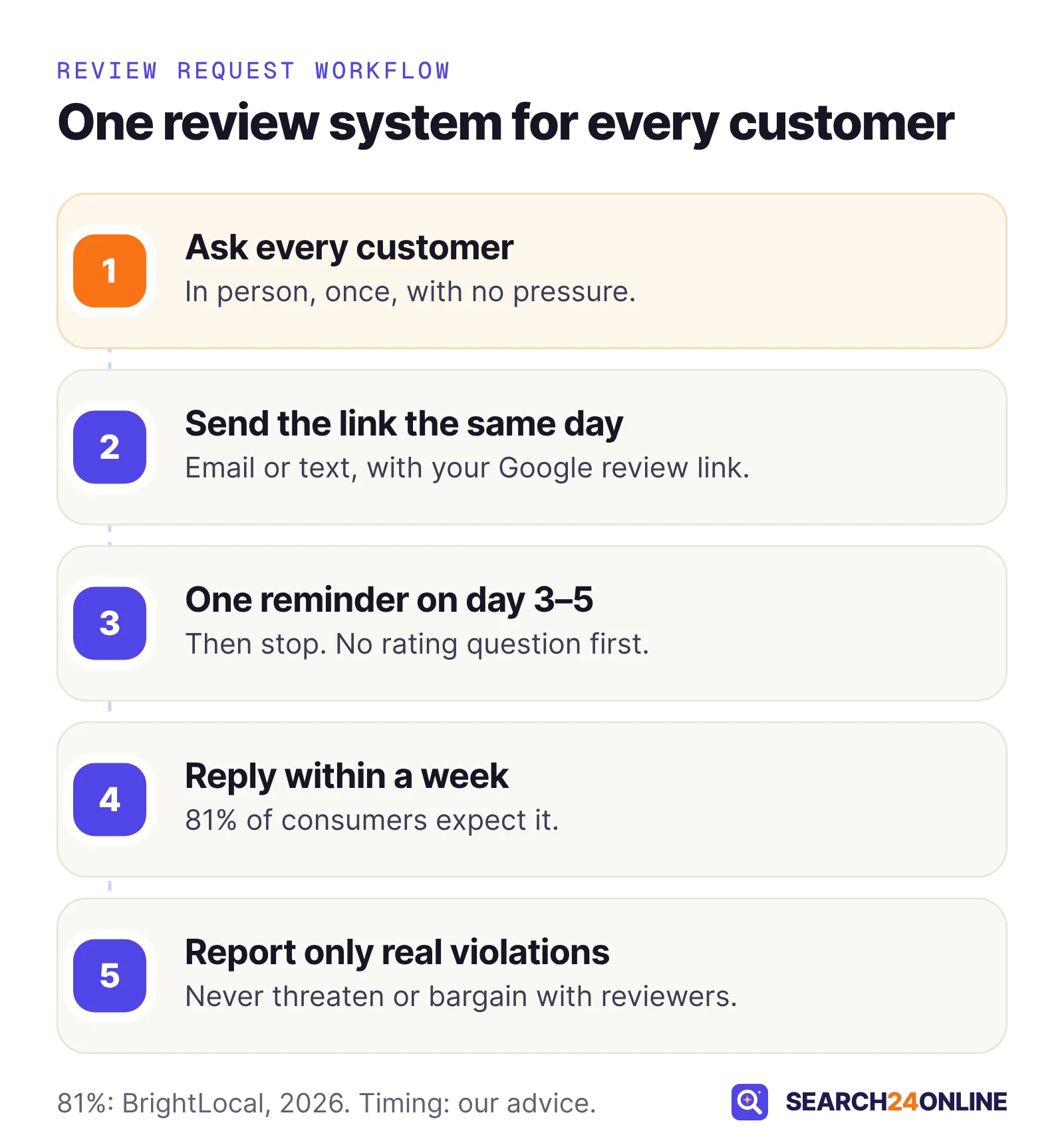
- Send it the same dayOur view: within a few hours of the job, while the experience is fresh. Google suggests receipts, thank-you emails, the end of a chat and printed QR codes in store.
- Send one reminder, then stopOne follow-up three to five days later catches people who meant to write. More than one starts to feel like pressure.
- Watch the process, not just the countCheck monthly that every completed job triggered a request. A drop in reviews usually means the trigger broke (new booking system, new employee, template switched off), not that customers stopped caring.
Timing by type of business
Ask when the customer has experienced the result, not just paid for it. Our starting points:
- Restaurants, salons, retail: a QR code on the receipt or table card, plus a same-day email or text if you have contact details.
- Home services: a text from the office when the work order closes, not the technician’s phone handed over. See our guide to SEO for plumbers, HVAC and home services.
- Healthcare, legal, accounting: an email after the appointment or matter closes, with no reference to the treatment or case.
- Long projects (remodels, web builds): after the final walkthrough, not at the deposit or halfway stage.
Google says customers must be signed in to a Google Account to leave a review, and can create one with a non-Gmail address. One line in your request saves people who would otherwise hit a sign-in screen and give up.
What should a review request say?
A good request is short, personal, names the job, links straight to the review form and asks for an honest opinion. It never hints at a rating, offers anything or steers unhappy customers away from posting. We wrote these four for this guide; replace the brackets and make them sound like you.
Email, sent the same day
Subject: How did your [service] go, [first name]?
Hi [first name], thanks for choosing [business] for your [service] on [day]. If you have two minutes, would you share your experience on Google? Honest feedback helps other people in [town] decide, and it tells us what to keep doing and what to fix.
Leave a review: [your Google review link] (you’ll need to be signed in to a Google account).
Thanks, [name], [role] at [business], [phone]
Text message
Hi [first name], it’s [name] from [business]. Thanks for having us out today. Would you share your experience on Google? [link] Reply STOP to opt out.
Text only customers who agreed to receive texts, usually at booking, and honor opt-outs. Ask your SMS provider how it records consent before switching this on.
One reminder, three to five days later
Hi [first name], a quick follow-up in case my last message got buried. If you’d like to review your [service], here’s the link: [link]. Either way, thanks for choosing us. This is the only reminder you’ll get.
In person, at the end of the visit
“Thanks for coming in today. We ask everyone to share their experience on Google; the card has a QR code that goes straight to our page. Whatever you think, an honest review helps us.”
Then drop it. Don’t wait while they write or hand them a tablet at the counter; Google’s policy rules out pressure on the premises.
“If you loved your visit, leave us five stars” steers the rating. “Get 10% off your next visit when you leave a review” is an incentive. “Please mention Jake by name” requests specific content about a staff member. “Not happy? Call us before you post” discourages negative reviews. You can offer a phone number for problems, but every customer must still get the same review link.
How should staff ask for reviews without breaking the rules?
Give staff one short script, make the written request automatic, and never reward individuals for review counts. That last point surprises owners, because “most five-star reviews this month wins a gift card” is a common contest. Google’s policy lists staff review quotas, and asking for reviews that identify a staff member, as rating manipulation. A process that holds up:
- The system sends the request, not the person. Staff mention reviews in person; the email or text goes to everyone from your booking, invoicing or CRM tool.
- Nobody chooses who gets asked. If a technician can skip the request for a difficult customer, you have built a gate.
- Measure completeness, not stars. Track the share of completed jobs that triggered a request.
- No staff or family reviews. Google treats content based on current or former employment as a conflict of interest. Put that in onboarding; well-meaning new hires do it.
- Handle complaints on the spot. Fix the problem when you can, and leave the review request exactly as it is.
A pattern we often see on local business websites: a “Review us” page that asks for a star rating first. Only four- and five-star answers see the Google link; everyone else gets a private feedback form. Often it is a review-software setting someone switched on years ago. It is exactly what Google means by selectively soliciting positive reviews. Change it so every visitor sees the Google link; the private form can sit beside it as an extra option.
How should you respond to Google reviews?
Reply promptly, briefly and specifically, sign with your name, and never use the reply to sell or argue. Google’s tips say to keep replies short and polite, skip deals and promotions, never attack the reviewer and respond in a timely way. BrightLocal’s 2026 survey found 89% of consumers expect owners to respond, 81% expect it within a week, and 50% are put off by generic or templated replies.
Google’s local ranking page says helpful replies can help a business stand out, but it lists review count and ratings, not replies, as the review signals for ranking. Reply for the customers reading.
A positive review
Weak:
Thank you for the 5 stars. We are the best AC repair, furnace repair and duct cleaning company in Austin. Call today for 15% off.
Better:
Thanks, Maria. Glad the new thermostat is keeping the upstairs cooler, and I’ll pass your note to the crew. If anything changes once the summer heat arrives, call the office and we’ll take a look. – Dan, owner
The weak version stuffs in keywords, pushes a discount and could sit under any review. The better one shows a person read it.
A negative review
Weak:
This is not what happened. You were 40 minutes late for your appointment and your card was declined twice. We stand by our work.
Better:
Sam, I’m sorry the repair took two visits; that isn’t the standard we aim for. I’d like to understand what went wrong and put it right. Please call me directly at [number] or email [address]. – Dan, owner
The weak reply discloses private details and argues in public, in front of every future customer. Google’s guidance: check your records, apologize where appropriate, admit real mistakes without accepting blame for things outside your control, and invite the reviewer to continue offline.
In December 2022, HHS’s Office for Civil Rights announced a $23,000 settlement with a California dental practice. It had disclosed patients’ names, treatment and insurance details in replies to online reviews. A safe reply: “Thank you for the feedback. Privacy rules prevent us from discussing anyone’s care online, but we would welcome the chance to talk. Please call our practice manager at [number].” More in our guide to SEO for medical clinics; lawyers and accountants should check their own confidentiality rules.
What can you do about negative and fake reviews?
Answer a genuine negative review as a customer service problem; report a review that breaks Google’s policies. Google is explicit: you can report any review, but only policy violations are eligible for removal, and you should not report a review just because you disagree with it.
Worth reporting: reviews from people who were never customers, competitor attacks, spam, off-topic rants, personal information, and coordinated batches. Google’s policy names “unusual volumes or patterns of review contributions” as a sign of manipulation, useful context if ten one-star reviews from new accounts arrive in one evening.
- Reply first, calmlyKeep it neutral and accuse no one: “We can’t find a record of a visit matching this description. If you are a customer, please contact [email] so we can help.”
- Report it from your Business ProfileSelect Read reviews, then the report icon next to the review, choose a reason and send. Or use the Reviews Management Tool and report a new review for removal.
- Track the decisionGoogle says evaluation typically takes several days. The Reviews Management Tool shows Decision pending, Report reviewed – no policy violation, or Escalated.
- Appeal once, with evidenceIf Google finds no violation, you get a one-time appeal covering up to 10 reviews. Explain which policy each review breaks.
- Handle extortion separatelyIf someone floods your profile with negative reviews and then demands money, Google’s help points to a separate extortion reporting process. Our advice: don’t pay or negotiate; save the messages, dates and review links.
Google notes its automated systems occasionally remove legitimate reviews by mistake; if a real customer’s review vanishes, contact support. And never threaten reviewers to get a review down: the FTC’s Q&A says the rule prohibits groundless legal threats and intimidation used to remove reviews.
What is true and false about review velocity?
“Review velocity” usually means how fast new reviews arrive, and most of what is said about it goes further than the evidence. Here is what can be supported and what can’t.
Myth: Google ranks you on a target number of reviews per week
Google has published no such number. Its local ranking help names relevance, distance and prominence, and says “more reviews and positive ratings can help your business’s local ranking.” Practitioners do think freshness matters. In Whitespark’s 2026 Local Search Ranking Factors survey of 47 local search experts, published November 2025, review recency ranked 11th and a sustained influx of reviews over time, rather than bursts, ranked 14th of 187 map pack factors. That is expert opinion, not a Google statement, and it describes a habit, not a quota.
Myth: a burst of genuine reviews will get you penalized
Google does not say genuine reviews get removed for arriving together; its policy targets unusual patterns that appear designed to manipulate a rating. Our view: emailing your whole five-year customer list in one afternoon is still a poor idea. Old customers barely remember the job, and you get one spike followed by silence, while customers look for recent reviews.
Myth: keywords in reviews and replies boost rankings
You can’t ask customers to include keywords anyway, because Google bans requesting specific content. For replies, experts in the Whitespark survey ranked “keywords in owner responses to reviews” 182nd of 187 factors, and “presence of owner responses to most reviews” 122nd. Write replies for readers.
True: rating and count matter to customers as much as to rankings
BrightLocal found 68% of consumers will only use a business with four stars or more, and 31% want 4.5 or higher. Whitespark’s experts ranked high Google ratings 6th and the number of reviews with text 9th. Our guide to ranking in the Google map pack covers the other factors.
Why do reviews alone not win the customer?
Reviews earn the click, but customers still check your profile and website before calling, and increasingly an AI assistant summarizes it all. BrightLocal’s 2026 survey found 45% of consumers use AI tools such as ChatGPT for local recommendations, and 82% read AI-generated review summaries. Google is still where 71% of consumers read reviews, though that is down from 83% a year earlier.
In audits we often find businesses with strong ratings whose websites undercut them: name, address and phone details that don’t match the profile, no click-to-call on mobile, no business structured data, thin service pages. A 4.8-star profile that links to a vague home page loses customers at the last step. Reviews are one part of local SEO; a complete profile is another, covered in our Google Business Profile optimization guide.
To see how your site handles the visitors your reviews send, our free SEO + GEO report analyzes your website, including local and trust signals such as NAP, click-to-call and business schema, with password-protected dashboard access within 24 hours.
Common questions
Can I offer a discount or a prize draw entry for leaving a Google review?
No. Google’s Maps policy bans incentives such as payment, discounts and free goods or services in exchange for any review, even if every rating is rewarded equally. We treat a prize draw entry the same way.
Can my employees or family members review my business on Google?
Not on Google. Its policy treats content based on a conflict of interest, including current or former employment, as rating manipulation. The FTC rule allows relatives to review with clear disclosure, but Google’s rules decide what stays on your profile.
How long does Google take to review a reported review?
Google says evaluating a report typically takes several days. You can follow the status in the Reviews Management Tool, and if Google finds no violation you get one appeal, covering up to 10 reviews at a time.
Can I pay a company to remove negative Google reviews?
Nobody can make Google remove a genuine review that follows its policies; only reviews that violate policy are eligible for removal. If someone posts negative reviews and then demands money to take them down, that is extortion, and Google has a separate report process for it.
Should I reply to every Google review?
Reply to every negative review and most positive ones. Google says you do not need to thank every reviewer publicly. Still, BrightLocal’s 2026 survey found 80% of consumers are likely to use a business that responds to all its reviews.
Sources
- Google Maps User Contributed Content Policy: Prohibited and restricted content
- Google Business Profile Help: Create a Google link or QR code to request reviews
- Google Business Profile Help: Tips to get more reviews
- Google Business Profile Help: Remove reviews from your Business Profile
- Google Business Profile Help: Business Profile restrictions for policy violations
- Google Business Profile Help: Tips to improve your local ranking on Google
- FTC: Consumer Reviews and Testimonials Rule, Questions and Answers
- FTC (December 22, 2025): FTC Warns 10 Companies About Possible Violations of the Agency’s New Consumer Review Rule
- U.S. Department of Justice (May 11, 2026): Complaint against B.E.S.T. GDR, LLC, doing business as Premium Home Service
- BrightLocal: Local Consumer Review Survey 2026
- Whitespark: 2026 Local Search Ranking Factors
- HHS Office for Civil Rights (December 14, 2022): Settlement with dental practice over disclosures of patients’ protected health information
Your reviews send people to your site. Is it ready for them?
We’ll analyze your website, including local and trust signals, create your SEO + GEO report and give you password-protected dashboard access to view it.
Free · No obligation · We only review your public pages.