
E-commerce SEO: Product Pages, Category Pages and AI Shopping
An online store gets found two ways: as pages Google crawls and ranks, and as product data that Google Shopping, AI Mode and ChatGPT read. This guide covers both, with Google’s current rules for filters, variants, structured data and stock changes.
Key takeaways
- E-commerce SEO means getting a store found twice: its category and product pages ranking in Google, and its product data feeding Google Shopping, AI Mode, Gemini and ChatGPT.
- Google’s faceted navigation guidance (updated December 2025) recommends blocking filter URLs you don’t need indexed in robots.txt, and returning a 404 for filter combinations with no results.
- Google recommends using Product structured data and a Merchant Center feed together; free listings require fields such as price, availability and image, and in the US, shipping settings.
- A temporarily out-of-stock product should stay live with its status shown on the page and matching in your feed; Merchant Center accepts clear “sold out” text or a greyed-out buy button.
- AI shopping runs largely on product data: Google says its Shopping Graph holds over 60 billion listings, and OpenAI says ChatGPT’s product results are not ads.
On this page
- What makes e-commerce SEO different from SEO for other websites?
- What should a category page include to rank?
- What makes a product page rank and convert?
- Filters and faceted navigation
- Duplicates and variants
- Product schema and Merchant Center
- Out-of-stock and discontinued
- Internal linking and speed
- How do AI shopping tools choose which products to show?
- Where should a store start?
- Common questions
- Sources
What makes e-commerce SEO different from SEO for other websites?
Three things: scale, change and data. A store with 400 products can generate tens of thousands of URLs once filters, sort orders and variants are counted. Prices and stock change daily. And more product discovery happens in places that read your product data rather than your page copy: the Shopping tab, AI Mode, Gemini and ChatGPT.
So we think of store SEO in three layers. The pages layer is your categories and products, the things people land on. The crawl layer decides which URLs Google spends time on: filters, variants, pagination, discontinued items. The data layer is your structured data and Merchant Center feed, which have to agree with each other and with the page. Most stores we see have one layer in decent shape and neglect the other two.
In audits we often find the same pattern. Thousands of filter URLs are crawlable, so Google wastes its visits on “red, size 9, sorted by price” while new products sit unindexed. Category pages are thin grids with no text. Product pages reuse the manufacturer’s description word for word. Structured data is missing or shows a different price than the page. None of this is exotic; fixing it in the right order is most of the job.
What should a category page include to rank?
A category page needs to be the best answer to a broad, plural search: “women’s hiking boots”, “espresso machines”, “standing desks”. In our experience, categories have the most ranking potential in a store, because they match how people start shopping, and they are the pages most often neglected.
Crawlable links to every product
Google’s ecommerce site-structure guide says it is “strongly recommended to link to all products that you wish indexed” from category pages, with a sitemap or Merchant Center feed as the fallback. It also warns that Googlebot generally doesn’t type queries into your search box, so products reachable only through site search may never be found. Use real <a href> links, not JavaScript click handlers on other elements. For long categories, Google’s URL-structure guide asks for a unique URL for every page of results.
A short, useful introduction
Our view: two to four sentences above the grid, and a longer buying guide below it, beat a wall of keyword text either way. Say what the category covers, who it’s for and how to choose (“Waterproof boots use a membrane; check the drop and the weight if you hike long days”). Link to subcategories and relevant buying guides.
One page per search intent
Keyword cannibalization, where several of your pages compete for the same search, is the category problem we see most often. A common situation: an outdoor retailer has a “Hiking Boots” category, a “Best Hiking Boots” blog post, a brand page and a seasonal sale page, all targeting “hiking boots”. Decide which page owns the phrase (usually the category), point the others’ internal links at it, and give each remaining page its own intent: the blog post compares models, the brand page covers that brand.
What makes a product page rank and convert?
A product page ranks for specific searches (a model name, a model plus an attribute) and has to convince someone close to buying. Pages that do both share an anatomy: a descriptive title, original images, visible price and stock, delivery and returns terms, a description that answers real questions, reviews and related links.
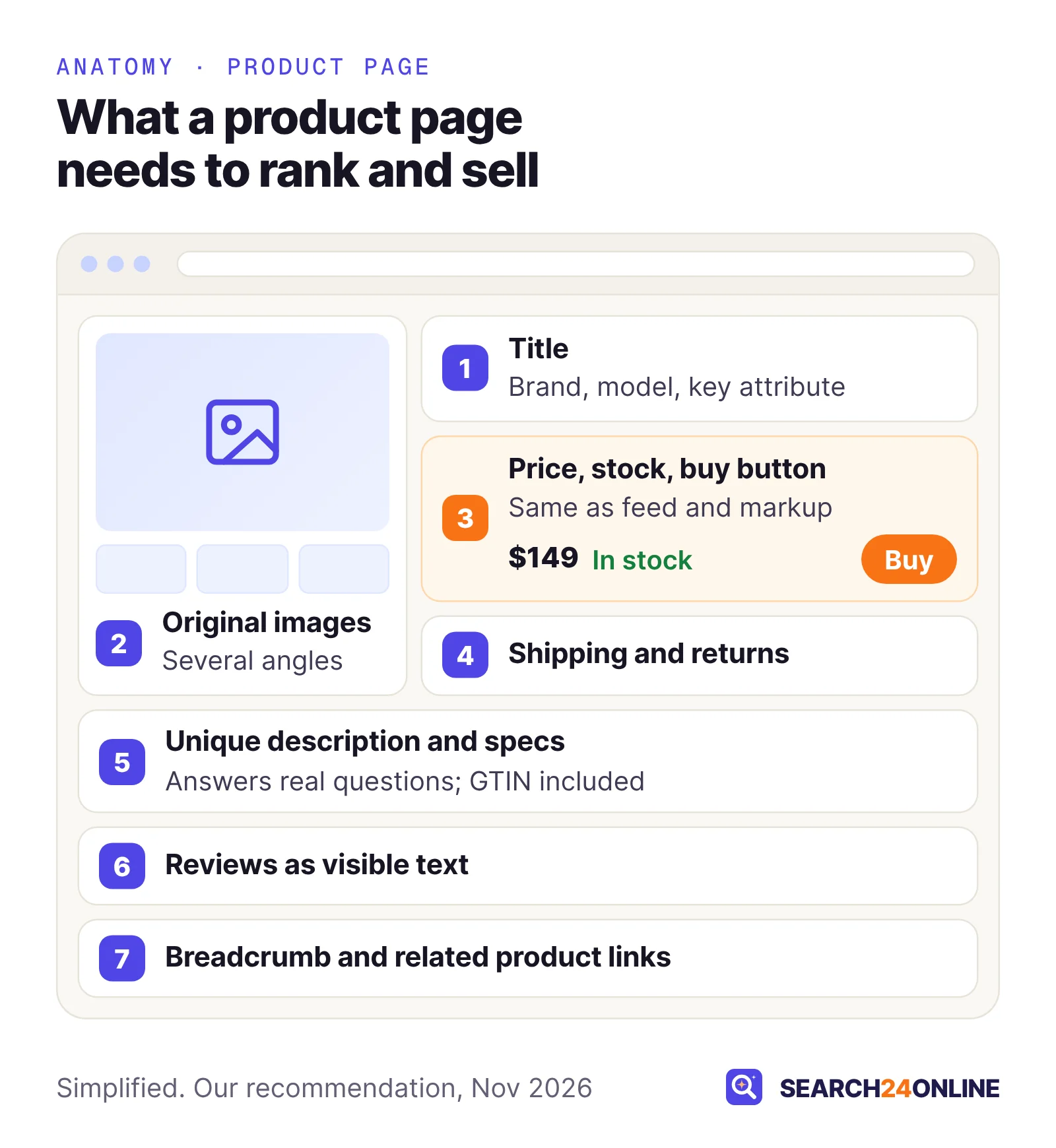
Title and heading. Brand, model and the attribute people search for: “Trailline Waterproof Hiking Boot, Women’s, Mid”, not “TL-204”. Images. Several angles, your own photos where you can, file names and alt text that describe the product. Price and availability. Shown in plain text near the buy button, and identical to what your feed and markup say.
Description. This is where most stores lose. If 40 retailers publish the same manufacturer paragraph, Google has no reason to prefer yours. Start with best sellers and high-margin items, and add what only a seller knows: how it fits, what it’s good and bad for, what customers ask before buying, what’s in the box. Identifiers. Include the GTIN (the barcode number) where the product has one; Google recommends “the most specific GTIN that applies” in its merchant listing documentation.
Reviews on product pages
Reviews give you fresh, specific text no competitor has. Keep them on the page as visible text, not only in a widget that loads late. For star ratings on Shopping ads and free listings, Merchant Center’s Product Ratings program needs at least 50 reviews across all your products. Reviews come in through a supported aggregator or a direct upload and are matched to items mainly by GTIN. Ask every buyer, never only the happy ones, and never pay for positive reviews; that is a trust problem and a legal one.
How should you handle filters and faceted navigation?
Decide which filter combinations deserve to be landing pages, make those indexable, and keep crawlers away from the rest. Faceted navigation (filters for size, color, brand, price) helps shoppers and is the biggest source of wasted crawling on most stores. Google’s guidance, last updated December 18, 2025, says crawlers may hit “a very large number” of filter URLs before working out that they’re useless, which slows discovery of new pages and costs server resources.
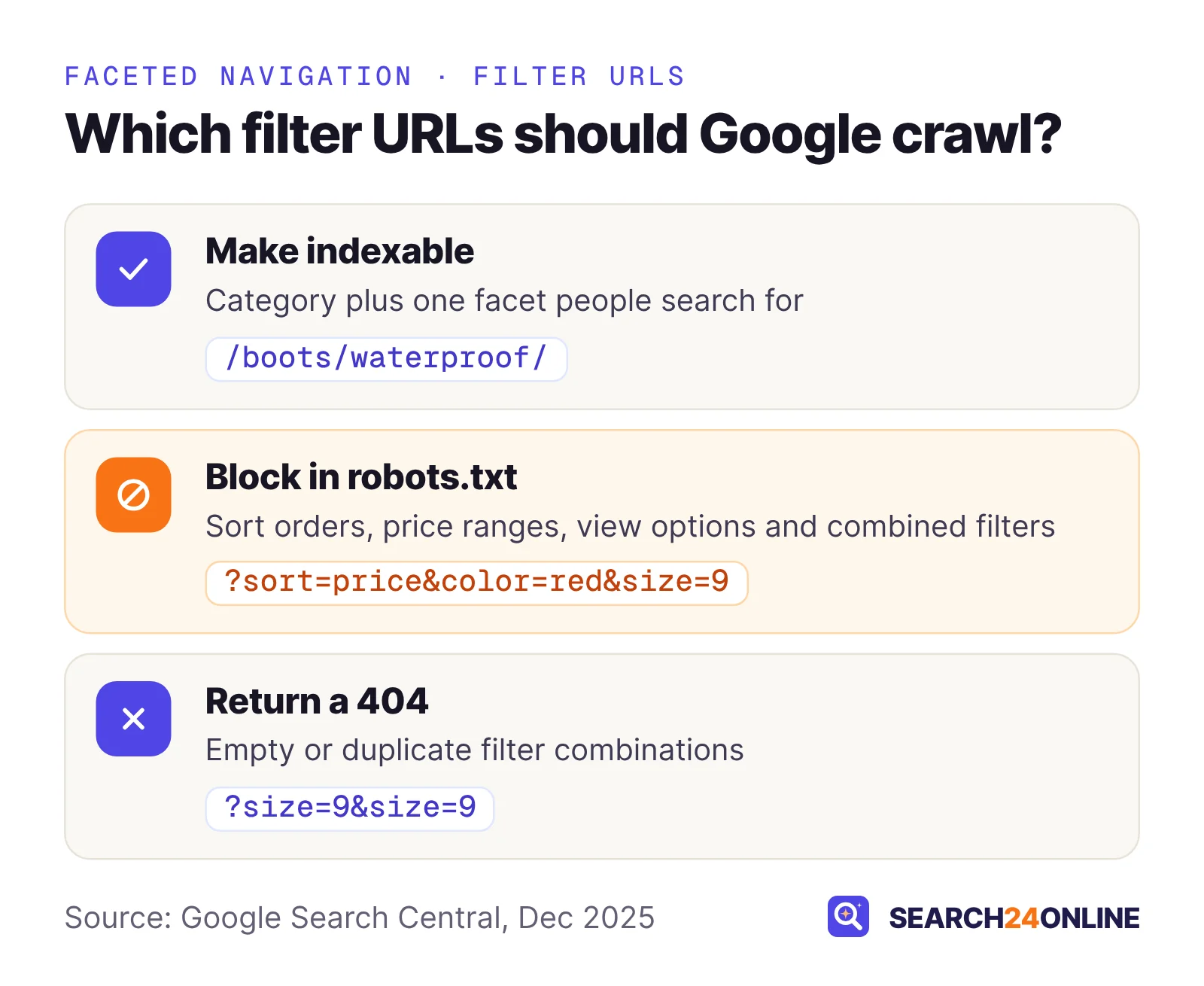
If you don’t need filter URLs indexed
Google’s first recommendation is to disallow them in robots.txt, or to apply filters with URL fragments (the part after #), which Google generally ignores for crawling. It describes rel="canonical" and rel="nofollow" as “generally less effective in the long term” for this job, and says nofollow only helps if every link to the URL carries it. A typical set of rules looks like this:
User-agent: *
# Keep crawlers out of sort orders, price ranges and view options
Disallow: /*?*sort=
Disallow: /*?*price=
Disallow: /*?*view=
# Multi-select filter combinations
Disallow: /*?*color=*&size=
Test rules against a list of real URLs before you ship them: a careless pattern such as size= also matches pagesize=. And remember that a crawler can’t read the canonical or noindex tag on a page it isn’t allowed to fetch.
If some filter pages should rank
Some combinations have real demand, such as “waterproof hiking boots”. Give those a stable, linked URL with its own title, heading and intro line, and keep them out of the block rules. For filter URLs you allow, Google asks for the standard & separator, a consistent filter order and no duplicate filters. When a combination has no results, return an HTTP 404 rather than redirecting to a generic error page.
Fixing filters with canonical tags alone. Google says a canonical may reduce crawling of the other versions only over time, and calls it less effective in the long term than robots.txt. If Search Console shows a growing pile of parameter URLs under “Discovered – currently not indexed”, crawl control is the fix, not more canonicals.
How do you avoid duplicate content from variants and multiple categories?
Give each product one main URL and each variant a crawlable URL that points back to it. Store duplicates come from variants, products listed in several categories, tracking or session parameters, and copied descriptions.
Variants
Google’s URL-structure guide asks that each variant be identifiable by a separate URL, either a path (/t-shirt/green) or a query parameter (/t-shirt?color=green). For optional parameters, it recommends the URL without the parameter as the canonical. It also notes that Google does not use fragments in indexing, so variants that exist only as #black and #white may be treated as one page. Google supports variant markup (a ProductGroup with its variants) for both product snippets and merchant listings, and recommends it if you sell variations.
Products in several categories
Our view: keep the category out of the product URL (/products/trailline-waterproof, not /womens/boots/hiking/trailline-waterproof), so a product listed under “Hiking”, “Sale” and “Waterproof” still has one address. Google’s guide asks for a self-referencing canonical on indexable pages and for the same URL in internal links, sitemaps and canonical tags.
Parameters and case
Google advises against internally linking to session IDs, tracking codes or user-relative values, and suggests converting URLs to one case if your server treats upper and lower case the same. In audits we regularly find internal links tagged with campaign parameters, quietly doubling the URL count.
Product structured data and Merchant Center: do you need both?
Yes, if you want the widest eligibility. Google says using both “maximizes your eligibility to experiences and helps Google correctly understand and verify your data.” The markup describes the page; the feed tells Google what to list and updates price and stock quickly.
Product snippets vs merchant listings
Google splits Product structured data into two uses. Product snippets are for pages where people can’t buy the product directly, such as review sites. Merchant listings are for pages where shoppers can buy from you, and only those pages are eligible. Merchant listings require a Product with name, image and offers, and an Offer with a price and currency. Availability, condition, shipping details, return policy and GTIN are recommended. Google also says it may try to verify merchant listing data before showing it.
<script type="application/ld+json">
{
  "@context": "https://schema.org",
  "@type": "Product",
  "name": "Trailline Waterproof Hiking Boot, Women's",
  "image": ["https://example.com/img/trailline-side.jpg"],
  "gtin13": "0123456789012",
  "brand": { "@type": "Brand", "name": "Trailline" },
  "offers": {
    "@type": "Offer",
    "url": "https://example.com/products/trailline-waterproof",
    "price": 149.00,
    "priceCurrency": "USD",
    "availability": "https://schema.org/InStock",
    "itemCondition": "https://schema.org/NewCondition"
  }
}
</script>
Every value in that block must match what the shopper sees. Our schema markup guide covers the other types worth adding, such as Organization, with your return policy nested under it as Google suggests for stores.
Merchant Center free listings
Free listings can show your products at no cost in the Shopping tab, product rich results, Google Images and Lens; Google’s help page also names Maps and Gemini. New Merchant Center accounts are opted in by default. The required product attributes are ID, title, link, image link, price, description and availability, with brand, GTIN or MPN, and condition required in some cases. Shipping settings are mandatory in the US, and Google asks for return policy information. Google is clear that permission to show products “doesn’t guarantee that your products will be shown.”
What should you do with out-of-stock and discontinued products?
Keep temporarily unavailable products live and honest; remove or redirect a page only when the product is gone for good. Deleting pages whenever stock runs out throws away rankings you’ll want back.
For anything in your Merchant Center feed, the page has to say the same thing as the feed. Google’s availability help page says availability must match across the landing page, checkout and your data source. For out-of-stock items it accepts clear text such as “sold out” or a disabled, greyed-out buy button; for in-stock items the buy button should be active. Preorder and backorder items need an availability date, shown on the page. Merchant Center’s landing-page rules get revised, so check the current help page rather than an older blog post.
| Situation | Page | Markup and feed | What we’d do |
|---|---|---|---|
| Back in a few weeks | Keep live (200), show “sold out” or a disabled button | OutOfStock / out_of_stock | Add a back-in-stock signup and links to similar items |
| Taking orders, ships later | Keep live, show the expected ship date | BackOrder or PreOrder, with an availability date in the feed | Keep the date honest and update it if it slips |
| Gone for good, direct successor exists | 301 redirect to the successor | Remove the old item from the feed | Redirect only to a genuinely equivalent product |
| Gone for good, page still gets visits or links | Keep as an information page with alternatives | Discontinued; remove from the feed | Useful for manuals, parts and spec lookups |
| Gone for good, no traffic, no links | Return 404 or 410 | Remove from feed and sitemap | Let it drop; don’t redirect to the home page |
Why not send every dead product to the home page? A shopper looking for a specific item lands somewhere irrelevant, and in our experience Search Console tends to report those redirects, like thin “no longer available” pages, as Soft 404s. Discontinued is one of the availability values Google lists for merchant listings.
How much do internal linking and speed matter for a store?
Internal linking is a ranking lever you fully control. Google’s ecommerce guidance says “the more links a page has to it within a site, the higher the relative importance of the page”. It suggests linking best sellers from the home page and building a clear path from menus to categories, subcategories and products.
A common situation: a store’s best-selling product is reachable only through page 6 of a category sorted by “newest”, while the home page links to a seasonal collection from last year. Practical fixes are breadcrumb links on every product, “related” and “often bought with” modules that link to real product URLs, and buying guides that link to the categories they discuss. Our view: skip mega-menus that link to 600 pages; they dilute the signal and rarely help shoppers.
Speed matters for both rankings and conversion, and stores have specific culprits: oversized product photos, carousels, review and chat widgets, and app scripts installed for a test and never removed. Our view is to measure template by template (home, category, product, cart) rather than chasing a single score. Our guide to Core Web Vitals for non-developers explains Google’s three metrics, and the technical SEO checklist covers crawling, indexing and redirects in more depth.
How do AI shopping tools choose which products to show?
Mostly from structured product data: merchant feeds, catalogs and the pages behind them. That is the practical difference between AI shopping and AI answers in general.
Google: AI Mode, Gemini and the Universal Commerce Protocol
Behind Google’s shopping features sits its Shopping Graph, which Google describes as “60+ billion continually refreshed product listings”. Merchant Center is the direct way to submit your products to it. On October 15, 2026, Google began rolling out Universal Cart in the US across Search and the Gemini app: shoppers save products from multiple retailers in one cart, with checkout powered by the protocol described below. Google says the merchant remains the seller of record.
Checkout inside Google runs on the Universal Commerce Protocol (UCP), Google’s standard for agentic commerce, where an AI agent completes the purchase. Google’s developer guide (updated October 19, 2026) describes a UCP integration hub in Merchant Center, in early access and “gradually rolling out in the United States”. It is open to selected merchants who submit an interest form and complete the technical work; Australia and Canada are expected next. Only listings using the native_commerce checkout-eligibility attribute show the buy button. On Shopify or another platform, ask your provider what it supports first.
ChatGPT shopping and the Agentic Commerce Protocol
OpenAI says ChatGPT shows a product when it judges it relevant to the request and the user’s context, using structured metadata such as price and description from first- and third-party providers. Shopify merchants are included through Shopify Catalog with no extra work; other merchants can apply for direct feed access. When several stores sell the same item, OpenAI ranks merchants by factors including availability, price and quality. OpenAI states that product results “are not ads, nor influenced by any OpenAI partnerships.”
Checkout is where sources disagree. MacRumors reported in March 2026 that OpenAI was deprioritizing Instant Checkout, its in-chat purchase option, saying it “did not offer the level of flexibility that we aspire to provide”. The focus moved to product discovery, built on an expanded Agentic Commerce Protocol (ACP) for catalogs and promotions. OpenAI’s shopping help page still says Instant Checkout may appear for some eligible products. Treat it as limited and in flux. For the pages themselves, crawler access matters too; we cover OpenAI’s crawlers in how to get your business mentioned in ChatGPT and our guide to AI crawlers.
For most small and mid-sized stores, checkout integrations can wait. Accurate prices and stock, complete identifiers, honest reviews and crawlable product pages are what these systems read first, and they help in ordinary Google results too. For Google’s AI answers more broadly, see what Google says about AI Overviews and AI Mode.
Where should a store start?
Fix what blocks Google first, then what makes pages competitive, then the data that feeds shopping surfaces. Each step makes the next one count for more.
- Check indexing of your money pagesList your top categories and best sellers and confirm each one is indexed, canonical to itself and linked from somewhere a crawler can reach.
- Close the filter trapsMap which parameters create URLs, block the ones with no search value in robots.txt, and make empty combinations return 404.
- Settle one URL per productRemove category paths and tracking parameters from internal links; give variants crawlable URLs with a canonical to the main product.
- Strengthen your top categoriesAdd a short intro, a buying guide and subcategory links; give each broad phrase a single owner page.
- Rewrite your best product pagesOriginal descriptions, GTINs, visible shipping and returns, and on-page reviews for the products that earn the most.
- Align markup and feedAdd merchant listing structured data, connect Merchant Center with free listings on, and make price and availability match everywhere.
- Handle the product lifecycleAgree a rule for out-of-stock, backorder and discontinued items so nobody deletes or redirects pages by habit.
For a starting point, our free SEO + GEO report analyzes your website for indexability, canonicals, robots.txt, structured data, mobile page speed and AI crawler access. Every issue is ranked from critical to low. For stores that want the work done, our SEO + GEO services cover the technical, content and AI visibility sides together. Across the 500+ brands we’ve served, the stores that make steady progress tend to treat product data as seriously as page copy.
Common questions
Should my category pages or my product pages target the main keywords?
Category pages should target the broad, plural searches such as "women’s hiking boots", and product pages should target specific model searches. If several pages chase the same broad phrase, they compete with each other.
Is it a problem to use the manufacturer’s product description?
It is not a penalty, but it gives Google no reason to rank your page over every other store using the same text. Rewrite descriptions for your best sellers first, adding sizing notes, use cases and answers to customer questions.
Do I need Google Merchant Center if my product pages already have structured data?
Yes, if you want to appear in free listings on the Shopping tab and other Google surfaces. Google recommends using both: structured data helps it understand and verify your pages, and a Merchant Center feed controls what is listed and how quickly price and stock changes reach Google.
Should I noindex or delete product pages when an item is out of stock?
No, not for a temporary stock-out. Keep the page live, mark it out of stock or on backorder in your markup and feed, and show that status clearly on the page. Remove or redirect a page only when the product is gone for good.
Can I pay to have my products recommended in ChatGPT shopping results?
No. OpenAI says product results in ChatGPT are selected independently and are not ads or influenced by its partnerships. What you can control is the data: accurate prices and availability, a product feed if you are accepted for direct feeds, and pages that OpenAI’s search crawler is allowed to read.
Sources
- Google Search Central: Managing crawling of faceted navigation URLs
- Google Search Central: Designing a URL structure for ecommerce sites
- Google Search Central: Help Google understand your ecommerce site structure
- Google Search Central: Introduction to Product structured data
- Google Search Central: Merchant listing (Product, Offer) structured data
- Google Merchant Center Help: Free listings for products
- Google Merchant Center Help: Availability [availability]
- Google Merchant Center Help: Product Ratings basics
- Google for Developers: UCP integration hub in Merchant Center (guides)
- Google Blog (October 15, 2026): An intelligent new shopping cart (Universal Cart launch)
- OpenAI Help Center: Shopping with ChatGPT search
- MacRumors (March 25, 2026): ChatGPT revamps shopping features, drops in-app checkout
Find out what Google can and can’t read on your store — free.
We’ll analyze your website, including indexability, canonicals and structured data, create your SEO + GEO report and give you password-protected dashboard access to view it.
Free · No obligation · We only review your public pages.