
Bing Places and Apple Business Connect (Now Apple Business): The Listings Most Businesses Miss
Most local businesses polish their Google Business Profile and never touch their Bing or Apple Maps listings, even though those listings feed Microsoft Copilot, Siri and Spotlight. Here is how to set up and verify both as they work in November 2026, and how to keep them matching Google.
Key takeaways
- Bing Places and Apple Business are the free listings that control how your business appears on Bing, Bing Maps, Apple Maps, Siri and Spotlight, and in our experience many local businesses have never claimed them.
- Microsoft documents that Copilot in Microsoft 365 sends its web searches to Bing, and its February 2026 guidance tells local businesses to keep address, hours and contact details current in Bing Places for location-based AI answers.
- Apple Business Connect no longer exists under that name: Apple replaced it with Apple Business on April 14, 2026, and said existing data would migrate automatically.
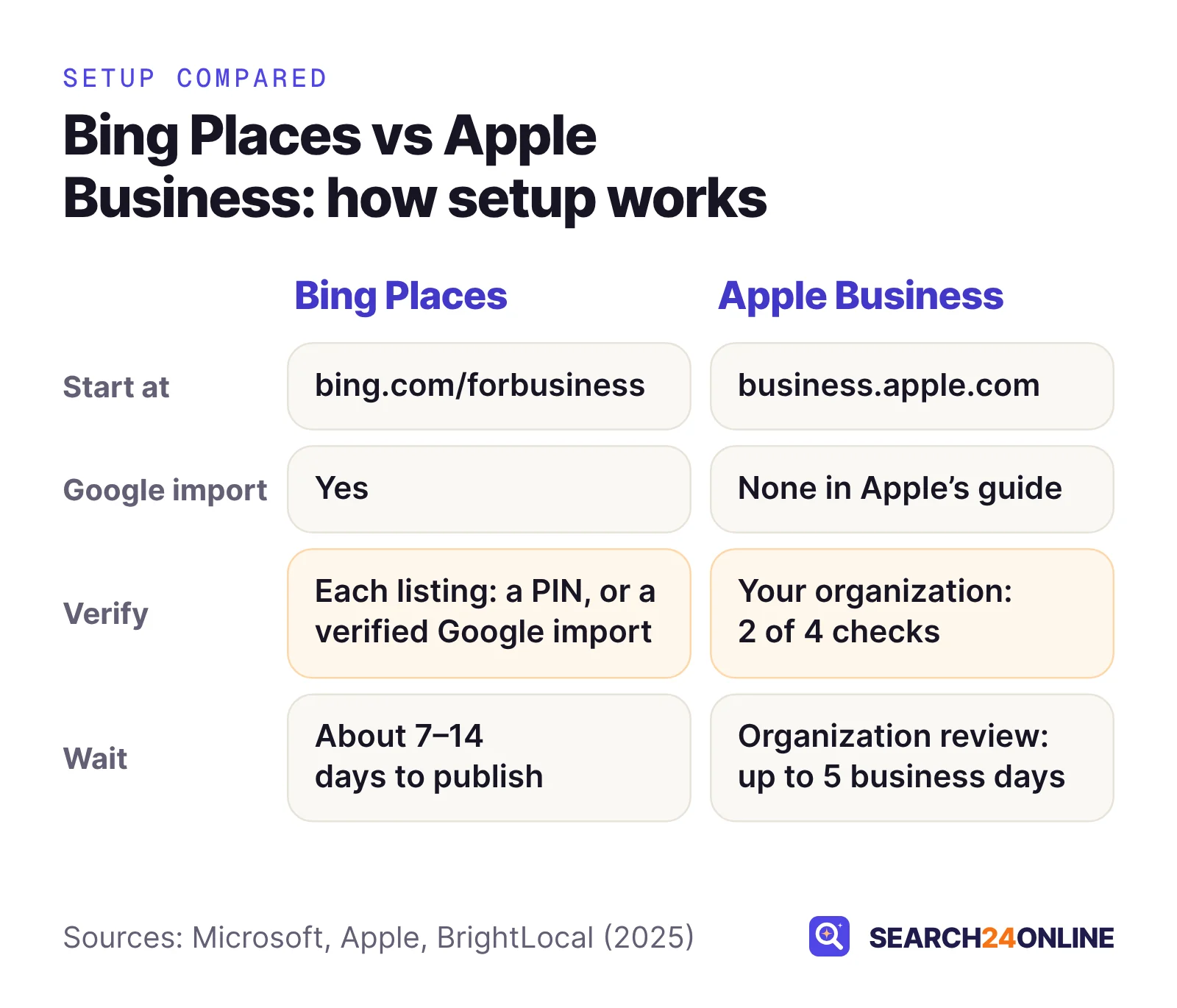
- Bing can import your Google Business Profile; Apple’s guide describes no Google import, and asks a new organization to pass two of four verification checks within 60 days.
- Set up one master record of your business facts first, then copy it exactly into Google, Bing and Apple, and check all three every quarter.
On this page
Why do Bing Places and Apple Maps listings matter in 2026?
Because they are the official record that Microsoft and Apple show when someone looks for your business, and that record now reaches well beyond two map apps. Microsoft’s documentation for Copilot in Microsoft 365 says that when web search is on, Copilot turns the user’s prompt into a short search query “that it sends to the Bing search service,” then writes its answer from what comes back. Apple says the place cards businesses manage in Apple Business “display across Apple Maps, Safari, Spotlight, and more,” and lists Siri among the places businesses reach local customers.
Microsoft has also been explicit about local AI answers. Its February 2026 announcement of the AI Performance report in Bing Webmaster Tools tells businesses to register with Bing Places for Business. The reason it gives: address, hours and contact details need to stay current when AI experiences answer location-based questions.
The cost of ignoring these listings is not an empty space. Both platforms let you claim a listing that already exists, which tells you they list plenty of businesses that never signed up. If nobody claims the listing, nobody corrects it. In audits we often find a carefully maintained Google Business Profile next to a Bing listing with a phone number the business dropped years ago and an Apple Maps place card still showing Saturday hours.
AI answers do get local details wrong. SOCi’s 2026 Local Visibility Index, a vendor study published in February 2026, said ChatGPT, Perplexity and other non-Google AI tools were “only about 68% accurate when providing business contact info.” It doesn’t say what it measured accuracy against, so treat that as a signal, not a benchmark. Our view: every listing you control is one fewer conflicting source.
Microsoft documents the Copilot–Bing connection for work accounts, and Bing counts citations in Microsoft Copilot; we don’t assume the same for ChatGPT. Getting into ChatGPT answers is a separate job, covered in how to get your business mentioned in ChatGPT. Consistent listings help there too, as one source among many.
What changed with Bing Places and Apple Business Connect?
Both platforms were rebuilt in the last 13 months, so many older setup guides are out of date.
Bing Places moved to bing.com/forbusiness
Microsoft launched a redesigned Bing Places for Business in October 2025 and moved it from bingplaces.com to bing.com/forbusiness. Existing accounts and listings migrated automatically. Microsoft says the Google import is now “faster, more reliable” and better at keeping your name, hours and contact details intact. A new Recommendation Tool suggests missing photos, links and hours. Microsoft listed “deeper integrations with Bing Maps and Copilot” as future work, not something already shipped.
Apple Business Connect became Apple Business
Apple announced Apple Business on March 24, 2026 and launched it on April 14 as a free service in more than 200 countries and regions. It replaced Apple Business Connect, Apple Business Manager and Apple Business Essentials. Apple said Business Connect data would “automatically migrate to Apple Business at launch,” so an existing place card should still be there, now managed at business.apple.com.
For existing users, Apple’s guide says a personal Apple Account that held the Administrator role in Business Connect can still sign in, but it is limited to brand and location management; a Managed Apple Account unlocks the rest. For a Maps listing alone that is fine, as long as the account doesn’t belong to someone who might leave.
| Bing Places for Business | Apple Business | |
|---|---|---|
| Where you manage it | bing.com/forbusiness | business.apple.com |
| Where the listing shows | Bing search and Bing Maps; Microsoft 365 Copilot searches Bing | Apple Maps, Safari, Spotlight, Siri and more |
| Import from Google Business Profile | Yes | Not described in Apple’s guide |
| How you verify | A PIN by phone, email or mail, or a verified Google import | Organization: two of four checks. Existing place: a phone code |
| Typical wait | About 7–14 days to publish (BrightLocal) | Up to 5 business days for organization review |
| Paid extras | None needed for the listing | Optional ads on Apple Maps (U.S. and Canada) |
How do you set up Bing Places for Business?
Sign in at bing.com/forbusiness, then either import your Google Business Profile or claim your existing Bing listing by hand. For a single-location business the import is usually the faster route, as long as your Google profile is correct. Bing’s interface has changed since the 2025 redesign and may change again, so treat the steps below as the shape of the process rather than exact button names.
Before you start
- Fix Google first. An import copies whatever is in your Google Business Profile, errors included. Correct the name, phone, hours, website and categories there before you connect it.
- Use an account the business owns. Sign in with a Microsoft account on a shared business email. Most “we can’t get into our listing” problems we see start with an account that left with an employee or a former agency.
- Have your master record open: the exact business facts you use everywhere (more on this below).
The fast route: import from Google Business Profile
- Choose the Google importFrom the Bing Places dashboard, pick the option to import from Google and sign in with the Google account that manages your Business Profile.
- Select your locationsTick the profiles you want copied. Microsoft says imported listings get dashboards, bulk editing and status updates.
- Check every imported fieldCompare the result with your master record. Look hardest at categories, which rarely map one-to-one between Google and Bing, and at holiday or special hours.
- Complete verification if askedBrightLocal’s guide says importing verified Google listings skips Bing’s separate verification step. If the dashboard asks you to verify anyway, follow the method it offers.
Older guides describe an option to keep Bing synced with Google. Don’t rely on it blindly: after changing hours or a phone number on Google, check Bing a week later.
The manual route: claim or add your listing
- Search for your businessSearch by phone number or by name and city. If Bing already has a listing, choose to claim it; if not, create a new one.
- Confirm name, address and map pinEnter the name exactly as it appears on your storefront and website. BrightLocal notes that Bing does not accept PO boxes. Drop the pin on your actual building.
- Pick categories and describe the businessChoose from Bing’s preset categories, core service first. Say what you do, for whom and where.
- Decide whether to show the addressShow it only if customers visit you there, as BrightLocal advises.
- Add contact details, hours and photosThe first photo becomes the main image, so use your logo or a clear storefront shot.
Verification and publishing
Bing decides which verification method your listing gets. According to BrightLocal’s guide, the options can include a phone call, email, your website or a PIN sent by post, and you can’t choose. BrightLocal says postcards may take 5 to 6 business days. Enter a mailed code the day it lands, and make sure the address on the listing matches your postal address exactly so the card can arrive at all.
After verification, BrightLocal describes a publishing cycle of 7 to 14 days before changes appear on Bing Maps and in local results. A listing stuck on “Pending publish” well beyond that is a support case, not a reason to keep editing. BrightLocal’s guide was last updated in July 2025, before the redesign, so treat its timings as a guide rather than a promise.
If you manage many locations, BrightLocal describes a chain workflow: verify the head office by email or postcard, then upload locations in Bing’s spreadsheet template, up to 10,000 listings. For a business with two or three sites, adding each one by hand is usually simpler.
How do you set up Apple Business for Apple Maps?
You sign up your organization at business.apple.com, verify the organization, then add or claim each location. Verification happens at the organization level, which is the biggest difference from Bing and Google, and it has a deadline.
Step 1: Sign up and verify your organization
At business.apple.com, choose to sign up and enter your organization’s name and address. Apple says adding your website can speed up verification. You then create the first administrator account, with a legal name and a phone number, and confirm one code sent to your email and another to your phone.
Apple then gives you 60 days to verify; an organization not approved in that window is deleted with its data. You need two of these four checks:
- A business ID: a D-U-N-S number or an Employer Identification Number (EIN). You don’t need a D-U-N-S number if you have an EIN.
- Domain validation: adding a TXT record to your domain’s DNS settings.
- App Store Connect: selecting your app, if your business publishes one.
- A document: a business license, sales tax permit, lease, utility bill or similar.
For most small businesses the practical pair is the EIN plus the DNS record, which whoever manages your domain can add in minutes. Apple says review takes up to five business days, longer in busy periods.
Step 2: Add or claim your location
In the portal, go to Brands, then Locations, then Add Location, and choose a single location. Search for your business by name. If Apple Maps already has it, select the match; if not, add it as new. Then:
- Place the pin on the buildingCheck the address, then drag the map until the pin sits on your building. Apple’s attribute guide says coordinates belong on top of the building, not on the sidewalk, road or nearest intersection; satellite view helps.
- Enter the core detailsDisplay name, primary category, status (open, or opening soon within six months), phone number with country code and website. Apple accepts a Facebook, Instagram or TikTok page as the website, but not other third-party websites.
- Set your hoursAdd regular hours, and use special hours for holidays or one-off changes.
- Assign a brandPick an existing brand or create one. The brand carries your logo and identity across Apple’s features.
- Verify the location if Apple offers itFor a place that already exists on Maps, Apple may offer phone verification: it calls the number it already has on file and you enter a four-digit code.
That last step catches people out: if Apple has an old number on file, the call goes there, and Apple tells you to contact Apple Business support. If another organization, such as a former agency, already manages your location, you can request a transfer with documents like a business license or utility bill; Apple says review takes up to five business days.
Apple sends verification results and change notices by email, and its guide specifically asks you to allow mail from apple.com domains. Miss those emails and you may not spot a verification problem until the 60-day window has closed.
What can you add to Apple Business after verification?
Once the basics are approved, Apple Business offers extras, from richer place cards to paid ads. A local service business mostly needs the first two below.
Complete the place card
Add a logo, a cover photo, more photos and an About description. Apple allows one primary category and up to 19 more, plus a “Good to Know” list of amenities such as payment methods, parking and EV charging. Add every category that honestly describes a service you sell, and nothing you only wish you sold.
Showcases
A showcase is a promotional module on a location’s place card: an image, a heading of up to 38 characters, body text of up to 100 characters and a call-to-action button. A showcase can run for up to 365 days, 90 by default. Apple reviews each one, which can take up to three calendar days, so submit at least three days before the start date. If Apple rejects the content in any one language, the whole showcase is rejected.
Our view: showcases earn their keep for seasonal offers, such as a furnace tune-up special each October, not permanent slogans. Make sure the button lands on a page that matches the offer.
Branded features
Apple Business also puts your verified brand into other Apple features. Branded Mail shows your logo on customer emails in the Mail app and iCloud Mail. Your branding can appear on tracked orders in Wallet, and on the payment screen when you take Tap to Pay on iPhone payments. These matter most to retailers and businesses that email customers often.
Ads on Apple Maps
Apple announced in March 2026 that ads on Maps would arrive in the summer in the U.S. and Canada, at the top of search results and in a new Suggested Places section. Apple’s help page on promoting your business, published August 14, 2026, says eligible advertisers need a verified organization, verified locations and an organization address in the U.S. or Canada. You set a monthly budget, can pause at any time, and eligible organizations may get a one-time $150 credit. Fix the free listing first; promoting a place card with wrong hours buys annoyed customers.
How do you keep Google, Bing and Apple consistent?
Keep one master record, copy from it exactly, and recheck every listing on a schedule. Consistency breaks quietly: a move or new winter hours gets updated on Google, where the calls come from, and forgotten everywhere else.
A common situation: a dental practice moves from Suite 120 to Suite 300 and updates Google that week. Two years later Bing still shows Suite 120, Apple Maps shows old Saturday hours, and the website footer uses a call-tracking number found nowhere else. Each listing is “mostly right”, which leaves search engines and assistants unsure which version to trust.
Build the master record
- Name exactly as on your storefront and website. Apple’s guide says the display name must match your storefront, signage or official website and can’t include symbols such as ® or ™. Don’t add keywords or cities.
- Address in one format, including the suite. Decide “Suite 300” or “Ste 300” once and use it everywhere.
- Main phone number: one local number, shown everywhere.
- Website URL: the location page, for multi-location businesses.
- Hours, regular and special, plus upcoming holiday closures.
- Categories mapped to each platform, and a 2–3 sentence description.
- Logins: who owns each account, with recovery details.
Your website should carry the same facts. In audits we often find the opposite: address details only inside an image, no click-to-call link, or LocalBusiness structured data (schema markup describing your business) that still lists an old address. Search engines compare these signals; make them agree.
Watch for edits you didn’t make
Listings don’t stay the way you left them. Apple says customers can report incorrect details from a place card, and Apple can then edit its name, status or hours. When it does, Apple emails your administrators and the location shows “Updates Available” in the portal, where you can accept or overwrite the change. If nobody reads those emails, a mistaken closure can sit on your place card unnoticed.
A quarterly routine
- Search yourself on each platformLook up your name, and your main service plus city, on Google Maps, Bing Maps and Apple Maps.
- Compare against the master recordNote every difference, however small.
- Fix it in each dashboardNot through customer “suggest an edit” links.
- Load holiday hours earlyAdd the coming quarter’s special hours on all three at once.
- Ask Copilot and SiriAsk for your hours and phone number. If an answer is wrong, trace which listing it came from.
Where do other directories and data aggregators fit?
After Google, Bing and Apple, the next tier is the directories your customers actually use and the ones that rank for your services: Yelp, Facebook, the leading directory for your industry, your chamber of commerce. Below those sit data aggregators, companies that collect business data and pass it on to other sites and apps. These listings are called local citations, and our guide explains which still matter and how to clean up duplicates.
The order matters because errors spread downward: a wrong number in one widely copied source can reappear across dozens of smaller sites. Lock the master record, fix the three platform listings you control, then work outward.
Be wary of packages that promise hundreds of citations. Ten accurate listings on sites people use beat three hundred nobody visits, and mass submissions create duplicates you later pay to remove. For how these listings fit with your reviews, website and Google profile, see the complete local SEO guide and our step-by-step guide to optimizing your Google Business Profile.
How do you know the listings are working?
Check three things: that each listing is live and correct, that it gets used, and that assistants repeat the right facts. Bing and Apple give you less data than Google, so add simple checks of your own.
- Apple’s Insights. Apple Business reports how customers discover and interact with your place card on Maps. Compare month to month rather than day to day, since a small business sees small numbers.
- Tagged website links. Add UTM parameters to the website link on each listing (for example, utm_source=bing&utm_medium=organic&utm_campaign=places) so visits from Bing and Apple Maps show up separately in your analytics.
- Bing Webmaster Tools. Its AI Performance report, launched in public preview in February 2026, shows how often your website pages are cited in Copilot, Bing’s AI summaries and some partner integrations. It covers your website, not the listing itself.
- Assistant spot checks. Ask Copilot and Siri the questions customers ask: your hours, whether you serve a nearby town, how to book. Our guide to tracking brand visibility in AI answers explains how to run these checks consistently.
Set expectations honestly. In our experience, a claimed Bing or Apple listing rarely becomes the biggest lead source; Google usually stays that. The value is being correct wherever a customer or assistant looks. No one can promise a listing will rank or be recommended.
For a second pair of eyes, our free SEO + GEO report analyzes your website, including local and trust signals such as your name, address and phone details, click-to-call links and business schema. You get password-protected dashboard access within 24 hours. Bing Places setup is also part of our Starter plan, alongside Google Business Profile work and 10 citations a month.
Common questions
Is Bing Places for Business free?
Yes. Microsoft describes Bing Places for Business as a free platform for creating and managing listings that appear in Bing search results and Bing Maps. Apple Business is also free; only optional extras such as ads on Apple Maps cost money.
What happened to Apple Business Connect?
Apple replaced it with Apple Business on April 14, 2026. Apple said Business Connect data would migrate automatically, so existing place cards should have carried over, and you now manage them at business.apple.com.
Can I import my Google Business Profile into Apple Maps?
Not according to Apple’s own guide, which describes no Google import. You add each location in Apple Business yourself, so copy the details from your Google profile carefully, field by field.
How long does it take for a Bing Places listing to go live?
Expect one to two weeks after verification. BrightLocal’s guide describes a publishing cycle of 7 to 14 days; a listing stuck on Pending publish for longer is worth raising with Bing Places support.
Will a Bing Places listing get my business into ChatGPT?
Nobody can promise that. Microsoft documents that Copilot for work accounts sends its web searches to Bing, and in our view a correct Bing listing matters for Copilot. ChatGPT works differently, and we treat it as a separate job rather than assume a Bing listing reaches it.
Sources
- Microsoft Bing Blogs (October 2025): Introducing the New Bing Places for Business
- Bing Webmaster Blog (February 10, 2026): Introducing AI Performance in Bing Webmaster Tools Public Preview
- Microsoft Learn (updated October 29, 2026): Data, privacy, and security for web search in Microsoft Copilot and Microsoft Copilot Chat
- BrightLocal (updated July 2025): How to add or claim your Bing Places for Business listing
- Apple Newsroom (March 24, 2026): Introducing Apple Business, a new all-in-one platform for businesses of all sizes
- Apple Business User Guide: Sign up and verify your organization
- Apple Business User Guide: Add a single location
- Apple Business User Guide: Configure location attributes
- Apple Business User Guide: Create your first showcase
- Apple Business User Guide: Maintain location information accuracy
- Apple Business User Guide: Promote your business on Apple Maps
- SOCi (February 2026): The 2026 Local Visibility Index (PDF)
Does your website show the same business details as your listings? Check it free.
We’ll analyze your website, including your name, address and phone details and business schema, create your SEO + GEO report and give you password-protected dashboard access to view it.
Free · No obligation · We only review your public pages.