
How to Appear in Google AI Overviews and AI Mode: What Google Actually Says
Google now publishes an optimization guide, a Search Console report and a site-wide opt-out for its AI search features. Here is what those documents say, what they leave out, and a checklist you can work through this month.
Key takeaways
- Google says AI Overviews and AI Mode have no additional requirements: a page must be indexed and eligible to show with a snippet, and your site must stay included in Search Console’s Search generative AI setting, which is on by default.
- Google’s optimization guide, updated July 2026, calls this work “still SEO”: original, non-commodity content, clear structure, key information in text and structured data that matches the visible page. It says llms.txt files, chunking and special schema are not needed.
- Since August 31, 2026, Search Console’s Generative AI performance report has been available to all websites. It shows impressions in AI Overviews and AI Mode by page, country, device and date, but no clicks.
- The same rollout added a site-wide exclusion control under Settings > Search generative AI. Excluded sites get no traffic or impressions from these features, and the control does not affect AI training, which Google-Extended governs.
On this page
What does Google say it takes to appear in AI Overviews and AI Mode?
The same things it takes to appear in Google Search, plus one setting you have probably never touched. Google’s documentation on AI features says “there are no additional requirements to appear in AI Overviews or AI Mode, nor other special optimizations necessary.” A page needs to be indexed and eligible to show in Search with a snippet. Since August 2026, your site also needs to be left “included” in a new Search Console setting, which is the default.
Everything else is about whether Google picks your page from the eligible ones, and there Google’s answer is consistent: do good SEO. Its optimization guide, last updated in July 2026, says “optimizing for generative AI search is optimizing for the search experience, and thus still SEO.”
In a June 2026 post, Google said “AI Overviews now has over 2.5 billion monthly active users, while AI Mode has surpassed one billion monthly users.” Since Google I/O in May 2026, people can ask a follow-up from an AI Overview and continue in AI Mode, so the two increasingly work as one journey.
Google’s AI features and your website page, its generative AI optimization guide and two Search Console help articles. Our opinions are labeled.
How do AI Overviews and AI Mode choose which pages to link?
They draw on Google’s normal Search index and Google’s normal ranking systems. Google says its generative AI features are “rooted in our core Search ranking and quality systems.” It describes the method as retrieval-augmented generation, also called grounding: the system retrieves relevant pages from the Search index, reviews them to write a response and shows links to the pages that support it.
The step that matters most for site owners is query fan-out. Google says both features may issue “multiple related searches across subtopics and data sources” to develop a response, which can surface a wider set of links than a classic results page. The AI answer is built from the results of several searches the user never sees.
What fan-out means for a real business
An illustration, since Google does not publish its sub-queries. Someone asks AI Mode whether dental implants are worth it at 65 and what they cost in Phoenix. A fan-out could search for implant success in older patients, implants versus dentures, typical costs, financing and Phoenix dentists who place implants.
A practice with one thin “Dental Implants” page competes in one of those searches. A practice with a clear cost section, an honest implants-versus-dentures comparison and a page about its own implant process competes in four. Our view: you are not trying to rank for one phrase, but to be the best answer to each question a buyer asks on the way to a decision.
Two details that explain inconsistent results
First, AI Overviews “are only shown when our systems determine that it is additive to classic Search, and as such, often don’t trigger,” in Google’s words. Pew Research Center’s analysis of 900 US adults’ browsing found an AI summary on 18% of their Google searches in March 2025. It is an early snapshot, but many searches still show no AI Overview at all.
Second, Google says AI Overviews and AI Mode may use different models and techniques, so the same question can produce different links in each. If your site is linked in an AI Overview but not in AI Mode for the same question, that is expected, not a penalty. For how the same retrieval process works in ChatGPT, Perplexity, Copilot and Claude, see our explainer on how AI assistants choose the sources they cite.
What makes a page eligible to appear?
Five conditions, each a yes-or-no gate rather than a score. Fail one and the quality of your writing never comes into play. Passing them is no promise either: Google says a page that meets every requirement still may not be crawled, indexed or shown.
| Gate | What Google requires | How to check | Where it usually breaks |
|---|---|---|---|
| Crawlable | Googlebot isn’t blocked, including by your CDN or host | URL Inspection live test; robots.txt report | Firewall or bot-protection rules added during a hosting change |
| Working page | HTTP 200 status and indexable content | URL Inspection, rendered HTML | Key content that only loads through scripts, or sits in PDFs and images |
| Indexed | The page is in Google’s index | Page indexing report; URL Inspection | Stray noindex tags, wrong canonical tags, pages with no internal links |
| Snippet-eligible | No nosnippet or max-snippet:0 on the page | Page source or URL Inspection | A theme or plugin setting that adds snippet limits site-wide |
| Site included | Search generative AI setting left on Include (or inherited) | Search Console > Settings > Search generative AI | Rarely changed, but worth confirming on properties several people manage |
A snippet is the text preview under a search result. Google’s robots meta tag documentation says a nosnippet rule “will also prevent the content from being used as a direct input for AI Overviews and AI Mode.” Turn off snippets and you turn off AI features for that page too.
The failures we see most
Our team brings over 20 years of digital marketing experience and has served 500+ brands, and when a good business is missing from AI Overviews the cause is usually ordinary technical debt. In audits we often find important pages never indexed, crawling problems left by a redesign and internal linking too thin for Google to reach key pages.
A common situation: a family law firm relaunches its site, and a noindex tag left over from the staging site stays on the practice-area template. Its most valuable pages drop out of Search, and so out of AI features, and nobody notices for months because the homepage still ranks. The Page indexing report in Search Console lists pages excluded by noindex. If the problem is broader, our guide to why a website is not showing up on Google walks through the other causes.
What does Google recommend to get chosen once you are eligible?
Standard SEO best practice, with a sharper emphasis on originality. Here is what Google recommends, and how we turn each point into work.
Write non-commodity content
Google’s guide asks for a unique point of view, such as first-hand experience, and is blunt about the alternative: “Don’t just recycle what others on the internet have already said, or could easily be produced by a generative AI model.” Google calls this non-commodity content.
For a business, that means what only you know: real price ranges and what moves them, your process, local conditions, the mistakes customers make before calling. Picture two landscapers in one county. One posts generic lawn tips; the other explains what it sees on the area’s heavy clay soil, with its own seasonal schedule. Only the second gives Google something worth linking.
Do not mass-produce pages for query variations
Google warns against mass-producing pages to manipulate rankings or AI responses and points to its scaled content abuse policy. In its words, “a high quantity of pages doesn’t make a website higher quality or more relevant to users.” A related audit finding is keyword cannibalization: pages targeting near-identical keywords and competing with each other.
Think of an accounting firm with separate, near-identical pages for “tax preparation,” “tax prep services” and “income tax filing.” None is clearly the best answer. Merge them into one strong page and redirect the others.
Keep important content in text, clearly organized
Google’s AI features page asks you to keep important content in text form, supported by images and video where they help. The optimization guide adds clear paragraphs, sections and headings, and says semantic HTML is recommended but not required. Thin, outdated or poorly structured pages are common audit findings. A service page with its pricing in a PDF and its service area in an image gives Google little text to work with. Our guide to writing content AI assistants want to quote shows the rewriting in detail.
Make structured data match the page
Google lists “making sure your structured data matches the visible text on the page” as a best practice. Its guide says structured data isn’t required for generative AI search and there is no special schema, but still recommends it for rich result eligibility. Missing or mismatched markup is a regular audit finding; our schema markup guide for small businesses covers which types are worth adding.
Keep your Business Profile and Merchant Center current
Google asks site owners to keep Merchant Center and Business Profile information up to date, and its guide says these help make products and local businesses visible in AI responses.
Google also lists internal links that make content easy to find, and a good page experience. Link every important page from related pages, and make sure pages load fast and work on a phone.
Which AI Overview tactics does Google say you can skip?
Most of the tactics sold as “AEO” or “GEO” tricks for Google. The optimization guide’s mythbusting section is unusually direct.
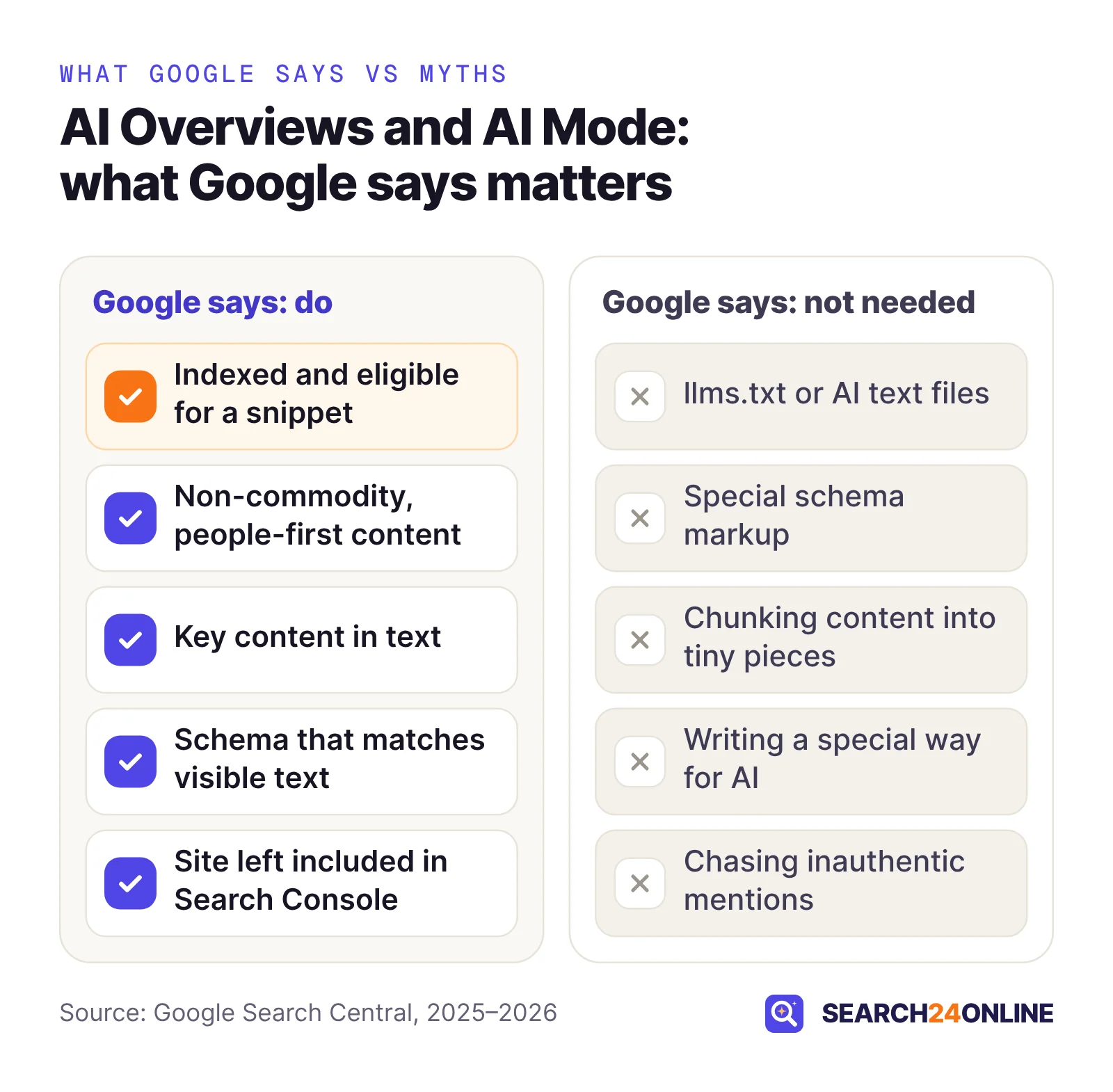
- llms.txt and other AI files. Google says “you don’t need to create new machine readable files, AI text files, markup, or Markdown to appear in Google Search.” Making them for other services is fine, but for Google they “will neither harm nor help” because Search ignores them. More in our article on whether llms.txt helps.
- Chunking pages into tiny pieces. Google says there is no requirement to break content up for AI and that its systems can identify several topics on one page. “There’s no ideal page length.”
- Writing a special way for AI. Google says “AI systems can understand synonyms and general meanings,” so you don’t need a page or paragraph for every long-tail wording.
- Seeking inauthentic mentions. Planting mentions of your brand “isn’t as helpful as it might seem,” Google says, because its systems prioritize quality and block spam.
- Blocking Google-Extended to leave AI Overviews. Google-Extended governs whether Google may use your content to train Gemini models and to ground Gemini Apps and Vertex AI. Google says it “does not impact a site’s inclusion in Google Search.” To leave AI Overviews and AI Mode, you use the Search Console control.
Our view: answer-first sections are still worth writing because people skim. Just don’t chop a good page into fragments for Google’s sake.
Google’s guide says “no third-party tool has access to our internal ranking or AI systems.” Tools can report what they observe, but none can see inside Google.
How can you limit or stop your content appearing in AI features?
Use the narrowest control that solves your actual problem. Google now offers a site-wide switch in Search Console plus page-level snippet controls, and they do different things.
| Control | Scope | Effect on AI Overviews and AI Mode | Effect on regular results |
|---|---|---|---|
| Search generative AI control (Exclude) | Whole Search Console property | Links and content kept out, including generative AI features in Discover; no traffic or impressions from them | Google says it is not used as a ranking or inclusion signal elsewhere |
| nosnippet | One page | Content not used as a direct input | No text snippet or video preview |
| max-snippet:[number] | One page | Limits how much content can be used as a direct input | Snippet capped at that many characters |
| data-nosnippet | Part of a page | Listed by Google as a way to limit what is shown | That text excluded from snippets |
| noindex | One page | Page cannot appear | Page removed from Search |
| Google-Extended (robots.txt) | Site or folder | Does not remove you; Google says it limits training of the models used to generate these responses | No effect on inclusion or ranking |
The page-level rules go in a robots meta tag or on an HTML element, like this:
<!-- Whole page: no snippet, no direct AI input -->
<meta name="robots" content="nosnippet">

<!-- Whole page: snippets of up to 50 characters -->
<meta name="robots" content="max-snippet:50">

<!-- One passage only -->
<p>Standard visits start at $95.
<span data-nosnippet>Member pricing is in your account.</span></p>
Coming next: Google’s crawler documentation says it intends to support the AIPREF shared training signal (user-agent: __usage_ai-training) in early 2027. Like Google-Extended, it concerns training, not appearing in AI Overviews.
Should your business opt out?
For most businesses that sell services or products, our view is no. Excluding your site means no traffic or impressions from these features, and Google notes that content from other sites will still appear there, and “may appear similar to yours.” Your competitors keep the visibility you give up.
Page-level controls fit when one thing is the worry, such as member pricing you don’t want summarized. Full exclusion is a business-model decision, mainly for publishers whose revenue depends on on-site reading, made after measuring what AI features send them.
Timing differs too. The Search Console control takes effect within one to two days, though caching can delay some content. Page-level rules count only after Googlebot recrawls the page, which Google says can take several days to several months. Check the rule with URL Inspection, then request a recrawl.
How do you measure AI Overview visibility in Search Console?
With the Generative AI performance report, rolled out to every site worldwide as of August 31, 2026, plus the standard Performance report for clicks.
What the new report shows
It counts one thing. Google defines impressions as “how many times links to your site were shown to a user in a generative AI feature on Google Search.” The report covers AI Overviews and AI Mode; Discover has its own generative AI report, and experiments in Search Labs are excluded.
- Pages, countries, devices and dates are the four breakdowns, with dates in Pacific Time.
- A search type filter separates text searches typed into Google from multimodal ones, such as Google Lens, Circle to Search and uploaded images.
- The chart counts by site. Two links to your site in one AI response count as one chart impression; filter by URL for page-level counts.
- No report at all usually means your site hasn’t had enough impressions in these features yet. It can also mean the site was excluded with the control.
What it does not show
Clicks. The help article defines no clicks, click-through rate or position for this report. Clicks from AI features sit in the main Performance report under the “Web” search type, mixed with every other result. Google said in June that it plans to add more metrics over time.
Outside Search Console, the evidence on clicks points two ways. Pew found that people clicked a traditional result on 8% of visits to search pages with an AI summary, against 15% without one, and clicked a link inside the summary on just 1% of visits. Google says clicks from pages with AI Overviews “are higher quality,” meaning visitors tend to spend more time on the site. Both can be true, so measure your own outcomes; see our guide to winning customers when people don’t click.
A monthly routine that works with impressions only
- Export both views for the same pagesAI impressions by page from the new report, and Web clicks and impressions by page from the Performance report, for the same date range.
- Find pages gaining AI impressions while clicks fallCheck whether the page gives a reason to visit, such as a quote form or detail a summary can’t hold.
- Find important pages with no AI impressionsRun them through the eligibility gates first, then judge the content against Google’s non-commodity bar.
- Watch branded searches and conversionsOur view: an AI answer can put your name in front of people who search for you later, so track branded impressions and leads, not just clicks.
Google’s Preferred Sources feature now reaches AI Overviews and AI Mode, where a site a user has chosen can carry a badge. It works for domains and subdomains included in AI features. Google supplies a button, or you can link to google.com/preferences/source?q= followed by your domain.
What should you do this month? A practical checklist
Work in order: later steps are wasted if early ones fail. In our experience, on a typical small business site the first three take a few days.
- Confirm the settingVerify your site in Search Console, open Settings > Search generative AI and confirm it is set to Include or inherits Include.
- Inspect your 20 to 30 most important URLsUse URL Inspection to confirm each is indexed, returns a 200 status, shows its main content in the rendered HTML and carries no nosnippet rule.
- Remove crawl blockersCheck robots.txt and ask your host or CDN whether bot protection affects Googlebot. Fix stray noindex and canonical tags, and link to orphaned pages.
- Test the questions buyers askSearch 10 to 15 real pre-purchase questions in Google and in AI Mode. Note whether an AI Overview appears and which sites are linked. Answers vary, so look for patterns.
- Map sub-questions to pagesList the follow-up questions a fan-out would likely search, give each a clear home and merge pages that compete for the same answer.
- Add what only you knowPrices, process, local specifics and first-hand detail. Move key facts out of PDFs and images into text.
- Align structured data and profilesMake markup match the visible page, and update your Business Profile or Merchant Center feed.
- Set a baseline and review monthlyRecord AI impressions by page now, then repeat the routine above each month.
If you would rather not run the technical checks alone, our free SEO + GEO report analyzes your website and gives you password-protected dashboard access within 24 hours. Our SEO + GEO services track AI answers alongside rankings; the plans start with 25 AI questions tracked in Google AI and ChatGPT. Nobody can promise your page a place in an AI Overview. You can make sure it is eligible, and worth choosing.
Common questions
Do I need to rank number one on Google to appear in an AI Overview?
No ranking position is listed as a requirement. Google requires a page to be indexed and eligible for a snippet, and because both features run several related searches, pages that answer a related question well can also be candidates.
Does the Search Console Generative AI performance report show clicks?
No. Google’s help article defines only impressions for that report, broken down by page, country, device and date. Clicks from AI Overviews and AI Mode are counted in the standard Performance report under the Web search type, mixed in with clicks from other results.
Will excluding my site from AI Overviews hurt my normal Google rankings?
Google says no: the Search generative AI control “isn’t used as a ranking or inclusion signal affecting other parts of Search.” An excluded site does lose all traffic and impressions from AI Overviews, AI Mode and the generative AI features in Discover.
Do AI Overviews and AI Mode show the same sources?
Not always. Google says the two features may use different models and techniques, so the same question can produce different responses and different links. Check both.
How long do changes take to show up in AI Overviews?
Google says the Search Console exclusion control takes effect within one to two days. Page edits and snippet controls count only after Googlebot recrawls the page, which can take several days to several months; URL Inspection lets you request a recrawl.
Sources
- Google Search Central: AI features and your website
- Google Search Central (updated July 2026): Optimizing your website for generative AI features on Google Search
- Search Console Help: Generative AI performance report (Search)
- Search Console Help: Search generative AI control
- Google (June 3, 2026): New opportunities, control and insights for website owners
- Google (May 19, 2026): Google Search’s I/O 2026 updates
- Google Search Central: Google Search technical requirements
- Google Search Central: Robots meta tag, data-nosnippet and X-Robots-Tag specifications
- Google Crawling Infrastructure: Google’s common crawlers (Google-Extended)
- Google Search Central: Preferred sources
- Pew Research Center (July 22, 2025): Google users are less likely to click on links when an AI summary appears in the results
Is your site eligible for AI Overviews? Find out free.
We’ll analyze your website, create your SEO + GEO report and give you password-protected dashboard access to view it.
Free · No obligation · We only review your public pages.