
AI Crawlers Explained: Should You Block GPTBot, ClaudeBot and PerplexityBot?
AI companies now run separate bots for model training, for search and for fetching pages a user asks about. Here is what each one does according to its own operator, how to write robots.txt rules that block only what you mean to, and what a firewall setting can quietly undo.
Key takeaways
- Most businesses that want leads should not block AI search crawlers. Blocking a training bot (GPTBot, ClaudeBot, Meta-ExternalAgent, CCBot) keeps content out of future training; blocking a search bot (OAI-SearchBot, Claude-SearchBot, PerplexityBot) can keep you out of that assistant’s answers.
- Google and Apple use their main search crawlers for AI too. Google-Extended and Applebot-Extended are robots.txt tokens that opt you out of AI training without affecting search, and Google’s AI Overviews have their own switch in Search Console.
- robots.txt is a request, not a lock. OpenAI, Perplexity, Meta and Amazon all say their user-triggered fetchers may not follow it; only a CDN or firewall rule enforces a block.
- A crawler that matches its own group in robots.txt ignores the
User-agent: *rules, so a badly written AI block can open private folders by accident.
On this page
Should you block AI crawlers?
Block the training crawlers if you object to your content training AI models, and leave the search and user-triggered bots alone if you want customers to find you through AI assistants. For a business that lives on inquiries, those two decisions are separate, and the most expensive mistake is treating them as one.
An AI crawler is an automated program that an AI company uses to fetch web pages. The major companies now split that work across several bots with different names, and each name means something different in your robots.txt file. Block the wrong one and you can vanish from ChatGPT search while believing you only opted out of training.
Everything below comes from the operators’ own documentation as of November 2026. Where a company documents nothing, we say so.
What are the three kinds of AI crawler?
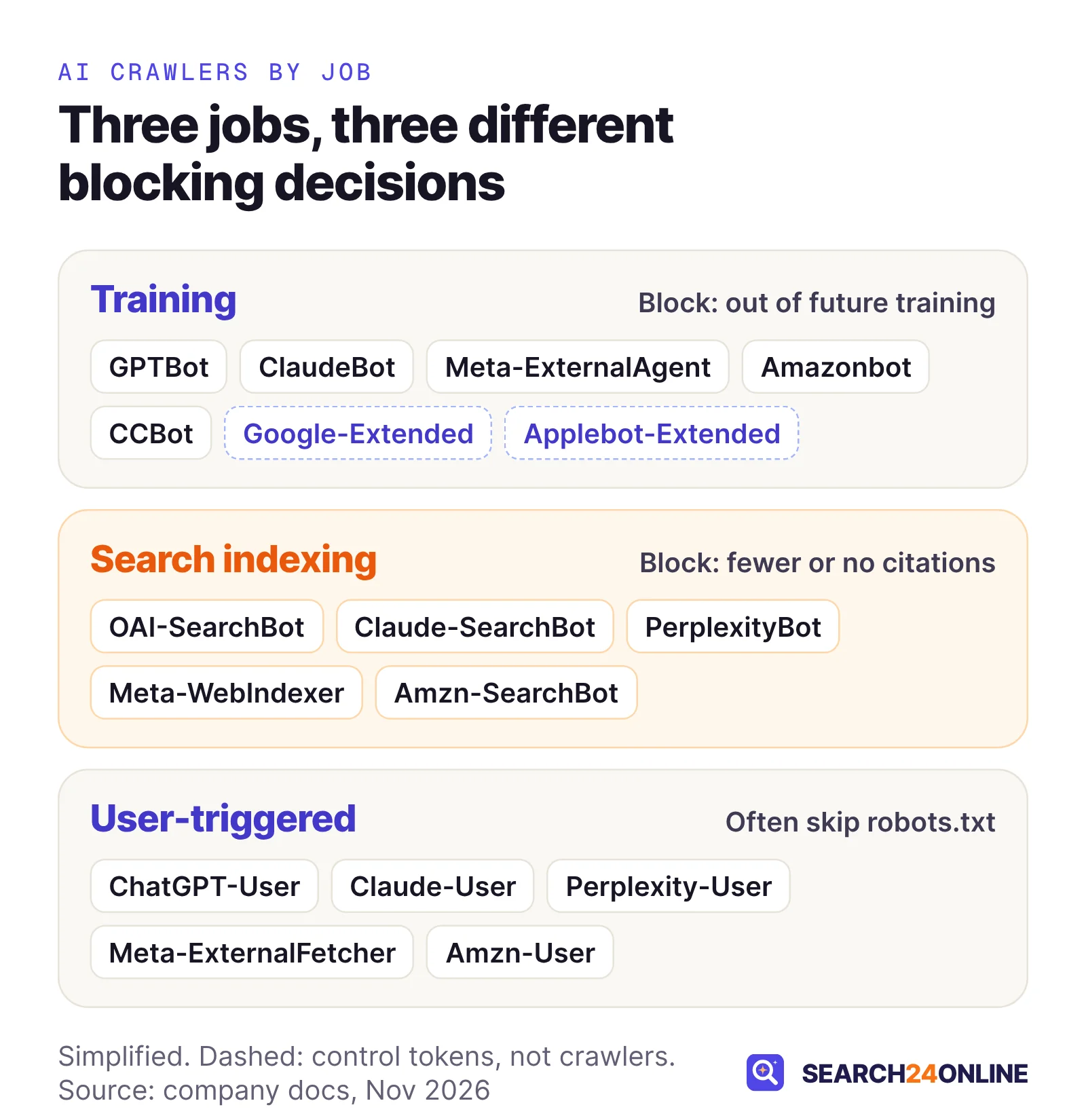
AI bots do one of three jobs: collect training data, build a search index, or fetch a page because a person just asked about it. A fourth item looks like a bot in robots.txt but isn’t one: a control token that tells an existing crawler how its data may be used.
- Training crawlers gather pages that may be used to build future AI models.
- Search crawlers index pages so an assistant can retrieve and cite them when it searches. Blocking one can remove you from that assistant’s pool of sources.
- User-triggered fetchers visit a specific page because someone pasted your link or asked a question that led there. Several operators say robots.txt may not apply to them.
- Control tokens such as Google-Extended and Applebot-Extended never visit your site. Google and Apple read them in robots.txt to decide what their main crawlers’ data may be used for.
A text file at yoursite.com/robots.txt that tells crawlers which parts of the site they may fetch. Each block starts with a User-agent line naming the bot, followed by Disallow or Allow rules. Well-behaved bots read it before crawling; nothing forces them to.
Which AI crawlers exist, and what does each one do?
The table lists the main AI-related bots we verified in their operators’ current documentation. The robots.txt token is the name you put after User-agent:; matching is case-insensitive, according to Google’s robots.txt specification.
| robots.txt token | Operator | Job | What blocking it does |
|---|---|---|---|
| GPTBot | OpenAI | Training | Signals your content should not be used to train OpenAI’s foundation models |
| OAI-SearchBot | OpenAI | Search | You are not shown in ChatGPT search answers (navigational links can still appear) |
| ChatGPT-User | OpenAI | User-triggered | OpenAI says robots.txt rules “may not apply” |
| ClaudeBot | Anthropic | Training | Future content excluded from Anthropic’s training data |
| Claude-SearchBot | Anthropic | Search | May reduce your visibility and accuracy in Claude’s search results |
| Claude-User | Anthropic | User-triggered | Claude stops fetching your pages for users’ questions (Anthropic honors this one) |
| PerplexityBot | Perplexity | Search (not training) | You drop out of Perplexity’s search results |
| Perplexity-User | Perplexity | User-triggered | Perplexity says it “generally ignores robots.txt rules” |
| Googlebot | Search, including AI Overviews and AI Mode | Google can no longer crawl your pages for Search; never block it for AI reasons | |
| Google-Extended | Control token, no crawler | Opts out of Gemini training and Gemini app grounding; no effect on Search | |
| Applebot | Apple | Search (Spotlight, Siri, Safari); data may also train Apple models | Apple can no longer crawl your pages for its search features |
| Applebot-Extended | Apple | Control token, no crawler | Opts out of Apple foundation-model training; search inclusion unaffected |
| Meta-ExternalAgent | Meta | Training and product indexing | Opts out of Meta’s AI training use |
| Meta-WebIndexer | Meta | Search for Meta AI | Meta AI is less able to cite and link to you |
| Meta-ExternalFetcher | Meta | User-triggered | Meta says it “may bypass robots.txt rules” |
| Amazonbot | Amazon | Product improvement; may train Amazon AI models | Opts out of that use |
| Amzn-SearchBot | Amazon | Search, such as Alexa (not training) | You lose eligibility for Amazon search experiences |
| Amzn-User | Amazon | User-triggered (live Alexa answers) | Amazon says it may not follow all robots.txt directives |
| CCBot | Common Crawl | Open web archive, widely used for AI training | Keeps your pages out of future Common Crawl archives |
A few rows need context. Perplexity says PerplexityBot is “not used to crawl content for AI foundation models,” and Amazon says the same of Amzn-SearchBot. Meta’s description of Meta-ExternalAgent covers both training foundation models and “improving products by indexing content directly,” so it is not purely a training bot. OpenAI also runs OAI-AdsBot, which only visits landing pages submitted as ChatGPT ads.
Common Crawl is a nonprofit that publishes an open archive of the web for anyone to analyze. Its CCBot page does not mention AI, but Mozilla Foundation’s February 2024 study found that at least 64% of 47 large language models published between 2019 and October 2023 had trained on a filtered version of Common Crawl data. Our reading: blocking CCBot is the training opt-out most likely to reach model builders you have never heard of.
Two gaps. We could not find ByteDance documentation for its Bytespider crawler, so it is not in the table. Microsoft offers no separate AI token for robots.txt yet, and Cloudflare classes Bingbot as a mixed-use crawler serving search and AI. According to Cloudflare’s September 2026 post, Microsoft currently handles training opt-outs through the NOARCHIVE meta tag and Bing Webmaster Tools’ Block URLs tool, with a robots.txt mechanism targeted for early 2027. On October 30, 2026, Microsoft announced (as reported by Search Engine Roundtable) separate AI training and AI grounding preferences that it starts honoring on February 1, 2027; sites relying on NOARCHIVE or NOCACHE need to set the new preferences by March 1, 2027 to keep their restrictions.
Google and Apple: one crawler, separate controls
Google and Apple don’t send a separate AI bot, so the controls work differently. Google says Google-Extended governs whether crawled content may be used to train future Gemini models and to ground answers in the Gemini app and in Vertex AI. It adds that Google-Extended “does not impact a site’s inclusion in Google Search nor is it used as a ranking signal.” Google plans to support AIPREF, a shared machine-readable training-preference standard, in early 2027.
Google-Extended does not touch AI Overviews or AI Mode. Those follow Search Console’s Search generative AI setting, rolled out to all sites by August 31, 2026. Choosing Exclude keeps your links and content out of AI Overviews, AI Mode and generative features in Discover; Google says the setting is not a ranking signal for the rest of Search. Our guide to appearing in AI Overviews and AI Mode covers that side.
Apple splits it the same way. Applebot-Extended opts your content out of training Apple’s foundation models, and pages that disallow it “can still be included in search results.” Applebot data can also add context to broad world-knowledge answers in Siri and Search; Apple’s opt-out for that is the nosnippet meta tag, not robots.txt. Note one inheritance rule: if your robots.txt names Googlebot but not Applebot, Apple says Applebot follows the Googlebot rules.
How do you write robots.txt rules for AI crawlers?
Name each bot you want to restrict in its own group and repeat any general rules it should still obey, because a crawler follows only one group. Google’s specification says “only one group is valid for a particular crawler”: the one with the most specific matching user agent. Rules are scoped to one host, protocol and port, so each subdomain needs its own file.
Example 1: opt out of training, stay in AI search
This is the setup we recommend to most lead-generation sites that want to opt out of training. Search and user bots aren’t named, so they follow the general group and can reach everything except the admin area. Several User-agent lines can share one set of rules, which Google’s specification explicitly allows.
# Everyone, including AI search bots
User-agent: *
Disallow: /wp-admin/
Allow: /wp-admin/admin-ajax.php

# Training only: opted out
User-agent: GPTBot
User-agent: ClaudeBot
User-agent: Meta-ExternalAgent
User-agent: Amazonbot
User-agent: CCBot
User-agent: Applebot-Extended
Disallow: /

Sitemap: https://www.example.com/sitemap.xml
We left Google-Extended out on purpose. Because it also controls grounding in the Gemini app, blocking it is a visibility decision as well as a training one. If you decide to add it, add it with that trade-off in mind.
Example 2: the wildcard trap
This is the robots.txt mistake we see most often after an “AI block” is pasted in:
User-agent: *
Disallow: /checkout/
Disallow: /account/

User-agent: GPTBot
Disallow: /blog/
The owner meant to keep GPTBot out of the blog. In fact GPTBot now follows only its own group, so it may crawl /checkout/ and /account/. The fix is to copy the general rules into the GPTBot group, or into one shared group for every bot you name.
Example 3: protect one folder, not the whole site
If only part of your site is the product, such as original research, a members area or a pricing database, restrict that folder for training bots and leave your marketing pages open:
User-agent: GPTBot
User-agent: ClaudeBot
User-agent: CCBot
Disallow: /research/
Disallow: /members/
Disallow: /wp-admin/
Anything genuinely private belongs behind a login, not just a Disallow line. Anthropic’s help article also shows a gentler option for heavy crawling: Crawl-delay: 1 under User-agent: ClaudeBot. Anthropic supports this non-standard directive, but Amazon says its crawlers do not, and Google’s specification says crawl-delay isn’t supported.
OpenAI says ChatGPT search can take about 24 hours to adjust after a robots.txt change; Perplexity says up to 24 hours, and Amazon about 24 hours. Google generally caches robots.txt for up to 24 hours. Check results the next day, not the next minute.
What can robots.txt not do?
It cannot force compliance, it may not cover user-triggered visits, and it does not reach backward in time.
It is voluntary. Cloudflare puts it bluntly: robots.txt cannot identify who is crawling or stop a crawler that ignores it. The companies in our table say their declared crawlers honor it. Anything that doesn’t identify itself honestly won’t.
User-triggered fetchers often skip it. OpenAI says robots.txt rules “may not apply” to ChatGPT-User because a user initiated the action. Perplexity says Perplexity-User “generally ignores robots.txt rules,” Meta says Meta-ExternalFetcher may bypass them, and Amazon says Amzn-User may not follow all directives. Anthropic is the exception here: blocking Claude-User in robots.txt stops Claude retrieving your pages for users.
Our view: for a business that wants customers, these visits are good news. Each one is a person asking an assistant about something on your site, often right before choosing a supplier.
It is not retroactive. Anthropic describes a ClaudeBot block as a signal that the site’s “future materials” should be excluded from training. None of the documentation we reviewed promises to remove content already collected.
It is not an llms.txt substitute, or vice versa. llms.txt is a proposed file that describes a site for language models; it does not allow or block anything. Our article on whether llms.txt helps explains why we treat it as optional.
How does blocking at the CDN or firewall work?
A CDN (content delivery network) or web application firewall checks each request before it reaches your server and can refuse it outright, which is how a block actually gets enforced. The flip side is that it can also block bots your robots.txt welcomes, and that is the problem we run into more often in audits.
Cloudflare’s current AI crawler settings
Cloudflare reorganized its AI controls on September 15, 2026. Domains now have three policies, configured in the zone’s Security Settings and available on all plans:
- Search (crawling to build a search index): Allow, Block, or Block on pages with ads.
- Agent (“user-directed agents visiting a page on behalf of a human”): the same three options.
- Training: Allow, Block, Block on pages with ads, or a new Disallow AI Training option.
The difference between Block and Disallow AI Training matters enormously. Disallow AI Training publishes a no-training preference in robots.txt and blocks training crawlers at the edge, while letting accountable mixed-use crawlers keep crawling for search. Cloudflare names Googlebot, Bingbot and Applebot as mixed-use crawlers. Block, by contrast, “will stop Applebot, Bingbot, and Googlebot from reaching your site,” search included. Picking Block for Training on a lead-generation site would shut Googlebot out along with the AI bots.
Cloudflare is retiring the old one-click “Block AI Bots” toggle; an old block migrates to Disallow AI Training, with Search left on Allow. New domains get a preset: sites without ads start with everything allowed, while ad-funded sites start with Training on Disallow AI Training and Agent blocked on ad pages.
In audits we often find a host’s bot protection or a CDN rule rejecting OAI-SearchBot or PerplexityBot while robots.txt allows them. Perplexity notes that Cloudflare’s Bot Fight Mode “can’t be skipped with WAF custom rules,” so a skip rule alone may not be enough.
Other CDNs, firewalls and plugins
Whatever tool you use, the principle is the same: match the bot’s user agent and its published IP ranges together, because a user agent alone is easy to fake. Perplexity’s documentation gives exactly that recipe for Cloudflare (a Skip rule placed above blocking rules) and for AWS WAF (an AND statement with an allow action). It also advises pulling current IP ranges from its JSON files rather than hard-coding them.
Be careful with blocking by IP address. Anthropic warns that blocking its IP addresses may not reliably opt you out, because it stops its bots from reading your robots.txt in the first place.
What does blocking cost a lead-generation business?
In our view, blocking training crawlers costs a lead-generation business little that anyone can measure; blocking search or user-triggered bots costs it the chance to be cited when a buyer asks an assistant for a recommendation. The right setting depends on whether your content is your marketing or your product.
| Type of site | Training bots | Search and user bots | Why |
|---|---|---|---|
| Local services, professional firms, B2B lead generation | Your choice; allowing is fine | Allow | Pages exist to win inquiries; being cited is the goal |
| E-commerce | Your choice | Allow | Product pages need to be found and compared |
| Ad-funded publisher | Disallow is reasonable | Allow search; review agents on ad pages | “Ad revenue depends on a human actually seeing the page,” as Cloudflare puts it |
| Paid research, courses, proprietary data | Disallow the paid folders | Allow on marketing pages | The content is the product; the sales pages still need discovery |
Our view on training bots, for lead-generation sites specifically: there is a reasonable case for allowing them. Models that have read your service pages may describe your business more accurately, even when they answer without searching. No platform documents that effect, so treat it as a judgment call, not a promise. If your objection is principled, block them; for most service businesses the search consequences are nil either way.
A common situation: a regional HVAC company’s developer pastes a “block all AI bots” list from a forum that includes OAI-SearchBot, PerplexityBot and Claude-SearchBot. Google traffic holds steady, and months later the owner asks why competitors appear in ChatGPT answers and they don’t. Across more than 500 brands we have served, technical issues that quietly affect crawling, like this one, are among the most frequent findings in our audits.
If AI visibility is the goal, crawler access is the first step, not the last; our guides to getting mentioned in ChatGPT and getting cited by Perplexity cover what comes next.
How do you check which AI bots visit your site?
Search your server’s access logs for each bot’s user agent, then check the IP addresses against the lists the operators publish. Logs show what actually happens, which robots.txt alone never tells you.
On most hosts the access log is available in the control panel or over SSH. This command counts log lines for each bot (replace access.log with your file):
for bot in GPTBot OAI-SearchBot ChatGPT-User ClaudeBot Claude-SearchBot \
  Claude-User PerplexityBot Perplexity-User Meta-ExternalAgent \
  Meta-WebIndexer Amazonbot Amzn-SearchBot CCBot Applebot; do
  printf '%-20s %s\n' "$bot" "$(grep -ci "$bot" access.log)"
done
Then look at the status codes the search bots receive. A line showing 403 or 503 for OAI-SearchBot or PerplexityBot means something between the internet and your pages is turning them away:
grep -iE "OAI-SearchBot|Claude-SearchBot|PerplexityBot" access.log | awk '{print $9}' | sort | uniq -c
That awk column assumes the common Apache and Nginx log format; adjust it if your host formats logs differently. Don’t expect to find Google-Extended or Applebot-Extended in your logs: Google says Google-Extended has no separate user agent string, and Apple says Applebot-Extended does not crawl.
Spotting fake bots
Anyone can type “GPTBot” into a user agent. To confirm a visit is real, compare its IP address with the operator’s published list: OpenAI publishes separate JSON files for OAI-SearchBot, GPTBot and ChatGPT-User; Anthropic, Perplexity and Amazon publish lists too. Apple supports reverse DNS lookups in the applebot.apple.com domain, and Common Crawl now runs CCBot from dedicated IP ranges with reverse DNS.
How do you audit your AI crawler setup in 30 minutes?
Work through these steps in order; the first three catch most of the problems we see. If you want the wider list, our technical SEO checklist puts crawler access alongside indexing, speed and site structure.
- Read your live robots.txtOpen yoursite.com/robots.txt on every subdomain you use. List each AI token it names and note whether it is a training, search or user bot.
- Check for the wildcard trapFor every named bot, confirm its group repeats the general Disallow rules it should still follow.
- Check your CDN and hostLook at Cloudflare’s Search, Agent and Training settings (or your provider’s equivalent) and any bot-protection mode. Make sure Training isn’t set to Block when you meant Disallow AI Training.
- Check Search ConsoleConfirm the Search generative AI setting is on Include unless you chose otherwise.
- Run the log checkConfirm OAI-SearchBot, Claude-SearchBot and PerplexityBot are visiting and receiving 200 responses.
- Write the decision downRecord which bots you block and why, so the next developer or plugin update doesn’t undo it. Re-check every quarter: in 2026 alone, Cloudflare overhauled its AI controls.
Then measure whether access turns into visibility: our guide to tracking brand visibility in AI answers covers the tools. If you would rather have someone else look, our free SEO + GEO report analyzes your website and gives you password-protected dashboard access within 24 hours. Our SEO + GEO services include this kind of technical monitoring on an ongoing basis.
Common questions
Does blocking GPTBot remove my website from ChatGPT?
No. GPTBot collects content that may be used to train OpenAI’s models; ChatGPT search relies on a different bot, OAI-SearchBot. OpenAI says sites that opt out of OAI-SearchBot will not be shown in ChatGPT search answers, so that is the one to keep allowed if you want to be cited.
Will blocking Google-Extended hurt my Google rankings or AI Overviews?
It will not affect your rankings: Google says Google-Extended is not used as a ranking signal and does not affect inclusion in Google Search. AI Overviews and AI Mode are governed by a separate Search Console setting, but Google-Extended does cover grounding in the Gemini app, so blocking it can cost visibility there.
If I block AI crawlers now, is my content removed from models that were already trained?
None of the documentation we reviewed promises that. Anthropic, for example, says a ClaudeBot block signals that the site’s future materials should be excluded from training, which is a forward-looking opt-out.
How long does a robots.txt change take to work for AI crawlers?
Usually about a day. OpenAI says ChatGPT search can take around 24 hours to reflect a robots.txt update, Perplexity and Amazon give similar windows, and Google generally caches robots.txt for up to 24 hours.
Can I slow AI crawlers down instead of blocking them?
Partly. Anthropic supports the non-standard Crawl-delay directive for its bots, but Amazon says its crawlers do not support it and Google does not support crawl-delay either. For bots that ignore it, a rate limit at your CDN or server is the dependable option.
Sources
- OpenAI: Overview of OpenAI crawlers
- Claude Help Center: Does Anthropic crawl data from the web, and how can site owners block the crawler?
- Perplexity docs: Perplexity crawlers
- Google Crawling Infrastructure: Google’s common crawlers (incl. Google-Extended)
- Search Console Help: Search generative AI control
- Google Search Central: How Google interprets the robots.txt specification
- Apple Support: About Applebot
- Meta for Developers: Meta web crawlers
- Amazon Developer: Amazon web search crawlers
- Common Crawl: CCBot
- Mozilla Foundation (February 2024): Training Data for the Price of a Sandwich, Common Crawl’s impact on generative AI
- Cloudflare Blog (September 15, 2026): Have it both ways, stay discoverable in search while disallowing AI training
Is your robots.txt or firewall hiding you from AI search? Check free.
We’ll analyze your website, create your SEO + GEO report and give you password-protected dashboard access to view it.
Free · No obligation · We only review your public pages.